Checking the Product's Status (Status Icon)
This topic explains the icons that appear on the status bar of the display to show the product's status.
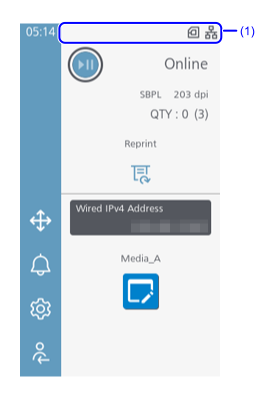
- Status bar
Communication Interface Status
| Icon | Description |
|---|---|

|
Connected via wired LAN. |

|
Wired LAN or wireless LAN is connected, but no IP address has been assigned. |

|
Connected via wireless LAN.
Signal Level: 4 |

|
Connected via wireless LAN.
Signal Level: 3 |

|
Connected via wireless LAN.
Signal Level: 2 |

|
Connected via wireless LAN.
Signal Level: 1 |

|
An error has occurred at the wireless LAN module. |

|
Connected as a group owner via Wi-Fi Direct. |
|
|
Connected as a client via Wi-Fi Direct. |

|
A device is connected to the product via Bluetooth. |

|
An error has occurred at the Bluetooth module. |

|
Product is connected to USB host. |

|
NFC is enabled. |

|
Waiting for external I/O signal. |
|
|
The product is connected to a mobile network.
|
|
|
The product is connected to a mobile network.
|
|
|
The product is connected to a mobile network.
|
|
|
The product is connected to a mobile network.
|


Status of Cloud Services
| Icon | Description |
|---|---|

|
The On-Demand mode of the SOS (SATO Online Services) is enabled. |

|
The periodic notification in the On-Demand mode of SOS as set previously has arrived. Scan the QR code and send the information to the SOS cloud. |

|
The Real Time mode of the SOS is enabled. The product is connected to the SOS cloud. |

|
The Light mode of the SOS is enabled. The product is connected to the SOS cloud. |

|
The Real Time mode or the Light mode of the SOS connection is in progress. |

|
The Real Time mode or the Light mode of the SOS is selected, but not connected to the SOS cloud. |

|
An SOS provisioning error has occurred. |

|
The Real Time mode or the Light mode of the SOS is enabled, but connection to the SOS Cloud has been disconnected.
If
|

|
SOTI Connect is enabled and connected to the server. |

|
SOTI Connect is enabled, but not connected to the server. |

|
SOTI Connect is enabled and connected to the server, and a message is being transmitted. |

|
SOTI Connect is enabled and connected to the server, but an invalid MQTT request message was received. |

|
SOTI Connect is enabled but failed to connect to the server or was disconnected. |
RFID Status (RFID Models Only)
| Icon | Description |
|---|---|

|
RFID is enabled. |

|
RFID is enabled, but the system is defective. |
USB Memory Status
| Icon | Description |
|---|---|

|
USB memory is connected. |
Print Job Status
| Icon | Description |
|---|---|

|
Waiting for media removal. Remove the media. |

|
Receive buffer is nearly full. Wait until the product starts printing the previously sent data, and then send the next data. |

|
HEX dump is enabled. |
Status Related to Commands
| Icon | Description |
|---|---|

|
Standard code is disabled. |

|
Command error detected. Check the print data.
|

Status Related to Maintenance and Replacement of Consumables
| Icon | Description |
|---|---|

|
Defective print head is detected. Replace the print head. |

|
Print head cannot be recognized normally. Replace the print head. |

|
The remaining amount of ribbon is running low. Prepare a new ribbon.
|

|
The remaining amount of media is running low. Prepare new media.
|
If you enable [Notifications] in the [System] menu, the following icons notify you when it is time to clean or replace consumable parts for each period of time set.
| Icon | Description |
|---|---|

|
Clean the print head or platen roller. |

|
Replace the print head. |

|
Replace the platen roller. |

|
Replace the cutter unit. |

|
Clean the cutter unit. |
Other Statuses
| Icon | Description |
|---|---|

|
Not connected to the NTP time server. |

|
Currently accessing via remote desktop. |

|
Scanner is connected. |

|
There is a file being downloaded. |