Checking the Product's Status (Status Icon)
This topic explains the icons that appear on the status bar of the display to show the product's status.
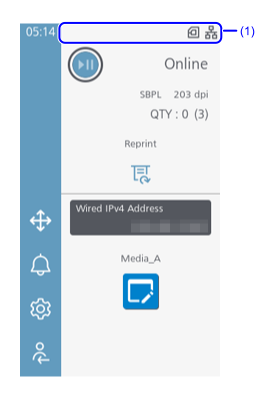
- Status bar
Communication Interface Status
| Icon | Description |
|---|---|
 |
Connected via wired LAN. |
 |
Wired LAN or wireless LAN is connected, but no IP address has been assigned. |
 |
Connected via wireless LAN. Signal Level: 4 |
 |
Connected via wireless LAN. Signal Level: 3 |
 |
Connected via wireless LAN. Signal Level: 2 |
 |
Connected via wireless LAN. Signal Level: 1 |
 |
An error has occurred at the wireless LAN module. |
 |
Connected as a group owner via Wi-Fi Direct. |
|
Connected as a client via Wi-Fi Direct. |
 |
A device is connected to the product via Bluetooth. |
 |
An error has occurred at the Bluetooth module. |
 |
Product is connected to USB host. |
 |
NFC is enabled. |
 |
Waiting for external I/O signal. |
|
The product is connected to a mobile network. |
|
The product is connected to a mobile network. |
|
The product is connected to a mobile network. |
|
The product is connected to a mobile network. |


Status of Cloud Services
| Icon | Description |
|---|---|
 |
The On-Demand mode of the SOS (SATO Online Services) is enabled. |
 |
The periodic notification in the On-Demand mode of SOS as set previously has arrived. Scan the QR code and send the information to the SOS cloud. |
 |
The Real Time mode of the SOS is enabled. The product is connected to the SOS cloud. |
 |
The Light mode of the SOS is enabled. The product is connected to the SOS cloud. |
 |
The Real Time mode or the Light mode of the SOS connection is in progress. |
 |
The Real Time mode or the Light mode of the SOS is selected, but not connected to the SOS cloud. |
 |
An SOS provisioning error has occurred. |
 |
The Real Time mode or the Light mode of the SOS is enabled, but connection to the SOS Cloud has been disconnected. If |
 |
SOTI Connect is enabled and connected to the server. |
 |
SOTI Connect is enabled, but not connected to the server and the product is not registered. |
 |
SOTI Connect is enabled and connected to the server, but the product is not registered or the registration is invalid. |
 |
SOTI Connect is enabled and connected to the server, and the product was successfully registered. |
 |
SOTI Connect is enabled but failed to connect to the server or was disconnected. (the product registration is invalid) |
 |
SOTI Connect is enabled and connected to the server, but registration of the product failed. |
 |
SOTI Connect is enabled but failed to connect to the server or was disconnected, and registration of the product failed. |
RFID Status (RFID Models Only)
| Icon | Description |
|---|---|
 |
RFID is enabled. |
 |
RFID is enabled, but the system is defective. |
USB Memory Status
| Icon | Description |
|---|---|
 |
USB memory is connected. |
Print Job Status
| Icon | Description |
|---|---|
 |
Waiting for media removal. Remove the media. |
 |
Receive buffer is nearly full. Wait until the product starts printing the previously sent data, and then send the next data. |
 |
HEX dump is enabled. |
Status Related to Commands
| Icon | Description |
|---|---|
 |
Standard code is disabled. |
 |
Command error detected. Check the print data. |
Status Related to Maintenance and Replacement of Consumables
| Icon | Description |
|---|---|
 |
Defective print head is detected. Replace the print head. |
 |
Print head cannot be recognized normally. Replace the print head. |
 |
The remaining amount of ribbon is running low. Prepare a new ribbon.
|
 |
The remaining amount of media is running low. Prepare new media.
|

If you enable [Notifications] in the [System] menu, the following icons notify you when it is time to clean or replace consumable parts for each period of time set.
| Icon | Description |
|---|---|
 |
Clean the print head or platen roller. |
 |
Replace the print head. |
 |
Replace the platen roller. |
 |
Replace the cutter unit. |
 |
Clean the cutter unit. |
Other Statuses
| Icon | Description |
|---|---|
 |
Not connected to the NTP time server. |
 |
Currently accessing via remote desktop. |
 |
Scanner is connected. |
 |
There is a file being downloaded. |