Adjusting the Head Pressure Balance
Head pressure balance refers to the balance of pressure between the print head and the platen roller. If the head pressure balance is not adjusted properly, printing on one side of the media may be darker than the other side, or the media may shift to one side.
- Check the position of the head pressure adjustment dial(s).
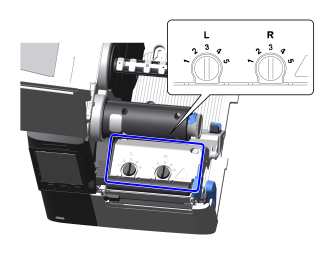
- Press down and turn the head pressure adjustment dial(s) to set the head pressure according to the thickness of the media.
Media Thickness* Head Pressure Adjustment Dial(s) Example of Media 0.060 to 0.200 mm (0.002 to 0.008") Left (L): 3
Right (R): 3
Thin media, standard media, etc. 0.200 to 0.268 mm (0.008 to 0.010") Left (L): 4 to 5
Right (R): 4 to 5
Thick media, tags, etc. 
- The factory default setting is "3" for both left and right.
- If the media is printed and appears to be shifted to the right when viewed from the front of the product, adjust the pressure balance by turning the head pressure adjustment dial(s) to match the width of the media.
CL4-SXRMedia Width Head Pressure Adjustment Dial(s) 25 to 54 mm (0.98 to 2.13") Left (L): 5
Right (R): 1
54 to 83 mm (2.13 to 3.27") Left (L): 3 or 4
Right (R): 2
83 to 131 mm (3.27 to 5.16") Left (L): 3
Right (R): 3
CL4-SXR When using Micro Label Print function:Media Width Head Pressure Adjustment Dial(s) 25 to 54 mm (0.98 to 2.13") Left (L): 5
Right (R): 1
54 to 83 mm (2.13 to 3.27") Left (L): 5
Right (R): 3
83 to 131 mm (3.27 to 5.16") Left (L): 5
Right (R): 5
CL6-SXRMedia Width Head Pressure Adjustment Dial(s) 50 to 120 mm (1.97 to 4.72") Left (L): 5
Right (R): 1
120 to 140 mm (4.72 to 5.51") Left (L): 3 or 4
Right (R): 1
140 to 160 mm (5.51 to 6.30") Left (L): 3 or 4
Right (R): 2
160 to 180 mm (6.30 to 7.09") Left (L): 3 or 4
Right (R): 3 or 4
CL6-SXR When using Micro Label Print function:Media Width Head Pressure Adjustment Dial(s) 50 to 90 mm (1.97 to 3.54") Left (L): 5
Right (R): 1
90 to 130 mm (3.54 to 5.12") Left (L): 5
Right (R): 3
130 to 180 mm (5.12 to 7.09") Left (L): 3
Right (R): 3
- The factory default setting is "3" for both left and right.
- The dial settings in the table are guidelines, and the optimal settings may vary depending on the type of media. Confirm that the print quality is stable by actually printing.
- For more information on the Micro Label Print function, see Setting the Micro Label Print Function.