Checking for Broken Elements in the Print Head
During printing, check whether the print head is broken.

- This function does not guarantee barcode readability. A regular barcode reader test is required. There may be a slight delay between the occurrence of white voids in printing and the activation of the Head Check function.
- For labels printed after a head check results in error No. 1012 ([Head Error]), check any printed barcodes by scanning them with a scanner.
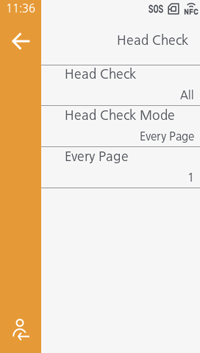
[Head Check]
-
[Disabled]
Disable the head check. -
[All]
Check the entire print area. -
[Barcode]
Check only the area for printing a barcode. Head check is not applicable for barcodes printed as graphic data.
Initial value:
-
 [All]
[All] -
 [Disabled]
[Head Check Mode]
[Every Page]