Setting the Micro Label Print Function
When using the Micro Label Print function, high-precision printing is possible on small labels.
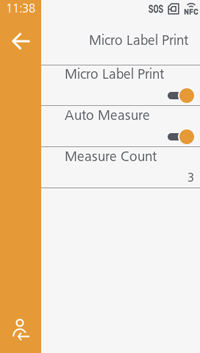
[Micro Label Print]
Use the Micro Label Print function.

- The printing precision of Micro Label Print may be affected by the processing precision of the label, the print layout, the ribbon size, and the customer's usage conditions.
We recommend using this feature under the following conditions.- Print speed: 6 inches/second (152.4 mm/second) or less
- Ribbon roll length: 300 m (984.25 ft) or less
- Media sensor type: Gap sensor (transparent)
- Head pressure balance: Refer to Adjusting the Head Pressure Balance.
- When this function is enabled, [Gap2] cannot be set in [Sensor Type].
- For media
* that is 52.8 mm (2.08") long or longer, this function does not affect the printing accuracy. - When the print speed is set to 7 inches/second (177.8 mm/second) or higher and this function is enabled, the print speed will be changed to the initial value.
- When this function is enabled and print speed specified by the command is 7 inches/second (177.8 mm/second) or higher, a command error occurs.
- When using this function with RFID models, we recommended that you check operations beforehand.
- 33.6 mm (1.32") or more for RFID models when using I-mark sensor
Initial value: Disabled
[Auto Measure]
When [Micro Label Print] is enabled, this setting automatically measures the length of the label.
- If the print start position is misaligned, disable this function and manually set the label length in [Micro Label Print] > [Label Length].
Initial value: Enabled
[Measure Count]
[Label Length]