Adjusting Printing Positions
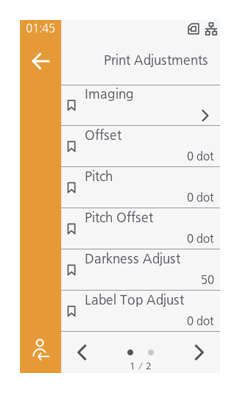
[Printing] > [Print Adjustment]
Adjust the print start position by setting '+' to move the print position in the direction opposite to the media feed direction and '-' to move it in the media feed direction.
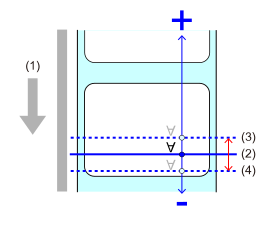
- Media feed direction
- Print position before adjustment
- Print position after adjustment in the plus direction
- Print position after adjustment in the minus direction
CL4-SXR
- 203 dpi: -19,999 to 19,999 dots (initial value: 0)
- 305 dpi: -17,999 to 17,999 dots (initial value: 0)
- 609 dpi: -9,599 to 9,599 dots (initial value: 0)
CL6-SXR
- 203 dpi: -19,999 to 19,999 dots (initial value: 0)
- 305 dpi: -17,999 to 17,999 dots (initial value: 0)
Adjust the print start position by using "+" to adjust to the left side and "-" to adjust to the right side while facing the front of the product.
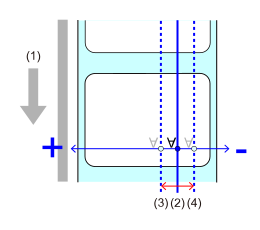
- Media feed direction
- Print position before adjustment
- Print position after adjustment in the plus direction
- Print position after adjustment in the minus direction
CL4-SXR
- 203 dpi: -831 to 831 dots (initial value: 0)
- 305 dpi: -1,247 to 1,247 dots (initial value: 0)
- 609 dpi: -2,495 to 2,495 dots (initial value: 0)
CL6-SXR
When the [Head Base Position] is [Standard]
- 203 dpi: -1,215 to 1,215 dots (initial value: 0)
- 305 dpi: -1,983 to 1,983 dots (initial value: 0)
When the [Head Base Position] is [Left-justify]
- 203 dpi: -1,339 to 1,339 dots (initial value: 0)
- 305 dpi: -2,009 to 2,009 dots (initial value: 0)
Adjust the tear-off position, cut position, and dispense position.
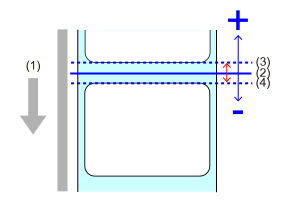
- Media feed direction
- Position before adjustment
- Position after adjustment in the plus direction
- Position after adjustment in the minus direction
CL4-SXR
- 203 dpi: -30 to 30 dots (initial value: 0)
- 305 dpi: -45 to 45 dots (initial value: 0)
- 609 dpi: -90 to 90 dots (initial value: 0)
CL6-SXR
- 203 dpi: -30 to 30 dots (initial value: 0)
- 305 dpi: -45 to 45 dots (initial value: 0)
Fine-tune the vertical print layout position by setting '+' to move the print position in the direction opposite to the feed direction and '-' to move it in the feed direction.
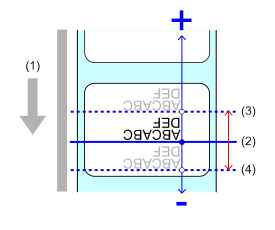
- Media feed direction
- Print position before adjustment
- Print position after adjustment in the plus direction
- Print position after adjustment in the minus direction
CL4-SXR
- 203 dpi: -30 to 30 dots (initial value: 0)
- 305 dpi: -45 to 45 dots (initial value: 0)
- 609 dpi: -90 to 90 dots (initial value: 0)
CL6-SXR
- 203 dpi: -30 to 30 dots (initial value: 0)
- 305 dpi: -45 to 45 dots (initial value: 0)
Adjust the tear-off position, cut position, dispense position, and print start position at the same time.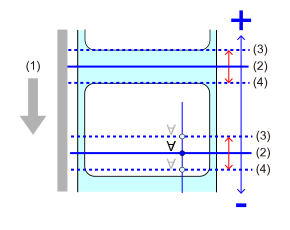
- Media feed direction
- Position before adjustment
- Position after adjustment in the plus direction
- Position after adjustment in the minus direction
CL4-SXR
- 203 dpi: -392 to 392 dots (initial value: 0)
- 305 dpi: -588 to 588 dots (initial value: 0)
- 609 dpi: -1,176 to 1,176 dots (initial value: 0)
CL6-SXR
- 203 dpi: -392 to 392 dots (initial value: 0)
- 305 dpi: -588 to 588 dots (initial value: 0)
Adjust the position at which the label top sensor detects the leading edge of the media.
This is not displayed if the dispenser, linerless cutter or rotary cutter is being used.
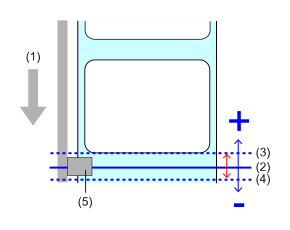
- Media feed direction
- Detection position before adjustment
- Detection position after adjustment in the plus direction
- Detection position after adjustment in the minus direction
- Label top sensor
CL4-SXR
- 203 dpi: -30 to 30 dots (initial value: 0)
- 305 dpi: -45 to 45 dots (initial value: 0)
- 609 dpi: -90 to 90 dots (initial value: 0)
CL6-SXR
- 203 dpi: -30 to 30 dots (initial value: 0)
- 305 dpi: -45 to 45 dots (initial value: 0)
Set the media feed amount for tear-off, cut and dispense stop, with the print head position at 0.
The actual media feed amount is the value of [Offset] + [Option Feed].
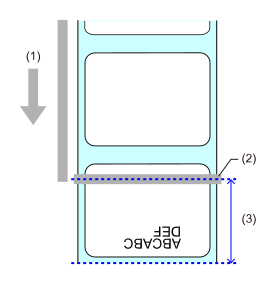
- Media feed direction
- Print head
- Option Feed + Offset values
CL4-SXR
- 203 dpi: 0 to 2,040 dots (initial value: 0)
- 305 dpi: 0 to 3,060 dots (initial value: 0)
- 609 dpi: 0 to 6,120 dots (initial value: 0)
CL6-SXR
- 203 dpi: 0 to 2,040 dots (initial value: 0)
- 305 dpi: 0 to 3,060 dots (initial value: 0)
Set the print reference position.
Select [Left-justify] to move the position of the printable area to the left when facing the product.
CL4-SXR
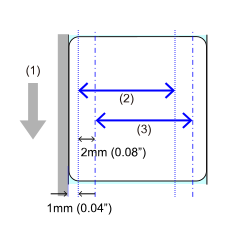
- Media feed direction
- Printable area (left-justify)
- Printable area (standard)
CL6-SXR
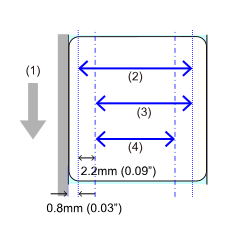
- Media feed direction
- Printable area (203 dpi/305 dpi, left-justify)
- Printable area (305 dpi, standard)
- Printable area (203 dpi, standard)
Initial value:
- CL4-SXR [Standard]
- CL6-SXR
 [Left-justify],
  [Standard]
Adjust the media stop position or cut position when [Sensor Type] is set to [None]. This adjustment sets the blank amount from the media stop position.
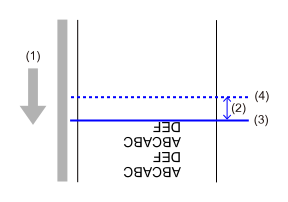
- Media feed direction
- Value to be set for [Print End Position]
- Media stop position/cut position before adjustment
- Media stop position/cut position after adjustment
CL4-SXR
- 203 dpi: 0 to 20,000 dots (initial value: 0)
- 305 dpi: 0 to 18,000 dots (initial value: 0)
- 609 dpi: 0 to 9,600 dots (initial value: 0)
CL6-SXR
- 203 dpi: 0 to 20,000 dots (initial value: 0)
- 305 dpi: 0 to 18,000 dots (initial value: 0)