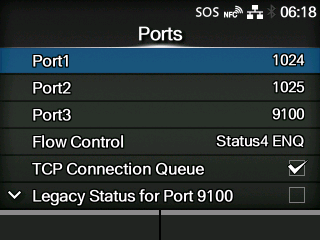
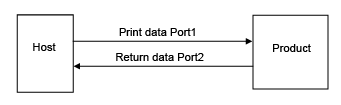
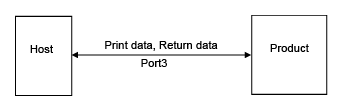
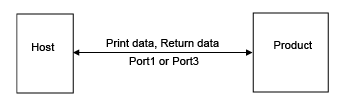
TOP > Various Settings of the Product > The Product's [Settings] Menu > [Interface] Menu > [Network] > [Services] > [Ports] [Ports] Set the TCP/IP port number. The setting items are as follows: Port1 Set the port number of Port1. For the two-port connection of Status4, this port is used for receiving print data. For the one-port connection of Status3/Status5, this port is used for both receiving print data and returning the product status. Port2 Set the port number of Port2. For the two-port connection of Status4, this port is used for returning the product status. Port3 Set the port number of Port3. For the one-port connection of Status3/Status4/Status5, this port is used for both receiving print data and returning the product status. Flow Control Set the communication protocol. TCP Connection Queue Set whether to allow queuing for connection when multiple hosts or applications are sending connection requests to the product. Legacy Status for Port 9100 Set whether to change the return status format of Port3 to legacy status. ◦ Does not appear if you have selected [None] in the [Flow Control] menu. ENQ Reply Delay Set the period to delay status reply to status request ENQ. ◦ Not available if you have selected [Status4] in the [Flow Control] menu. Status4 Cyclic Response Set the interval for the cyclic status response. ◦ Available only if you have selected [Status4] in the [Flow Control] menu. BCC Set the BCC check function. ◦ Appears only if you have selected [Status5] in the [Flow Control] menu. Roles of Port1 to Port3 In the socket server function of TCP/IP, either of the following connection methods can be used. The ports to be used and their roles change depending on the connection method and communication protocol. Two-port connection Port1 is used for receiving print data, and Port2 is used for returning the product status. Two-port connection is available when the communication protocol is Status4. One-port connection One port is used for both receiving print data and returning the product status. When the communication protocol is Status4, Port3 is used. When the communication protocol is Status3 or Status5, Port1 or Port3 is used. Back to top