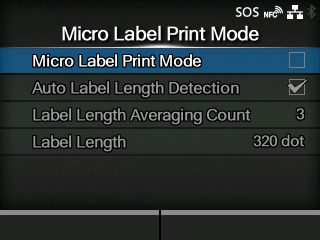
TOP > Various Settings of the Product > The Product's [Settings] Menu > [Printing] Menu > [Micro Label Print Mode] [Micro Label Print Mode] [Micro Label Print Mode] [Auto Label Length Detection] Set the micro label print mode operation. Micro Label Print Mode is a mode to provide high accuracy printing for small sized labels. • The accuracy of Micro Label Print Mode is dependent on the usage conditions, including quality of label production, print layout, and ribbon sizes. The following conditions are recommended, ◦ Ribbon length: Less than 300 m ◦ Used media sensor: Gap sensor ◦ Head pressure balance: as follows; Media Width (mm (inch)) and Adjustment Dials (for CL4NX Plus) 25 - 54 (0.98" - 2.13") : Left: , Right: 54 - 83 (2.13" - 3.27") : Left: , Right: 83 - 131 (3.27" - 5.16") : Left: , Right: Media Width (mm (inch)) and Adjustment Dials (for CL6NX Plus) 50 - 90 (1.97" - 3.54") : Left: , Right: 90 - 130 (3.54" - 5.12") : Left: , Right: 130 - 180 (5.12" - 7.09") : Left: , Right: • The improved accuracy provided by micro label print mode is for labels sizes of less than 53 mm (incl. GAP). • When the Micro Label Print Mode is enabled when print speed is 7 ips or above, the print speed will be automatically reduced to 6 ips. • When using RFID models, Micro Label Print Mode cannot be used. The setting items are as follows: Micro Label Print Mode Enable or disable the micro label print mode. Auto Label Length Detection Enable or disable the auto label length detection. ◦ Available if [Micro Label Print Mode] is set to [Enabled]. Back to top


 , Right:
