CT4-LX-HC Operator Manual
SATO

MENU

MENU

  • TOP (Table of Contents)
  • Getting Started
  • Searching from Category
  • Searching by Function Names
  • Searching According to What You Want to Do
  • Troubleshooting
  • Support and Warranty
Close
TOP > main > Various Settings of the Product > The [SETTINGS] Menu > [Printing] Menu > [Advanced] > [Label Waste Prevention] > [I-Mark Offset]

[I-Mark Offset]
This feature is supported on firmware versions 6.7.4 and later.
For media where the I-Mark or label is not at the leading edge, set the I-Mark Offset to enable the Label Waste Prevention function.
Appears when the following conditions are met.
•
[Label Waste Prevention] > [Enable] is enabled.
•
On the [Printing] > [Media Type] menu, [Label] is selected.
•
On the [Printing] > [Sensor Type] menu, [I-Mark] is selected.
The setting range varies depending on the print resolution of the product.
The setting range is as follows:
Resolution
Setting range
203 dpi (1 dot = 0.125 mm (0.0049"))
0 to 112 dots
305 dpi (1 dot = 0.083 mm (0.0033"))
0 to 168 dots
 
•
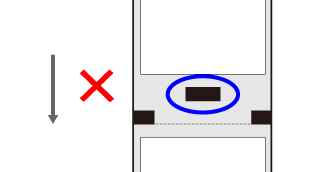
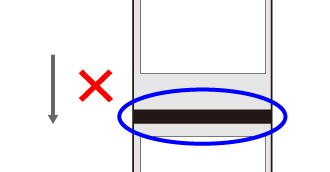
The label Waste Prevention function is not available in the following cases:
◦
when there is pre-printing on the back side at the horizontal center of the label between the I-Mark and the leading edge of the media.
◦
when the I-Mark passes over the Label top sensor.

Back to top

© 2020 SATO Corporation