CT4-LX-HC Operator Manual
SATO

MENU

MENU

  • TOP (Table of Contents)
  • Getting Started
  • Searching from Category
  • Searching by Function Names
  • Searching According to What You Want to Do
  • Troubleshooting
  • Support and Warranty
Close
TOP > main > Various Settings of the Product > The [SETTINGS] Menu > [Interface] Menu > [Network] > [Services] > [Online Services] (SOS users only) > [QR code offset] (SOS users only)

[QR code offset] (SOS users only)
Adjust the print position for printing a QR code displayed on the notification screen for SOS (SATO Online Services).
Available only if you have selected [On-Demand] in the [SOS Mode] menu.
Available only if you have selected [Print] in the [Update Screen] menu.
The setting items are as follows:
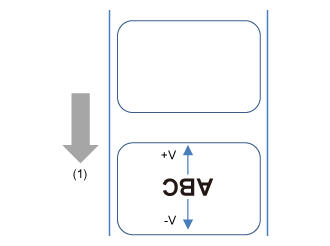
Vertical
Adjust the print position of the QR code in the vertical direction.
Set the correction value from the print reference position as "-" for the direction of the paper feed and "+" for the direction opposite to the paper feed.
(1) Feed direction
The setting range is from -792 to +792 dots.
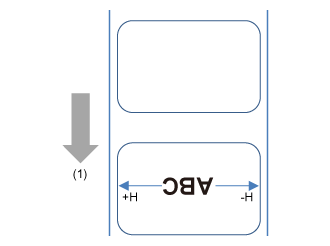
Horizontal
Adjust the print position of the QR code in the horizontal direction.
Set the correction value from the print reference position when facing the product as "-" to adjust to the right side and "+" to adjust to the left side.
(1) Feed direction
The setting range is from -792 to +792 dots.
 
•
The length of 1 dot varies depending on the print resolution of the product.
◦
203 dpi : 1 dot = 0.125 mm (0.0049")
◦
305 dpi : 1 dot = 0.083 mm (0.0033")
•
You can change the units to dots, " (inches), or mm in the [System] > [Regional] > [Unit] menu.

Back to top

© 2020 SATO Corporation