CT4-LX-HC Operator Manual
SATO

MENU

MENU

  • TOP (Table of Contents)
  • Getting Started
  • Searching from Category
  • Searching by Function Names
  • Searching According to What You Want to Do
  • Troubleshooting
  • Support and Warranty
Close
TOP > main > Various Settings of the Product > The [SETTINGS] Menu > [Wi-Fi] Menu > [Wi-Fi Setting] > [Ports]
[Ports]
Set the TCP/IP port number.
If AEP mode is enabled, there are only two ports available for LAN and wireless LAN connections.
If AEP mode is enabled and the wireless LAN interface is being used, this menu becomes unavailable. Set the port in the [Interface] > [Network] > [Settings] > [LAN] > [Ports] menu.
Roles of Port1 to Port3
In the socket server function of TCP/IP, either of the following connection methods can be used.
The ports to be used and their roles change depending on the connection method and communication protocol.
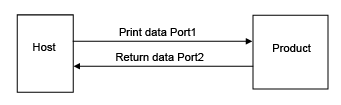
Two-port connection
•
If AEP mode is disabled (initial value)
Port1 is used for receiving print data, and Port2 is used for returning the product status.
Two-port connection is available when the communication protocol is STATUS4.
•
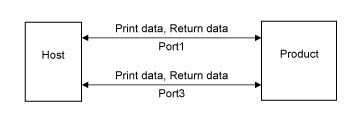
If AEP mode is enabled
Port1 and Port3 can be used for both receiving print data and returning the product status. Port2 cannot be used.
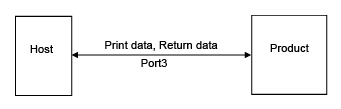
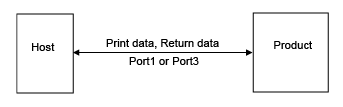
One-port connection
One port is used for both receiving print data and returning the product status.
When the communication protocol is STATUS4, Port3 is used.
When the communication protocol is STATUS3 or STATUS5, Port1 or Port3 is used.
 
•
AEP does not support STATUS3, STATUS4, or STATUS5.
The setting items are as follows:

Back to top

© 2020 SATO Corporation