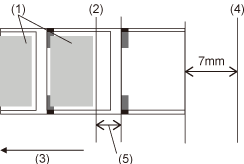
TOP > Adjusting the Product > Adjusting the Base Reference Point > Adjusting the Media Stop Position Adjusting the Media Stop Position (1) Print(2) Head position(3) Media feed direction(4) Paper end sensor(5) Amount of media remaining, amount of printing remaining is none • The above cut reference position for printing indicates the label stop position when the media sensor is set to Gap sensor.• You can also adjust when the operation mode is set to Tear-off or Dispenser. 1. When in the printing (online) state in normal mode, press the (Print/Select) button. The product switches to the stopped state (offline).2. Hold down the and buttons for more than 2 seconds. • If the password is enabled, input the password.The product switches to the settings mode.3. Check that [Printing] is displayed, and press the button. 4. Select [Advanced] using the button, and press the button. 5. Select [Adjustments] using the button, and press the button. 6. Select [Offset] using the button, and press the button. 7. Select the sign using the button, and press the button. 8. Select the most significant digit using the button, and press the button. 9. Select the least significant digit using the button. The setting range is from -30 to +30 dots (1 dot = 0.125 mm (0.0049")).10. Once you have set the values, press the button. The input values are confirmed and the next setting item is displayed.11. Press the button 4 times. The stopped (offline) screen is displayed.12. Press the button. The product switches to the printing state (online).You can print to check the adjusted stop position.Related TopicsAdjustments Mode Back to top



 (Print/Select) button.
 buttons for more than 2 seconds.





 button 4 times.