
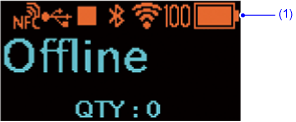
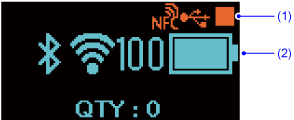















TOP > Basic Information > Display > Icon > Status Icons
This icon only appears if you have selected the [Dispense Mode] (PW208NX only) or the [Linerless] operation mode.
This icon only appears if you have selected [Enabled] in the HEX dump mode.
[Interface]
[Network]
[Services]
[Port]
[Encryption]
[Enabled]
[LPD]
[Encryption]
[Enabled]
[FTP]
[Enabled]
[Disabled]
[SNMP]
[Agent]
[Read-Only]
[SNMP Version]
[Community]
[Security]
[Privacy]
[Authentication Protocol]
[SHA]
[Privacy Protocol]
[AES]
[Read-Write]
[SNMP Version]
[Community]
[Security]
[Privacy]
[Authentication Protocol]
[SHA]
[Privacy Protocol]
[AES]
[Traps]
[SNMP Version]
[Community]
[Security]
[Privacy]
[Authentication Protocol]
[SHA]
[Privacy Protocol]
[AES]
[Webconfig]
[SSL/TLS Protocol]
[TLS 1.0]
[Disabled]
[TLS 1.1]
[Disabled]
[TLS 1.2]
[Enabled]
[Cipher Suites]
[Preferred]
[Bluetooth]
[Authentication]
[Level 4]
[System]
[Password]
[Password Enable]
[Enabled]
[Install Security]
[All]
[NFC Security]
[Passwords]
[Cmn Cmd Auth]
[Enabled]
[Tools]
[Save Print Image]
[Disabled]
When the Eco Charge function is set to [Disabled], different information is displayed depending on the battery level.

Back to top