
PW208NX/PW208mNX Operator Manual
SATO

MENU

MENU

  • TOP (Table of Contents)
  • Getting Started
  • Searching from Category
  • Searching by Function Names
  • Searching According to What You Want to Do
  • Troubleshooting
  • Support and Warranty
Close
TOP > Various Settings of the Product > Product’s [Settings] Menu > [System] Menu > [Password] > [Password Enable]
[Password Enable]
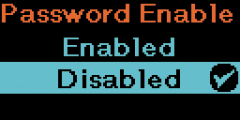
Enable or disable the password setting.
If you have set the password to [Enabled], the product requires you to enter the password set in the [Password] screen before you enter the [Settings] menu.
To enhance communication security, it is recommended to set this option to [Enabled].
The options are as follows:
Enabled
Enable the password setting.
Disabled
Disable the password setting.
 
•
The specifications of the initial password differ depending on the shipment timing of the product.
For models that include a password label, a unique password is printed on the label. For models that do not include a password label, the initial password is "0310". If you do not know the password, please contact the customer help desk.
•
For security purposes, make sure to change the password.
To set a new password, open the [Password] > [Change Password] menu.

Related Topics
[Change Password]

Back to top

© 2019 SATO Corporation