Example of Command Reference
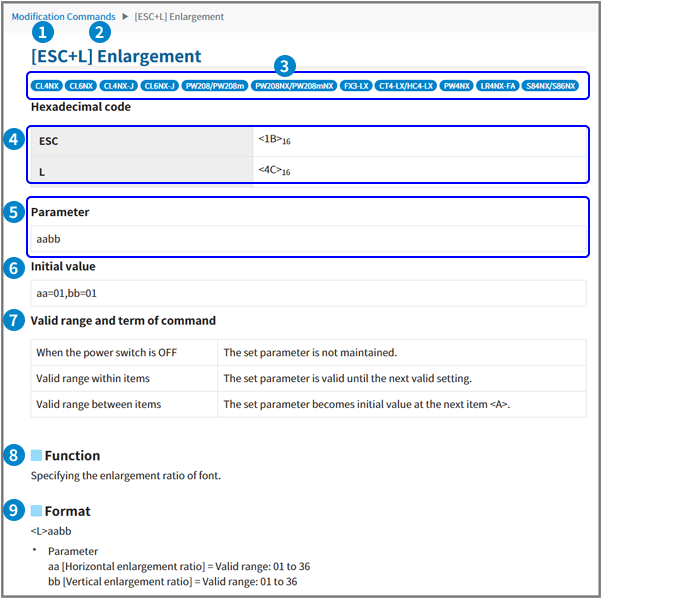
Indicates command code.
Indicates command name.
Command availability depending on printer model.
indicates unavailable commands.
e.g.) If it is available for CL4NX/CL4NX-J, CL6NX/CL6NX-J and CL4-SXR/CL6-SXR, but not for PW208/PW208m, PW208NX/PW208mNX, FX3-LX, CT4-LX/HC4-LX, PW4NX, LR4NX-FA, and S84NX/S86NX, the following is shown.
Indicates command in Hexadecimal code.
Indicates parameter to be described in command.
Indicates initial value for command.
Indicates valid range of command.
- When power switch is OFF
- The set parameter is maintained.
- The set parameter is not maintained.
- The set command is not maintained.
-
Valid range within item
- The set parameter is valid until the next specification is made.
- The set parameter becomes invalid.
- The set command becomes invalid.
-
Valid range between items
- The set parameter becomes initial value at the next item <A>.
- The set parameter is valid until the next specification is made.
- The set parameter becomes invalid.
- The set command becomes invalid.
Explains the function of command.
Explains the command and required parameter.
<L>aabb indicates the command ESC+L(<1B>16<4C>16) and two types of parameters such as "aa" and "bb".
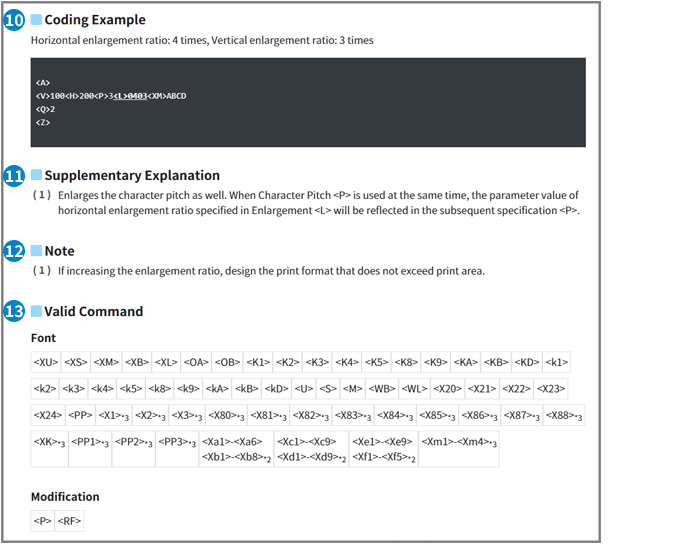
Shows the example of how the command is used.
This is the coding example programmed in BASIC output to the printer connected with RS-232C.
10 ESC$=CHR$(&H1B)
20 OPEN "COM1:9600,N,8,1,RS,BIN" FOR OUTPUT AS #1
30 PRINT #1,ESC$;"A";
40 PRINT #1,ESC$;"V100";ESC$;"H200";
50 PRINT #1,ESC$;"P3";ESC$;"L0403";
60 PRINT #1,ESC$;"XMABCD";
70 PRINT #1,ESC$;"Q2";
80 PRINT #1,ESC$;"Z";
90 CLOSE #1
100 END
Provides the supplemental information of command function and parameter.
Provides notes and restriction for the use of command.
Shows the commands that come under the influence of used commands.
-
Supported commands vary by printer model, so refer to Command List as well.