[ESC+0] Partial Edit
CL4NX
CL6NX
CL4NX-J
CL6NX-J
PW208/PW208m
PW208NX/PW208mNX
FX3-LX
CT4-LX/HC4-LX
PW4NX
LR4NX-FA
S84NX/S86NX
CL4-SXR
CL6-SXR
Hexadecimal code
| ESC | <1B>16 |
|---|---|
| 0 | <30>16 |
Parameter
Nil
Initial value
Nil
Valid range and term of command
| When the power switch is OFF | The set command is not maintained. |
| Valid range within items | The set command becomes invalid. |
| Valid range between items | The set command becomes invalid. |
Function
Editing the portion in the previous print data.
Format
<0>
Coding Example
[DEF], a part of print data, is changed to [123].
<A>
<V>100<H>200<P>2<L>0202<XM>ABC
<V>200<H>200<P>2<L>0202<XM>DEF
<Q>1
<Z>

<A>
<0>
<V>200<H>200<P>2<L>0202<XM>123
<Q>1
<Z>
| Code | Explanation |
|---|---|
|
First label |
|
Second label |
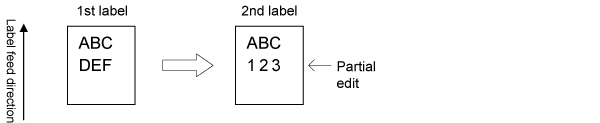
Supplementary Explanation
- Use this command to edit only one part of previous print data.
- Invoke the previous print data with this command to edit and print out. In this case, specify the part of previous data to edit, and send change data to it.
- Specified portion in the previous data will be cleared.
- If Rotation <%> is included in the specified editing portion, keep it for partial editing.
- Use this command with fixed pitch, same font or same digit number.
- When you specify a negative value of <P>, if space between characters is narrow, drawing results of characters etc. will be lack. In that case, please adjust the value.