[ESC+AL] Field Alignment
Hexadecimal code
| ESC | <1B>16 |
|---|---|
| AL | <4B>16<4C>16 |
Parameter
a
Initial value
a=1
Valid range and term of command
| When the power switch is OFF | The set parameter is not maintained. |
| Valid range within items | The set parameter is valid until the next valid setting. |
| Valid range between items | The set parameter becomes initial value at the next item <A>. |
Function
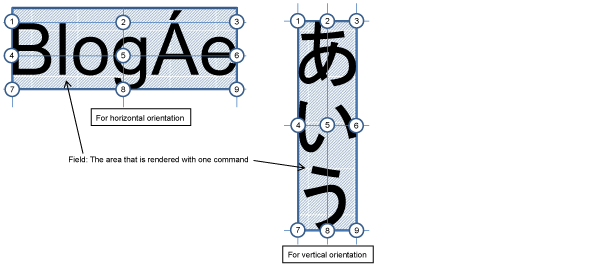
The base reference point specified with print positioning commands <H>, <V> is equal to the "Alignment position" of this command. The field's base reference points are changeable with "Alignment position". The supported fields are all text fields, barcode, 2D barcode, graphics, ruled lines and boxes etc.
Format
<AL>a
-
Parameter
a [Alignment position]
= 1: Top left
= 2: Top center
= 3: Top right
= 4: Middle left
= 5: Middle center
= 6: Middle right
= 7: Bottom left
= 8: Bottom center
= 9: Bottom right
Field and alignment positions (in case of font command)
The number inside the circle indicate the value of parameter a, "Alignment position (the positions specified with print positioning commands <H>, <V>)".
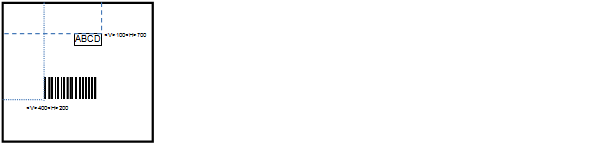
Coding Example
Font's alignment position: Top Right, barcode alignment position: Bottom left
<A>
<AL>3
<V>100<H>700<P>3<L>0403<X22>,ABCD
<AL>7
<V>400<H>200<BD>103160*123*
<Q>2
<Z>
Supplementary Explanation
- The alignment position will ignore anything that was set, and sets the default "Top left" if the value for parameter a was 0 or a non-numeric value.
- If you select Middle or Bottom, the position may vary depending on the ascender line and descender line of each field. Ascender/descender lines depend on each font, so not all fonts may show like in the examples as below.
E.g.) Cases with and without 'ĺ' and 'g'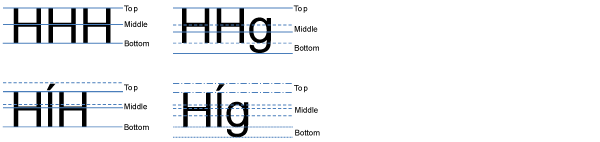
- Make sure to specify <H>
; and <V> to the field when you select Center and Right. If they are not specified when specifying for the 2nd field, the trailing edge of the 1st field becomes the base reference point of the 2nd field, which means that the parts of the 1st and 2nd field will overlap.
E.g.) If <H> and <V> are not specified to the 2nd field when specifying Center
E.g.) If <H> and <V> are not specified to the 2nd field when specifying Right
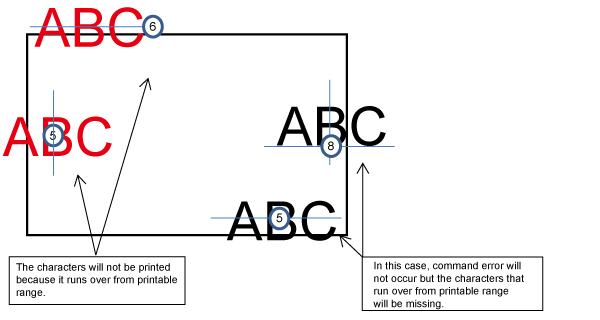
- Printer does not print if the positions specified with <H> and <V> (equal to "Alignment position") if they are out of printable range.
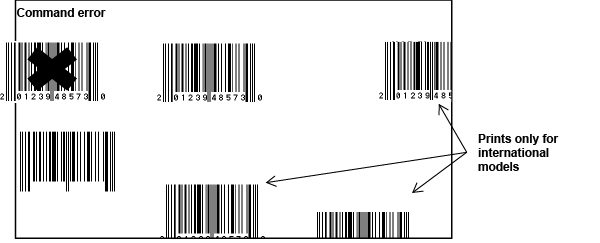
- There are cases where the rendered field may run off from printable area depending on "Alignment position" and print position commands <H> and <V>. Command error (Position Error) may occur depending on the conditions as described below.
- The composition of the field depends on the command when specifying "Alignment position" for barcode and 2D code fields.
Ex.) When specifying barcode, 2D code without automatically attached human readables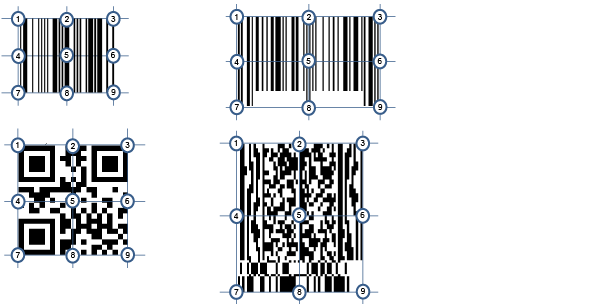
Example) When specifying a barcode with automatically attached human readables (<BD>, <BM>, <BI> etc.)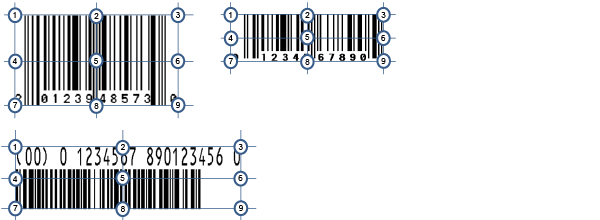
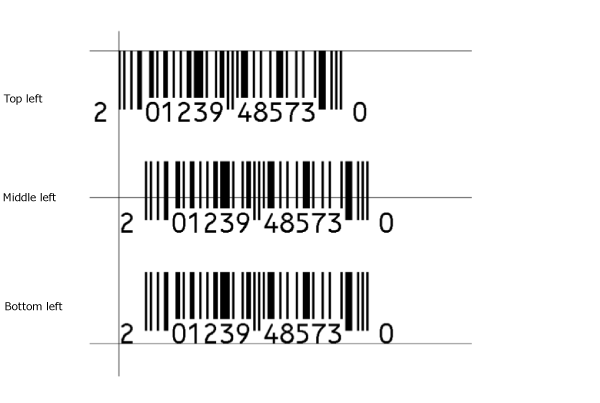
- The "alignment position (horizontal position of printing <H>)" is different for Top left, Middle left and Bottom left in case of barcodes whose position of automatically applied human readables start printing before the barcodes such as UPC-A for <BD> and <BM> and JAN/EAN-13.
Note:
- Human readables are included in the field of "Field Alignment" for barcode.
- Printer works as below if the printing runs off printable area as a result of "Alignment position".
- Position Error will occur and will not print if the top left of the barcode runs off.
- International models will print if the Top Left of the barcode doesn't run off the paper. However some parts of the barcode will be missing.
- Barcodes will be printed if human readables run off the Left of the paper. However the human readables will not be printed.
Available commands
Font
<XU>
<XS>
<XM>
<XB>
<XL>
<OA>
<OB>
<U>
<S>
<M>
<WB>
<WL>
<X20>
<X21>
<X22>
<X23>
<X24>
<$=>
<RD>
<RH>
<RG>
<K1>
<K2>
<K3>
<K4>
<K5>
<K8>
<K9>
<KA>
<KB>
<KD>
<k1>
<k2>
<k3>
<k4>
<k5>
<k8>
<k9>
<kA>
<kB>
<kD>
<K1>
(<K2>)
<k1>
(<k2>)
<PP>
<Xa1>-<Xa6>
<Xb1>-<Xb8>
<Xc1>-<Xc9>
<Xd1>-<Xd9>
<Xe1>-<Xe9>
<Xf1>-<Xf5>
<X1>
<X2>
<X3>
<X80>
<X81>
<X82>
<X83>
<X84>
<X85>
<X86>
<X87>
<X88>
<XK>
<PP1>
<PP2>
<PP3>
<Xm1>-<Xm4>
Barcode
<B>
<BC>
<BG>
<BI>
<D>
<D><d>*1
<BD>
<BW>
<BP>
<BM>
<BF>*2
<BS>*3
<BL>
<BL><d>*1
<BZ>
2D barcode
<2D10>
<BK>
<2D12>
<2D20>
<BV>
<2D30>
<2D31>
<2D32>
<2D33>
<2D34>
<2D35>
<BQ>
<2D50>
<BX>
<2D51>
<2D70>
<FX>
Composite barcode
<EU>
Graphics
<G>
<GM>
<GP>
System
<E>
Modification
<FW>
<F>
<%>
<RF>
<L>
<P>
<PS>
<PR>
Memory card
<GR>
<GC>
<PY>
<BJT>
Calendar
<WA>
- The position depends on the specified human readable type and data. Make sure to specify just the right number of characters for human readables data. Printing is not guaranteed if there are excess or insufficient human readables.
- <BF>: Bookland is a barcode which uses multiple commands such as <BD> and <BF>, <D>-<d> and <BF>. Please arrange so that they are printed in expected positions since alignment positions are calculated by each field for this command.
- <BS>: USPS Barcode has the same position as specifying Middle position in this command without specifying this command. When you specify Middle position with this command, it prints to an alignment position equivalent to Bottom position.
Example) Top left

Example) Middle left

Example) Bottom left
