[ESC+PZ] Edit Character Box
Hexadecimal code
| ESC | <1B>16 |
|---|---|
| PZ | <50>16<5A>16 |
Parameter
aaaa,bbbb,c,d
Initial value
None
Valid range and term of command
| When the power switch is OFF | The set parameter is not maintained. |
| Valid range within items | The set parameter becomes invalid. |
| Valid range between items | The set parameter becomes invalid. |
Function
Set vertical and horizontal size to print character string and edit horizontal position (Left-alignment, Centering, Right-alignment, Justify etc.) and vertical position (top-alignment, centering, bottom-alignment) in frame
Format
<PZ>aaaa,bbbb,c,d
-
Parameter
a [Vertical size] = Refer to the chart below
b [Horizontal size] = Refer to the chart below
c [Horizontal position]
= 0: Left-alignment
= 1: Centering
= 2: Right-alignment
= 3: Justify
= 4: (Reserve)
= 5: Character size adjustment
d [Vertical position]
= 0: Top-alignment
= 1: Vertical-alignment, Centering
= 2: Bottom alignment
Valid range
| Model | Valid range: Horizontal size (dot) | Valid range: Vertical size (dot) | |
|---|---|---|---|
| FX3-LX | 305 dpi | 1 to 960 | 1 to 6000 |
| CT4-LX HC4-LX |
203 dpi | 1 to 832 | 1 to 20000 |
| 305 dpi | 1 to 1248 | 1 to 18000 | |
| CL4NX CL4NX-J |
203 dpi | 1 to 832 | 1 to 20000 |
| 305 dpi | 1 to 1248 | 1 to 18000 | |
| 609 dpi | 1 to 2496 | 1 to 9600 | |
| CL6NX CL6NX-J |
203 dpi | 1 to 1216 (*1) | 1 to 20000 |
| 1 to 1340 (*2) | |||
| 305 dpi | 1 to 1984 (*1) | 1 to 18000 | |
| 1 to 2010 (*2) | |||
| PW208NX/PW208mNX | 203 dpi | 1 to 440 | 1 to 8000 |
| LR4NX-FA | 203 dpi | 1 to 832 | 1 to 20000 |
| 305 dpi | 1 to 1248 | 1 to 18000 | |
| 609 dpi | 1 to 2496 | 1 to 9600 | |
| S84NX | 203 dpi | 1 to 832 | 1 to 20000 |
| 305 dpi | 1 to 1248 | 1 to 18000 | |
| 609 dpi | 1 to 2496 | 1 to 9600 | |
| S86NX | 203 dpi | 1 to 1340 | 1 to 20000 |
| 305 dpi | 1 to 2010 | 1 to 18000 | |
| CL4-SXR | 203 dpi | 1 to 832 | 1 to 20000 |
| 305 dpi | 1 to 1248 | 1 to 18000 | |
| 609 dpi | 1 to 2496 | 1 to 9600 | |
| CL6-SXR | 203 dpi | 1 to 1216 (*3) | 1 to 20000 |
| 1 to 1340 (*4) | |||
| 305dpi | 1 to 1984 (*3) | 1 to 18000 | |
| 1 to 2010 (*4) | |||
CL6NX/CL6NX-J
- Valid range in the case of setting "Standard" is "Valid range for print"
- Valid range in the case of setting "Left-justify" is "Valid range for print"
- Valid range in the case of setting "Standard" is "Valid area for print position"(CL6-SXR(International) default value)
- Valid range in the case of setting "Left-justify" is "Valid area for print position"(CL6-SXR(Japan) default value)
CL6-SXR
The valid range depends on the setting of [Settings] > [Printing] > [Print Adjustments] > [Head Base Position].
Coding example
<A>
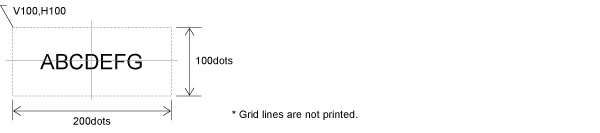
<PZ>100,200,1,1
<V>100<H>100<X2>,ABCDEFG
<Z>
| Code | Explanation |
|---|---|
|
Horizontal: Centering, Vertical: Centering |
|
Specify X2 character |
Print image
Supplementary explanation
- The following are specified character at horizontal position in frame (ex: Vertical top align)
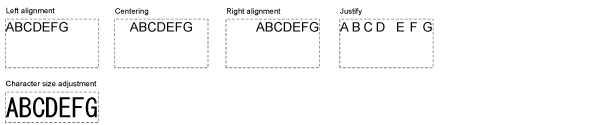
- The following are specified character at vertical position in frame (ex: Horizontal left
align)

- Able to combine and to specify vertical and horizontal positions as described above.
- Able to use it with proportional pitch <PS>. It operates with fix pitch when equal space is specified even though proportional pitch is enabled.
- Insert line feed automatically if specified character string exceeds the width of frame.
- Able to change line pitch with Auto line feed <E>. Unable to insert life feed with line
feed code CR (0Dh)
When it is specified, it is handled as 1 character string until line feed code CR (0Dh), data after line feed code CR (0Dh) will not be printed correctly. - Prints only data which can fit within frame when specified character string exceeds the size of frame.
- Prints only data which can fit within frame when specified character string exceeds the size of
frame. (Only FX3-LX (Japan))
However, if a negative value is specified using automatic line feed specification <E>, it may not fit within the frame.
When a minus value is specified by automatic line feed specification <E>, Operation is not guaranteed when overlapping or passing. - The following shows an operation when commands are Kanji Horizontal writing
<k8><k9><kA><kB><kD>.
-
Horizontal position

-
Vertical position

-
Horizontal position
- Please refer to the following chart for print command type in which this command is valid.
- The maximum string length for the character box is as follows:
CL4NX/CL6NX: 1500 characters. (750 for Kanji).
PW208NX/PW208mNX: 1500 characters. (750 for Kanji).
FX3-LX (International): 1000 characters. (500 for Kanji).
FX3-LX (Japan): 5000 characters. (2500 for Kanji).
CT4-LX/HC4-LX: 1500 characters. (750 for Kanji).
LR4NX-FA: 1500 characters. (750 for Kanji).
S84NX/S86NX: 1500 characters. (750 for Kanji).
CL4-SXR/CL6-SXR: 1500 characters. (750 for Kanji).
The data that exceeds the max digits is not printed. - The character size adjustment function supports only the rasterizer.
- When combined with automatic line feed specification <E>, the horizontal alignment is not guaranteed to be bottom-aligned, and the vertical alignment is not guaranteed to be left-aligned. (FX3-LX (Japan))
- CL4NX/CL6NX, LR4NX-FA, S84NX/S86NX and CL4-SXR/CL6-SXR are not support outline font.
Commands that enables editing within frame
Bitmap
<XU>
<XS>
<XM>
<XB>
<XL>
<OA>
<OB>
<U>
<S>
<M>
<WB>
<WL>
<X20>
<X21>
<X22>
<X23>
<X24>
<K1>
<K2>
<K3>
<K4>
<K5>
<K8>
<K9>
<KA>
<KB>
<KD>
<k1>
<k2>
<k3>
<k4>
<k5>
<k8>
<k9>
<kA>
<kB>
<kD>
<PP>
<X1>
<X2>
<X3>
<X80>
<X81>
<X82>
<X83>
<X84>
<X85>
<X86>
<X87>
<X88>
<XK>
<PP1>
<PP2>
<PP3>
Outline
<$><$=>
Markdown font
<Xm1>
<Xm2>
<Xm3>
<Xm4>