[ESC+WD] Partial Copy
Hexadecimal code
| ESC | <1B>16 |
|---|---|
| WD | <57>16<44>16 |
Parameter
VaaaaaHbbbbYcccccXdddd
Initial value
Nil
Valid range and term of command
| When the power switch is OFF | The set parameter is not maintained. |
| Valid range within items | The set command becomes invalid. |
| Valid range between items | The set parameter becomes invalid. |
Function
Copying specified area to another place.
Format
<WD>VaaaaaHbbbbYcccccXdddd
-
Parameter
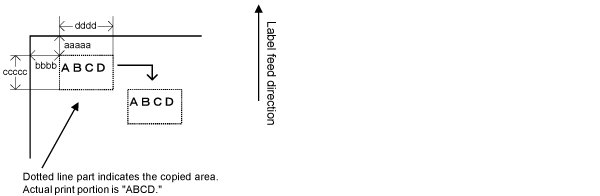
a [Vertical start point of original data] = Valid range: See the table below.
b [Horizontal start point of original data] = Valid range: See the table below.
c [Vertical dot size of original data] = Valid range: See the table below.
d [Horizontal dot size of original data] = Valid range: See the table below.
Coding Example
Vertical start point of original data: 50 Horizontal start point of original data: 50
Vertical dot size of original data: 200 Horizontal dot size of original data: 400
<A>
<V>50<H>50<P>2<L>0202<XU>ABCD
<V>300<H>100<WD>V50H50Y200X400
<Q>2
<Z>
Supplementary Explanation
- To locate the destination of copy, specify Vertical Print Position <V> and Horizontal Print Position <H> prior to this command.
- Destination of copy has to be outside of specified original data.
- When the print start position of the copied area is outside of printable area, printing will not be performed due to command error.
- Partial copy and reverse color print are processed after all other processes have been done.
Valid Range
| Model | Valid range: Horizontal start point of original data Horizontal dot size of original data (dot) |
Valid range: Vertical start point of original data Vertical dot size of original data (dot) |
|
|---|---|---|---|
| CL4NX CL4NX-J |
203 dpi | 1 to 832 | 1 to 20000 |
| 305 dpi | 1 to 1248 | 1 to 18000 | |
| 609 dpi | 1 to 2496 | 1 to 9600 | |
| CL6NX CL6NX-J |
203 dpi | 1 to 1216 (*1) 1 to 1340 (*2) |
1 to 20000 |
| 305 dpi | 1 to 1984 (*1) 1 to 2010 (*2) |
1 to 18000 | |
| PW208 PW208m PW208NX PW208mNX |
203 dpi | 1 to 440 | 1 to 8000 |
| FX3-LX | 305 dpi | 1 to 960 | 1 to 6000 |
| CT4-LX HC4-LX |
203 dpi | 1 to 832 | 1 to 20000 |
| 305 dpi | 1 to 1248 | 1 to 18000 | |
| PW4NX | 203 dpi | 1 to 832 | 1 to 8000 |
| LR4NX-FA | 203 dpi | 1 to 832 | 1 to 20000 |
| 305 dpi | 1 to 1248 | 1 to 18000 | |
| 609 dpi | 1 to 2496 | 1 to 9600 | |
| S84NX | 203 dpi | 1 to 832 | 1 to 20000 |
| 305 dpi | 1 to 1248 | 1 to 18000 | |
| 609 dpi | 1 to 2496 | 1 to 9600 | |
| S86NX | 203 dpi | 1 to 1340 | 1 to 20000 |
| 305 dpi | 1 to 2010 | 1 to 18000 | |
| CL4-SXR | 203 dpi | 1 to 832 | 1 to 20000 |
| 305 dpi | 1 to 1248 | 1 to 18000 | |
| 609 dpi | 1 to 2496 | 1 to 9600 | |
| CL6-SXR | 203 dpi | 1 to 1216 (*3) 1 to 1340 (*4) |
1 to 20000 |
| 305 dpi | 1 to 1984 (*3) 1 to 2010 (*4) |
1 to 18000 | |
CL6NX/CL6NX-J
- Valid range in the case of setting "Standard" is "Valid range for print"
- Valid range in the case of setting "Left-justify" is "Valid range for print"
CL6-SXR
The valid range depends on the setting of [Settings] > [Printing] > [Print Adjustments] > [Head Base Position].
* Even if the specified parameter is within a valid range, it may get out of the valid range depending on its print start position, base position of copy or dot size. In that case, command error will occur.