[ESC+$] Outline Font Design
Hexadecimal code
| ESC | <1B>16 |
|---|---|
| $ | <24>16 |
Parameter
a,bbb,ccc,d
Initial value
a=A, bbb=50, ccc=50, d=0
Valid range and term of command
| When the power switch is OFF | The set parameter is not maintained. |
| Valid range within items | The set parameter is valid until the next valid setting. |
| Valid range between items | The set parameter becomes initial value at the next item <A>. |
Function
Specifying the type, size, and shape of font.
Format
<$>a,bbb,ccc,d
-
Parameter
a [Font type]
= A: SATO outline font (Proportional)
= B: SATO outline font (Inter-character pitch fixed)
= K: Kanji specified by hexadecimal number *1
= L: Kanji specified by binary number *1
= k: Kanji (vertical) specified by hexadecimal number *1
= l: Kanji (horizontal) specified by hexadecimal number *1
b [Font width] = Valid range: 1 to 999 dots
c [Font height] = Valid range: 1 to 999 dots
d [Font design]
= 0: Normal font (Black)
= 1: White characters on black background
= 2: Grey font (Pattern 1)
= 3: Grey font (Pattern 2)
= 4: Grey font (Pattern 3)
= 5: Font with shadow
= 6: White characters with shadow on black background
= 7: Mirrored font
= 8: Normal italic font
= 9: White italic characters with shadow on black background
- Will specify Kanji outline font
Coding example
Font type: A, font width: 100 dots
Font height: 100 dots, font design: 1
<A>
<V>100<H>100<P>2
<$>A,100,100,1<$=>SATO
<Q>2
<Z>
Supplementary Explanation
- Italic characters are tilt in an angle of 15 degrees, within their specified width.
- The outline font printing command <$=> shall be executed after the outline font design selection <$>.
- For the font design 1 through 9, if the specified dot setting is irregularly small, the font cannot be identified.
- If the font width / height are very small, there can be cases that the font is squeezed.
Valid Command
Font
<$=>
Outline Font Design
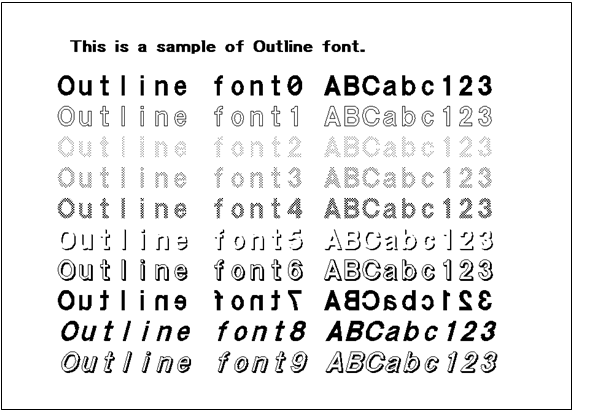
The print sample shown above is issued with a head density of 8 dots/mm.