[ESC+T1] 16 x 16 dots External Font Registration
Hexadecimal code
| ESC | <1B>16 |
|---|---|
| T1 | <54>16<31>16 |
Parameter
abbn...n
Initial value
Nil
Valid range and term of command
| When the power switch is OFF | The set parameter is not maintained. |
| Valid range within items | The set parameter becomes invalid. |
| Valid range between items | The set parameter becomes invalid. |
Function
Registering 16 x 16 dots external fonts.
Format
<T1>abbn...n
-
Parameter
a [Registration data selection]
= H: Registration code in HEX character.
= B: Registration code in binary code.
b [Registration font code address]
Using Kanji set <KS> command to set Japanese (0, 1, 2)
JIS code
H: Up to 95 registrations from "21" to "7F" is available.
B: Up to 95 registrations from 21H to 7FH is available.
Shift JIS code
H: Up to 95 registrations from "40" to "9E" is available.
B: Up to 95 registrations from 40H to 9EH is available.
Unicode (UTF-16BE, UTF-8)
H: Up to 95 registrations from "00" to "5E" is available.
B: Up to 95 registrations from 00H to 5EH is available.
Using Kanji set <KS> command to set other than Japanese
(3 (China Simplified Chinese), 5 (China Traditional Chinese), 6 (Korean)), B18030, BIG5, KSC5601 (EUC-KR) code
H: Up to 95 registrations from "21" to "7F" is available.
B: Up to 95 registrations from "21H" to "7 FH" is available.
Unicode (UTF-8)
H: Can be registered up to 95 ; range: "00"to"5E"
B: Can be registered up to 95 ; range: "00H" to "5EH"
(Note: UTF-8 is not supported with FX3-LX, PW208/PW208m)
n [Registered external font data] = Data
Coding Example 1
Registration data in JIS HEX character
<A>
<KS>0
<KC>0
<CC>0
<T1>H21
00FF ・・・・・・・・・・FF00
<Z>

<A>
<KS>0
<KC>0
<CC>0
<V>100<H>200<K1>H9021
<Q>2
<Z>
Coding Example 2
Registration code in Shift JIS binary code.
<A>
<KS>0
<KC>1
<CC>0
<T1>B<40>16
<00FF ・・・・・・・・・・FF00>16
<Z>

<A>
<KS>0
<KC>1
<CC>0
<V>100<H>200<K1>B<90>16<40>16
<Q>2
<Z>
Coding Example 3
Registration code in Unicode binary code.
<A>
<KS>0
<KC>2
<CC>0
<T1>B<00>16
<00FF ・・・・・・・・・・FF00>16
<Z>

<A>
<KS>0
<KC>2
<CC>0
<V>100<H>200<K1>B<E0>16<00>16
<Q>2
<Z>
Coding Example 4
Register in the user registration memory
<A>
<KS>0
<KC>1
<CC>1
<T1>B<40>16
<00FF ・・・・・・・・・・FF00>16
<Z>
Supplemental explanation
- Registering 16 x 16 dots external fonts in the internal memory or user registration memory.
- The code to specify in the registration font code address needs to match the Kanji set (<KS>) and Kanji code (<KC>).
- Overwriting registration data is available.
- The order of data registration is as follows.
- The data registered in the printer memory will be deleted at the power off. In this case, you need to register the data again.
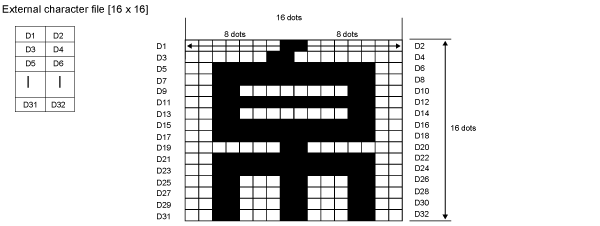
When registering the external characters described above, D1 data becomes <01>16 and D2 data becomes <80>16 because D1 consists of [00000001], D2 consists of [10000000].
In the same manner, D3 is <03>16, D4 is <00>16, D5 is <3F>16, D6 is <FC>16 and the external registration data will be <018003003FFC...>16 up to D32.
Point
- The data registered in the user registration memory will be maintained after the printer's power is off.
- You cannot use the internal memory in combination with the user registration memory.
- Specify the slot to register.
If <CC> command is not sent after the power on, the data are registered in the internal memory.