Barcode Command
In barcode specification, print of various barcodes, change of bar width ratio, and print of guard bar or human-readable information can be performed by the specification (B, D, BD) after ESC.
The contents may vary depending on the specification. This page should be read closely and followed.
Refer to the table below for the specification of B, D, and BD.
Specification of Bar width ratio
| Barcode specification parameter |
Barcode specification | <B> | <D> | <BD> |
|---|---|---|---|---|
| 0 | CODABAR (NW-7) | 1:3 | 1:2 | 2:5 |
| 1 | CODE39 | 1:3 | 1:2 | 2:5 |
| 2 | ITF | 1:3 | 1:2 | 2:5 |
| 5 | Industrial 2 of 5 | 1:3 | 1:2 | 2:5 |
| 6 | Matrix 2 of 5 | 1:3 | 1:2 | 2:5 |
Bar width ratio
Barcode is composed of Narrow Bar, Wide Bar, Narrow Space and Wide Space. Bar width ratio is the proportion of Narrow Bar and Wide Bar.
- Bar width ratio (Ratio 1:3) <B>
This barcode is composed of Narrow Bar [1] and Wide Bar [3].
- Bar width ratio (Ratio 1:2) <D>
This barcode is composed of Narrow Bar [1] and Wide Bar [2].
- Bar width ratio (Ratio 2:5) <BD>
This barcode is composed of Narrow Bar [2] and Wide Bar [5].
If specifying bar width ratio for your own convenience, register the ratio with Bar Width Ratio <BT> and print labels with Print of Specified Bar Width Ratio <BW>.
Width of narrow bar and height of barcode
Narrow bar indicates the narrow bar width, and bar height indicates the height of barcode.
For instance, printing narrow bar for 1 dot in head density of 8 dots/mm (203 dpi), the narrow bar width will be 0.125mm and barcode scanner may have a reading problem. To avoid this problem, set the narrow bar to 2 dots so that the narrow bar width will be 0.25mm and this will improve the scanner reading condition.
There is a necessity to set the narrow bar width based on the printer head density or performance of barcode scanner.
In bar width ratio, [Narrow bar width] specification sets the width of bar.
e.g.) When bar width ratio = 1:3 and narrow bar width is 3 dots, bar width ratio becomes 3:9.
Bar height is to specify the height of barcode, and proper height based on the scanner type can be set.
Intercharacter gap
Intercharacter gap is the space between two adjacent barcode characters in a discrete barcode.
To specify and enable intercharacter gap, insert Character Pitch <P> right before barcode specification such as <B>, <D> and <BD> or Print of Barcode with Registered Ratio <BW>. If not, initial value (2 dots) will be set.
Intercharacter gap is designable for the following barcodes.
- CODABAR (NW-7)
- CODE 39
- Industrial 2 of 5
- Matrix 2 of 5
Intercharacter gap is the multiplier of values specified with Character Pitch <P> and narrow bar width.
e.g.)
When Character Pitch <P> is 3 and narrow bar width is 2 dots:
Intercharacter gap = 3 x 2 = 6 (dots)
Designation of human readable information (HRI) and guard bar
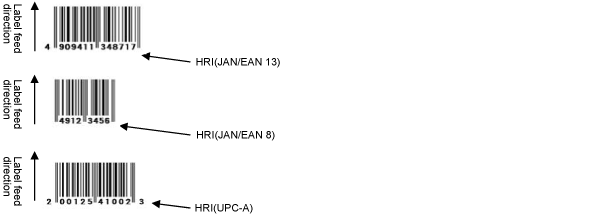
For UPC-A and JAN/EAN 8 and 13 digits barcode, availability of human-readable information (hereinafter HRI) and guard bar can be specified.
| Barcode specification parameter |
Barcode specification | <B> | <D> | <BD> |
|---|---|---|---|---|
| 3 | JAN/EAN 13 | HRI: Nil Guard bar: Nil |
HRI: Nil Guard bar: Available |
HRI: Available Guard bar: Available |
| 4 | JAN/EAN 8 | HRI: Nil Guard bar: Nil |
HRI: Nil Guard bar: Available |
HRI: Available Guard bar: Available |
| H | UPC-A | HRI: Nil Guard bar: Nil |
HRI: Nil Guard bar: Available |
HRI: Available Guard bar: Available |
-
Specification of <B> (No HRI, No guard bar)
If specifying <B>, following barcode will be printed.

-
Specification of <D> (No HRI, Guard bar available)
If specifying <D>, following barcode will be printed.

[Note] HRI is printable specifying <Character Type> data subsequently to <D>.
For more information, refer to [ESC+D-ESC+d] Barcode (With HRI). -
Specification of <BD> (HRI and guard bar available)
If specifying <BD>, following barcode will be printed.
[Barcode Specification Only]
| Barcode specification parameter |
Barcode specification | <B> |
|---|---|---|
| C | CODE93 | Barcode only |
| E | UPC-E | Barcode only |
| G | CODE 128 | Barcode only |
| I | UCC/EAN 128 for standard carton ID | Barcode only |
[Important]
- In this case, barcode will not have specification such as Bar Width Ratio and HRI.
- HRI will not be printed when barcode is error for barcode with HRI.
Composition of check digit
Refer to the table below for check digit in each barcode.
[Composition of C/D]
| Barcode specification parameter |
Barcode specification | Input digit No. | Print digit number and contents |
|---|---|---|---|
| 3 | JAN/EAN 13 | 12-digit | 13-digit (Input data of barcode + C/D)
C/D is calculated by modulus10. |
| 13-digit | 13-digit (Input data of barcode) C/D is not checked. | ||
| 4 | JAN/EAN 8 | 7-digit | 8-digit (Input data of barcode + C/D)
C/D is calculated by modulus10. |
| 8-digit | 8-digit (Input data of barcode) C/D is not checked. | ||
| C | CODE 93 | Max. 99- digit | C/D is calculated by modulus47. |
| E | UPC-E | 6-digit only | C/D is calculated by modulus10. |
| G | CODE 128 | - | C/D is calculated by modulus103. |
| H | UPC-A | 11-digit only | 12-digit (Input data of barcode + C/D)
C/D is calculated by modulus10. |
| I | UCC/EAN128 for
standard carton ID |
17-digit only | C/D is calculated by modulus103. |
[Note] C/D stands for "Check Digit".
Barcode Rotation Print
Print direction of barcode can be rotated. Note that when specifying Serial 1 and Serial 2 for barcode rotation, it may cause blurring due to barcode enlargement ratio.
Avoid printing of 1-dot narrow bar since 1 dot becomes 0.125 / 0.083 / 0.042 mm when head density is 8 dots/mm (203 dpi) or 12 dots/mm (305 dpi) or 24 dots/mm (609 dpi).
Parallel 1: Forward feed print
Parallel 2: Backfeed print at 180-degree rotation
[Note] Forward feed: Prints horizontally to label feed direction
Serial 1: Forward feed print at 90-degree rotation
Serial 2: Forward feed print at 270-degree rotation
- To print with Parallel1 and Parallel2, specify enlargement ratio of bar width so that narrow bar
gets at least 2 dots. ("L" indicates the enlargement ratio to the bar width ratio.)
Head density:
8 dots/mmHead density:
12 dots/mmHead density:
24 dots/mmBar width ratio 1:2 2L or more 2L or more 4L or more Bar width ratio 1:3 2L or more 2L or more 4L or more Bar width ratio 2:5 1L or more 1L or more 2L or more UPC-A/EAN/JAN 2L or more 2L or more 4L or more - If printing in serial 1 or serial 2 mode, specify the bar width expansion factor so that when
using a 8 dots/mm or 12 dots/mm head the width of the narrow bar is at least 3 dots.
Head density:
8 dots/mm (203 dpi)Head density:
12 dots/mm (305 dpi)Head density:
24 dots/mm (609 dpi)Bar ratio 1:2 3L or more 3L or more 6L or more Bar ratio 1:3 3L or more 3L or more 6L or more Bar ratio 2:5 2L or more 2L or more 4L or more UPC-A/JAN/EAN 3L or more 3L or more 6L or more - If printing in serial 1 or serial 2, reduce the print speed
Printing barcode exceeding the area of media size (<A1>).
<CL4-SXR,CL6-SXR,CL4NX, CL6NX, PW208NX/PW208mNX (International), FX3-LX (International), CT4-LX (International), PW4NX, S84NX/S86NX, LR4NX-FA (International)>
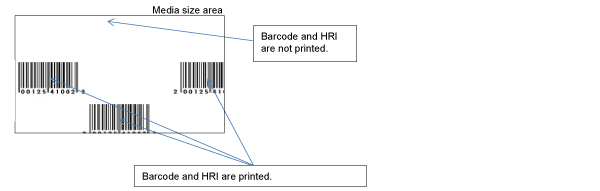
When printing barcode or HRI exceeding the area of media size (<A1>), the barcode and HRI inside the media will be printed.
Example of printing UPC-A (with HRI) exceeding the area of media size.
< CL4-SXR,CL6-SXR,CL4NX-J, CL6NX-J, PW208/PW208m, PW208NX/PW208mNX (Japan), FX3-LX (Japan), CT4-LX (Japan), HC4-LX, LR4NX-FA (Japan) >
When the beginning of HRI is not within the area of media size (<A1>), the barcode and HRI will be printed. If printing is performed at a position in where start/stop code of barcode is missing, command error will occur and there will be no printing of barcode.
Example of printing UPC-A (with HRI) exceeding the area of media size.
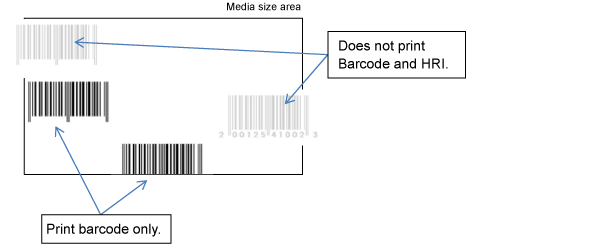
* When the base reference point is not within the size of media, there will be no printing of barcode and HRI.