[ESC+BG] Code 128 Barcode
CL4NX
CL6NX
CL4NX-J
CL6NX-J
PW208/PW208m
PW208NX/PW208mNX
FX3-LX
CT4-LX/HC4-LX
PW4NX
LR4NX-FA
S84NX/S86NX
CL4-SXR
CL6-SXR
Hexadecimal code
| ESC | <1B>16 |
|---|---|
| BG | <42>16<47>16 |
Parameter
aabbbn...n
Initial value
Nil
Valid range and term of command
| When the power switch is OFF | The set parameter is not maintained. |
| Valid range within items | The set parameter becomes invalid. |
| Valid range between items | The set parameter becomes invalid. |
Function
Specifying CODE128 barcode.
Format
<BG>aabbbn...n
-
Parameter
a [Narrow bar] = Valid Range: 01 - 36 dots
b [Height of Barcode] = Valid Range: 001 - 999 dots
n [Print data] = Barcode data (Refer to the CODE128 - Code Table)
Coding Example
Narrow bar width: 02, Barcode height: 120, Print data: ABCD123456 (Start character A)
<A>
<V>100<H>200<BG>02120>GABCD123456
<Q>2
<Z>

Supplementary Explanation
- Specify [START CODE] at the head of print data.
- START CODE A = ">G"
- START CODE B = ">H"
- START CODE C = ">I"
- C/D is an auto-generation.
-
- When using "START CODE C", specify print data in even-numbered digit.
- When "START CODE C" is set to print data in odd-number digit, specify "START CODE A" or "B" to change the first one character of print data. And then specify the rest of data with "Code Set Character C" to change it to even-numbered digit.
e.g.1) 15 digits [123456789012345] <B>1<C>23456789012345
e.g.2) 9 digits / Alphanumeric 6 digits [123456789ABC123] <C>12345678<B>9ABC123 - When odd digits are specified with START CODE C, the behavior changes depending on printer settings.
Prints with 1 character padded to the last digit of the print data when SBPL -> Compatible-> CODE128I is enabled from menu.
A command error will occur and the barcode will not be printed when SBPL->Compatible -> CODE128I is disabled from menu. - When start character is omitted, data will be printed with "START CODE B".
CODE128 - Code Table
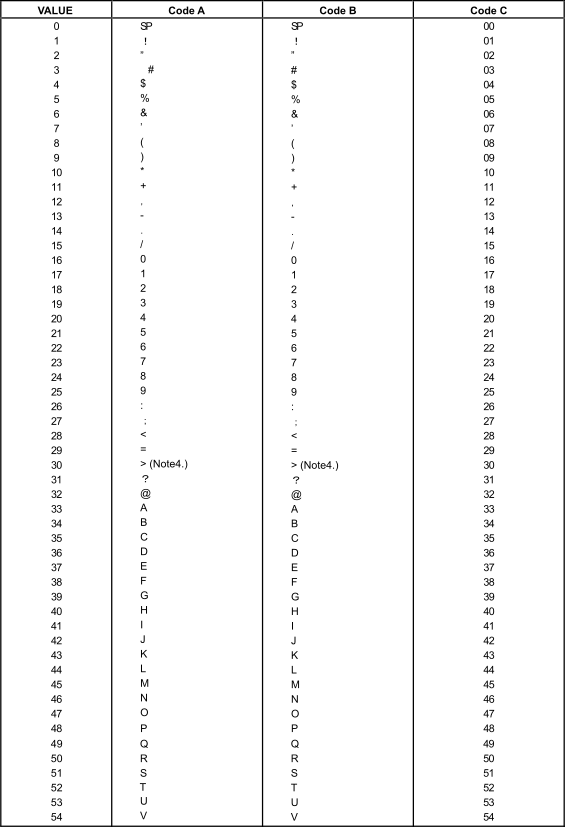
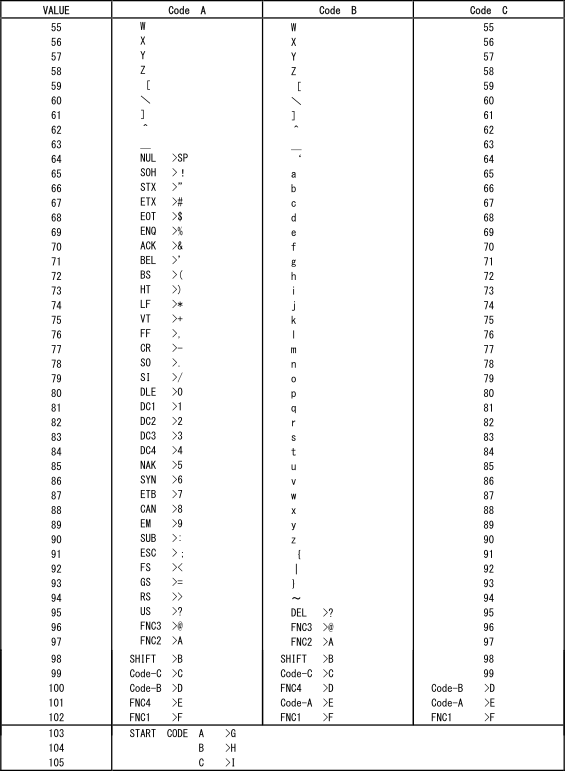
Note
- START code must be sent.
- STOP code is added in the printer automatically.
- Code after VALUE64 in Code A and Code B should be specified as 2 character code with ">" attached.
- Specification code for ">" is ">J".