[ESC+A3] Base Reference Point Correction
Hexadecimal code
| ESC | <1B>16 |
|---|---|
| A3 | <41>16<33>16 |
Parameter
VabbbbbHcdddd
Initial value
a=+, b=00000, c=+, d=0000
Valid range and term of command
| When the power switch is OFF | The set parameter is not maintained. (with the start point correction) |
| The set parameter is maintained. (without the start point correction) | |
| Valid range within items | The set parameter is valid until the next valid setting. |
| Valid range between items | The set parameter is valid until the next valid setting. |
Function
Changing the start point coordinate in User mode of the printer (normally).
Format
<A3>VabbbbbHcdddd
- Parameter
a [Vertical start point correction sign] = +, -
b [Vertical start point correction (No. of dots)] = Refer to the table below
c [Horizontal start point correction sign] = +, -
d [Horizontal start point correction (No. of dots)] = Refer to the table below
Coding Example
<A>
<A3>V+10H+10
<Z>
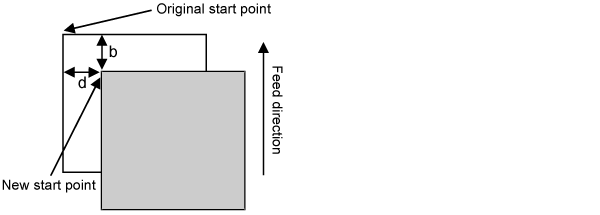
Supplementary Explanation
- If changing start point correction and being located outside of printable area, printing may not be performed.
- When changing start point correction through multiple label formats, correction will affect all of the formats.
Note
- This command is effective prior to the User mode settings of printer LCD.
- The offset value specified by the start point correction <A3> with the start point correction sign is not saved. Thus, the offset value specified by the <A3> command is maintained until the change is made by the next <A3> or the printer's power is off (See [Valid range and saving parameter]).
- The offset value specified by the <A3> command without the sign (+/-) is registered also in the user mode of the printer LCD. Thus, the offset value specified by the <A3> command is maintained even the printer power is off. However this is a format to be compatible with the older printer models. Please specify the sign (+/-) in normal operation (See [Valid range and saving parameter]).
Valid range and saving parameter
| Model | Horizontal start point correction (dots) | Vertical start point correction (dots) | Saving parameter | |
|---|---|---|---|---|
|
CL4NX CL4NX-J |
203 dpi | -831 to +831 | -19999 to +19999 |
[CL4NX-J/CL6NX-J, LR4NX-FA, PW4NX, CL4-SXR/CL6-SXR(Japan)] With (+/-) sign: Not saved Without (+/-) sign: Saved (*3) [CL4NX/CL6NX, S84NX/S86NX, CL4-SXR/CL6-SXR(International)] "A3 Command Save (S-type)" setting (*4) Valid: All parameters (with /without (+/-) sign) saved Invalid: With (+/-) sign: Not saved Without (+/-) sign: Saved (*3) |
| 305 dpi | -1247 to +1247 | -17999 to +17999 | ||
| 609 dpi | -2495 to +2495 | -9599 to +9599 | ||
|
CL6NX CL6NX-J |
203 dpi |
-1215 to +1215 (*1) -1339 to +1339 (*2) |
-19999 to +19999 | |
| 305 dpi |
-1983 to +1983 (*1) -2009 to +2009 (*2) |
-17999 to +17999 | ||
| PW4NX | 203 dpi |
-831 to +831 |
-7999 to +7999 |
|
| LR4NX-FA | 203 dpi |
-831 to +831 |
-19999 to +19999 |
|
| 305 dpi |
-1247 to +1247 |
-17999 to +17999 |
||
| 609 dpi |
-2495 to +2495 |
-9599 to +9599 |
||
| S84NX | 203 dpi |
-831 to +831 |
-19999 to +19999 |
|
| 305 dpi |
-1247 to +1247 |
-17999 to +17999 |
||
| 609 dpi |
-2495 to +2495 |
-9599 to +9599 |
||
| S86NX | 203 dpi |
-1339 to +1339 (*5) -1215 to +1215 (*6) -1023 to +1023 (*7) |
-19999 to +19999 |
|
| 305 dpi |
-2009 to +2009 (*5) -1823 to +1823 (*8) |
-17999 to +17999 |
||
| CL4-SXR | 203dpi | -831 to +831 | -19999 to +19999 | |
| 305dpi | -1247 to +1247 | -17999 to +17999 | ||
| 609dpi | -2495 to +2495 | -9599 to +9599 | ||
| CL6-SXR | 203dpi | -1215 to +1215 (*9) -1339 to +1339 (*10) |
-19999 to +19999 | |
| 305dpi | -1983 to +1983 (*9) -2009 to +2009 (*10) |
-17999 to +17999 | ||
-
The range for horizontal start point correction
Valid range when "Head Base Position" is set to "Standard".
-
The range for horizontal start point correction
Valid range when "Head Base Position" is set to "Left-justify".
- The setting "without sign" is only applicable to the old model printers, Please specify the sign (+/-) in normal operation.
- Only available with CL4NX/CL6NX (International), PW4NX, S84NX/S86NX (Initial value = Invalid, S84NX/S86NX: Initial value = Valid).
- Valid range in the case of setting "Applications > SBPL > Compatible > Head Size" is "Normal".
- Valid range in the case of setting "Applications > SBPL > Compatible > Head Size" is "M8460Se".
- Valid range in the case of setting "Applications > SBPL > Compatible > Head Size" is "M8485Se".
- Valid range in the case of setting "Applications > SBPL > Compatible > Head Size" is "M8465Se".
- Valid range in the case of setting "Standard" is "Valid area for print position"(CL6-SXR(International) default value)
- Valid range in the case of setting "Left-justify" is "Valid area for print position"(CL6-SXR(Japan) default value)
CL6NX/CL6NX-J
CL4NX-J/CL6NX-J, LR4NX-FA, PW4NX
CL4NX/CL6NX(International),PW4NX(International),S84NX/S86NX
S86NX
CL6-SXR
The valid range depends on the setting of [Settings] > [Printing] > [Print Adjustments] > [Head Base Position].
| Model | Horizontal start point correction (dots) | Vertical start point correction (dots) | Saving parameter | |
|---|---|---|---|---|
|
PW208 PW208m PW208NX PW208mNX |
203 dpi | -300 to +300 | -300 to +300 |
With (+/-) sign: Not saved Without (+/-) sign: Saved (*1) |
| FX3-LX | 305 dpi | -792 to +792 | -792 to +792 | |
|
CT4-LX HC4-LX |
203 dpi | -831 to +831 | -19999 to +19999 | |
| 305 dpi | -1247 to +1247 | -17999 to +17999 | ||
- The setting "without sign" is only applicable to the old model printers, please specify the sign (+/-) in normal operation.