[ESC+E] Auto Line Feed
CL4NX
CL6NX
CL4NX-J
CL6NX-J
PW208/PW208m
PW208NX/PW208mNX
FX3-LX
CT4-LX/HC4-LX
PW4NX
LR4NX-FA
S84NX/S86NX
CL4-SXR
CL6-SXR
Hexadecimal code
| ESC | <1B>16 |
|---|---|
| E | <45>16 |
Parameter
aaa
Initial value
Nil
Valid range and term of command
| When the power switch is OFF | The set parameter is not maintained. |
| Valid range within items | The set parameter becomes invalid. |
| Valid range between items | The set parameter becomes invalid. |
Function
Specifies amount of line spacing and CR (Line feed)
Format
<E>aaa
- Parameter
a [line spacing]
= valid range: 0 to 999 dots
= valid range: -999 to 999 dots *1
- Only FX3-LX (Japan) support.
Coding Example
<A>
<E>10
<V>100<H>200<P>2<L>0304<XM>,ABCDE+CR
FGHIJ+CR
<Q>2
<Z>
Supplementary Explanation
- When CR (0DH) is specified, linefeed based on line pitch will be performed.
- Rotation command <%> can be used in combination with this command.
- The command <E> may be used in a job and change the line spacing as necessary.
- Specify this command before designating the consecutive print of 1-line.
- Specifying this command executes the line feed regardless of CR/LF deletion setting.
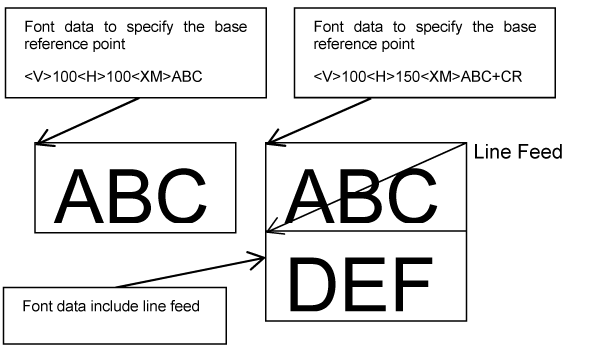
- Performing auto linefeed by the designation of CR (0DH), print start position of linefeed will be determined based on the pitch specified with <E> and the value specified with Horizontal Print Position <H> designated after <E>.
In case that <H> is specified several times after <E>, return position by CR (0DH) will be at the end of <H>. - The purpose is to reduce the line spacing when specifying a negative value. Adjust so that the characters do not overlap. Operation is not guaranteed if characters overlap or pass. (FX3-LX (Japan))
Print sample
<A><E>0
<V>100<H>100
<XM>ABC
<V>100<H>150
<XM>ABC+CR
DEF
<Z>
Valid commands
Bitmap
<XU>
<XS>
<XM>
<XB>
<XL>
<OA>
<OB>
<U>
<S>
<M>
<WB>
<WL>
<X20>
<X21>
<X22>
<X23>
<X24>
<K1>
<K2>
<K3>
<K4>
<K5>
<K8>
<K9>
<KA>
<KB>
<KD>
<k1>
<k2>
<k3>
<k4>
<k5>
<k8>
<k9>
<kA>
<kB>
<kD>
<PP>
<X1>
<X2>
<X3>
<X80>
<X81>
<X82>
<X83>
<X84>
<X85>
<X86>
<X87>
<X88>
<XK>
<PP1>
<PP2>
<PP3>
Outline
<$=>
CG Font
<RD>
Scalable font
<RH>
Markdown font
<Xm1>
<Xm2>
<Xm3>
<Xm4>