[ESC+EP] Print End Position
CL4NX
CL6NX
CL4NX-J
CL6NX-J
PW208/PW208m
PW208NX/PW208mNX
FX3-LX
CT4-LX/HC4-LX
PW4NX
LR4NX-FA
S84NX/S86NX
CL4-SXR
CL6-SXR
Hexadecimal code
| ESC | <1B>16 |
|---|---|
| EP | <45>16<50>16 |
Parameter
[,aaaaa]
Initial value
Nil
Valid range and term of command
| When the power switch is OFF | The set command is not maintained. |
| Valid range within items | The set command becomes invalid. |
| Valid range between items | The set command becomes invalid. |
Function
Specifying the label stop position in the sensor ignored mode.
Format
<EP>[,aaaaa]
- Parameter
a [Print stop position] = Refer to the following table
Range of specification
| Model | Length of label (dots) | |
|---|---|---|
|
CL4NX CL4NX-J |
203 dpi | 0 to 20000 |
| 305 dpi | 0 to 18000 | |
| 609 dpi | 0 to 9600 | |
|
CL6NX CL6NX-J |
203 dpi | 0 to 20000 |
| 305 dpi | 0 to 18000 | |
|
PW208/PW208m PW208NX/PW208mNX |
203 dpi | 0 to 8000 |
|
FX3-LX |
305 dpi | 0 to 6000 |
|
CT4-LX HC4-LX |
203 dpi | 0 to 20000 |
| 305 dpi | 0 to 18000 | |
|
PW4NX |
203 dpi | 0 to 8000 |
|
S84NX |
203 dpi | 1 to 20000 |
| 305 dpi | 1 to 18000 | |
| 609 dpi | 1 to 9600 | |
|
S86NX |
203 dpi | 1 to 20000 |
| 305 dpi | 1 to 18000 | |
|
CL4-SXR |
203 dpi | 0 to 20000 |
| 305 dpi | 0 to 18000 | |
| 609 dpi | 0 to 9600 | |
|
CL6-SXR |
203 dpi | 0 to 20000 |
| 305 dpi | 0 to 18000 | |
Coding Example 1
<A>
<A1>14240832
<Z>
<A>
<V>100<H>200<P>2<L>0202<XS>ABCD
<Q>2
<EP>
<Z>
Example) 8 dots/mm, 12 dots/mm
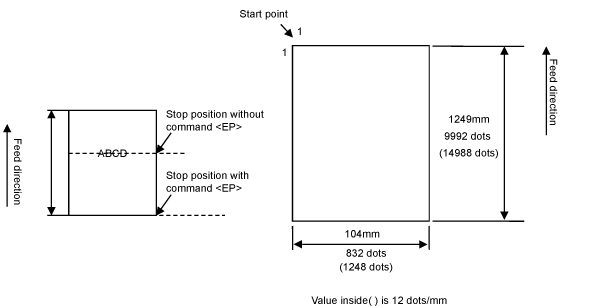
Coding Sample 2
<A>
<V>100<H>200<P>2<L>0202<XS>ABCD
<Q>2
<EP>,128
<Z>
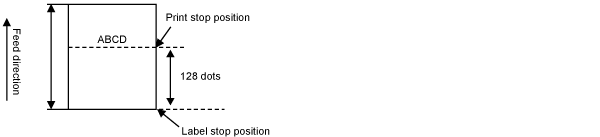
Supplementary Explanation
- Use this command in the sensor invalid mode.
- Use this command in combination with Label Size <A1>.
- When you specify the parameter, the last position of printing + value specified in parameter will be the stop position of label. However if last position of printing + position specified in parameter exceeds label length, the size is truncated to label length.
- If you specify label size <A1> in Format Registration <YS> and Form Overlay Registration <&S> make sure to specify Print End Position<EP> when you specify Format Call<YR> and Form Overlay Call<&R>.
- The label stop position depends on the following combination. The table below shows which commands will be adopted by the combination of <A1>-LCD setting items.
| <A1> | <EP>: Without parameter |
<EP>: With parameter |
LCD setting item | Adopted command | Remarks |
|---|---|---|---|---|---|
| Yes | Yes | - | - | <A1> | |
| Yes | - | Yes | - | <EP> | |
| Yes | - | - | Yes | LCD (Print End Position) | If you do not specify of the <EP>. |
| Yes | Yes | - | Yes | <A1> | |
| Yes | - | Yes | Yes | <EP> | |
| - | Yes | - | - | <A1> | If after power ON, <A1> is designated once. |
| LCD (Label Length) | If after power ON, <A1> is not specified even once. | ||||
| - | - | Yes | - | <EP> | |
| - | - | - | Yes | LCD (Print End Position) | If you do not specify of the <EP>. |
| - | Yes | - | Yes | <A1> | If after power ON, <A1> is designated once. |
| LCD (Label Length) | If after power ON, <A1> is not specified even once. | ||||
| - | - | Yes | Yes | <EP> |
Supplementary explanation: S84NX/S86NX
- In case of linerless operation mode, the label stop position will be the place where the offset setting value is fed from the stop position of the above mentioned labels.