[ESC+&S] Form Overlay Registration
Hexadecimal code
| ESC | <1B>16 |
|---|---|
| &S | <26>16<53>16 |
Parameter
,aa(,bbbb,ccccc)
Initial value
Nil
Valid range and term of command
| When the power switch is OFF | The registered data becomes valid. |
| Valid range within items | The registered data is valid until the next specification is made. |
| Valid range between items | The registered data is valid until the next specification is made. |
Function
Specifying the registration of fixed print contents to a memory card.
Format
<&S>,aa(,bbbb,ccccc)
-
Parameter
a [Registration No.] = Valid range: 1 to 99
b [Size specification of window width] = Valid range: Refer to the table below (Omissible)
c [Size specification of window height] = Valid range: Refer to the table below (Omissible)
Coding Example
<A>
<V>100<H>100<X21>MODEL
<CC>1
<&S>,1
<Z>
Supplementary Explanation
- Specify slot No. with Card Slot for Use <CC> prior to this command.
- Delimit Start of Data Transmission <A> and End of Data Transmission <Z> with the format to be registered.
- Registration of identical registration No. is invalid.
- Both Print of Graphic <G> and Print of BMP File <GM> can be registered.
- This command <&S> allows up to 99 registries. Note that the capacity of registry may vary depending on the memory card to be used.
- Data registered with this command<&S> can be cleared with Clear <*>R.
- The error occurs when specifying unused or specifying the slot which the printer is allocated.
- If the vertical size of the window is larger than the set paper length, a command error occurs.
Note
- Don't power off while accessing the memory. There is no guarantee of data in media if the power is turned off while accessing the memory.
Valid Range
| Model | Horizontal size of the window Valid Range (dot) |
Vertical size of the window Valid Range (dot) |
|
|---|---|---|---|
| CL4NX CL4NX-J CL4-SXR |
203 dpi | 550 to 832 | 50 to 20000 |
| 305 dpi | 50 to 1248 | 50 to 18000 | |
| 609 dpi | 50 to 2498 | 50 to 9600 | |
| CL6NX CL6NX-J CL6-SXR |
203 dpi | 50 to 1216 (*1) 50 to 1340 (*2) |
50 to 20000 |
| 305 dpi | 50 to 1984 (*1) 50 to 2010 (*2) |
50 to 18000 | |
| PW208 PW208NX PW208mNX |
203 dpi | 50 to 440 | 50 to 8000 |
| FX3-LX | 305 dpi | 50 to 960 | 50 to 6000 |
| CT4-LX HC4-LX |
203 dpi | 50 to 832 | 50 to 20000 |
| 305 dpi | 50 to 1248 | 50 to 18000 | |
| PW4NX | 203 dpi | 50 to 832 | 50 to 8000 |
| LR4NX-FA | 203 dpi | 50 to 832 | 50 to 20000 |
| 305 dpi | 50 to 1248 | 50 to 18000 | |
| 609 dpi | 50 to 2498 | 50 to 9600 | |
| S84NX | 203 dpi | 50 to 832 | 50 to 20000 |
| 305 dpi | 50 to 1248 | 50 to 18000 | |
| 609 dpi | 50 to 2496 | 50 to 9600 | |
| S86NX | 203 dpi | 50 to 1340 | 50 to 20000 |
| 305 dpi | 50 to 2010 | 50 to 18000 | |
CL6NX/CL6NX-J
- Valid range in the case of setting "Standard" is "Valid range for print"
- Valid range in the case of setting "Left-justify" is "Valid range for print"
Valid Command
Print position
<V>
<H>
Font
<XU>
<XS>
<XM>
<XB>
<XL>
<OA>
<OB>
<RD>
<$=>
<K1>
<K2>
<K3>
<K4>
<K5>
<K8>
<K9>
<KA>
<KB>
<KD>
<k1>
<k2>
<k3>
<k4>
<k5>
<k8>
<k9>
<kA>
<kB>
<kD>
<U>
<S>
<M>
<WB>
<WL>
<X20>
<X21>
<X22>
<X23>
<X24>
<PP>
<X1>
<X2>
<X3>
<X80>
<X81>
<X82>
<X83>
<X84>
<X85>
<X86>
<X87>
<X88>
<XK>
<PP1>
<PP2>
<PP3>
<Xa1>-<Xa6>
<Xb1>-<Xb8>
<Xc1>-<Xc9>
<Xd1>-<Xd9>
<Xe1>-<Xe9>
<Xf1>-<Xf5>
<Xm1>-<Xm4>
Barcode
<B>
<BC>
<BG>
<BI>
<D>
<D><d>
<BD>
<BT>
<BW>
<BP>
<BF>
<BS>
<BL>
<BL><d>
<BM>
2D Code
<2D10>
<BK>
<2D12>
<2D20>
<BV>
<2D30>
<2D31>
<2D32>
<2D33>
<2D34>
<2D35>
<BQ>
<2D50>
<BX>
<2D51>
<2D70>
Composite symbol
<EU>
Modification
<WD>
<FW>
<(>
<RF>
<FC>
<FT>
<RM>
Graphic
<G>
<GM>
<GP>
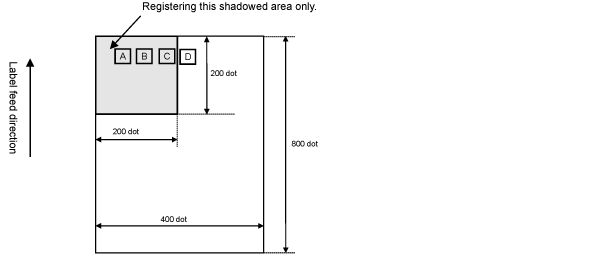
In general, this command is used for [Registration number] only. Specification of window height and width will control the movement with Vertical Print Position <V> and Horizontal Print Position <H> at the time of calling. For the movement at the time of calling, if registered area is exceeding print area, the portion outside of print area will not be printed.
The following are the brief operation.
- Normal (To register)
<A>
<V>100<H>100<P>2<L>0202
<X23>0ABCD
<V>60<H>60
<FW>0808V800H400
<V>320<H>60
<FW>04H400
<CC>1
<&S>,1
<Z>
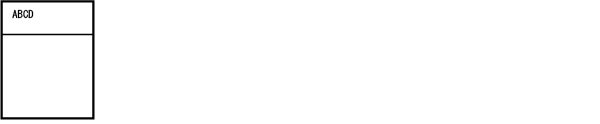
Registered image
- When print is specified after the command <&S>
<A>
<V>100<H>100<P>2<L>0202
<X23>0ABCD
<V>60<H>60
<FW>0808V800H400
<V>320<H>60
<FW>04H400
<CC>1
<&S>,1
<V>200<H>100<OB>12345
<Z>
Code Explanation <V>100<H>100<P>2<L>0202 <X23>0ABCD <V>60<H>60 <FW>0808V800H400 <V>320<H>60 <FW>04H400 <CC>1Anything specified prior to the command <&S> will be registered as form overlay. <V>200<H>100<OB>12345Printing out this part - When window size is specified
Label Size <A1>08000400, Window width [200], Window height [200]
<A>
<A1>08000400
<V>100<H>00<P>2<L>0202
<X23>0ABCD
<CC>1
<&S>,1,200,200
<Z>