[ESC+T2] Memory Card 24 x 24 dots External Font Registration
Hexadecimal code
| ESC | <1B>16 |
|---|---|
| T2 | <54>16<32>16 |
Parameter
abbn...n
Initial value
Nil
Valid range and term of command
| When the power switch is OFF | The set parameter is maintained. |
| Valid range within item | The set parameter becomes invalid. |
| Valid range between items | The set parameter becomes invalid. |
Function
Registering 24 x 24 dots external fonts in the memory card.
Format
<T2>abbn...n
-
Parameter
a [Registration data selection]
= H: HEX character
= B: Binary code
b [Registration font code address]
Using Kanji set <KS> command to set Japanese (0, 1, 2)
JIS code
H: Up to 95 registrations from 21H to 7FH is available.
B: Up to 95 registrations from "21" to "7F" is available.
Shift JIS code
H: Up to 95 registrations from 40H to 9EH is available.
B: Up to 95 registrations from "40" to "9E" is available.
Unicode
H: Up to 95 registrations from 00H to 5EH is available.
B: Up to 95 registrations from "00" to "5E" is available.
Using Kanji set <KS> command to set other than Japanese
(3 (China Simplified Chinese), 5 (China Traditional Chinese), 6 (Korean))
H: Up to 95 registrations from 21H to 7FH is available.
B: Up to 95 registrations from "21" to "7F" is available.
n [Registered external font data]
Coding Example
<A>
<CC>1
<T1>H2100FF00FF-3C0000FF
<Q>2
<Z>
Supplementary Explanation
- Overwriting registration data is available.
- Specify slot registered with Card Slot for Use <CC> prior to this command <T2> by all means.
- The code to specify in the registration font code address needs to match the Kanji set (<KS>) and Kanji code <KC>.
- When use <T2> with other registration command, it may occur error because of capacity shortage of
the memory card.
In this case, register another command in on other memory card, or use a memory card having bigger capacity. - Data output is as follows.
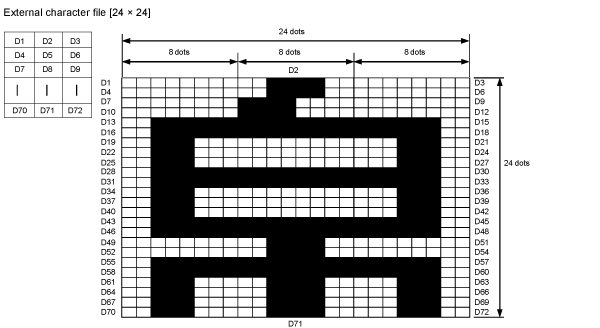
When registering the external characters described above, D1 data becomes <00>16, D2 data becomes <3C>16 and D3 data becomes <00>16 because D1 consists of [00000000], D2 consists of [00111100] and D3 consists of [00000000].
In the same manner, D4 becomes <00>16, D5 becomes <3C>16 and D6 becomes <00>16, and the external registration data are specified to <003C00003C00...> and up to D72.
Note
- Don't power off while accessing the memory. There is no guarantee of data in media if the power is turned off while accessing the memory.