[ESC+RK] RFID Write (ISO/IEC15693) [SX]
HEX code
| ESC | <1B>16 |
|---|---|
| RK | <52>16<4B>16 |
Parameter
See under "Parameters".
Default Value
None
Valid range and term of command
| When turning off the power switch | The set command is not maintained. |
| Valid range within item | The set parameter becomes invalid. |
| Valid range between items | The set parameter becomes invalid. |
Function
Specifies the data to write on RFID tag that supports ISO/IEC15963.
Format(Standard format)
<RK>a,(b,)Dmmmm,n...n (,ict:xx) (,iso:c) (,wsb:sss)(,lbs:xxx,lbn:yyy)(,eas:v)(,afi:ww)(,dsf:xx)(,eal:g)(,afl:h) (,dsl:i) (,eap:jjjjjjjj)(,eai:kkkk)(,pw0-4:eeeeeeee)(,aw0-4:ffffffff)(,kpw:gggggggg) (,pps:lllm) (,fsw:f)
Note: Typical parameters are shown in the format examples above. Refer to the next item for detailson the parameters.
-
Parameter
| Specification of inlay type | ||||||||||||||||||||||||||||||||||||||||||||||
|---|---|---|---|---|---|---|---|---|---|---|---|---|---|---|---|---|---|---|---|---|---|---|---|---|---|---|---|---|---|---|---|---|---|---|---|---|---|---|---|---|---|---|---|---|---|---|
| a |
Valid range for models with Takaya module: 2, 3, 5
, 11
2: ICODE
3: Tag-it
5: my-d
11: Fudan Microelectronics(FM13HF01,FM13HF02N)
Note: A tag error occurs when data exceeds the maximum number of bytes for each product. |
|||||||||||||||||||||||||||||||||||||||||||||
| Ignore RFID tag error (omissible) | |||||||||||||||||
|---|---|---|---|---|---|---|---|---|---|---|---|---|---|---|---|---|---|
| b |
Note 1: If this parameter is omitted, the number of retries set under the menu Interfaces -> RFID->Retries ([DC2]PA's identifier IF, MAX_RETRY_LABEL) is applied instead. Note 2: Do not omit this parameter or change its value, in the middle of successive <RK> command items. Also, do not send a <TU> command item continuously after a <RK> command item with this parameter. They will result in not guaranteed operation when a tag error occurs. |
||||||||||||||||
| Data input format + number of data to write in bytes | ||||||||||||
|---|---|---|---|---|---|---|---|---|---|---|---|---|
|
Dmmmm
or dmmmm |
Number of data to write
"D" or "d" shows that this field is for the number of data to write. Capital "D" indicates that the data is in ASCII, lower-case "d" indicates the data is in HEX. Specify the length of data in bytes with the number (mmmm) that comes after "D" or "d". |
Specifies the number of bytes for the next parameter "n: data array to write". This
portion
should be written in bytes, so the number specified for this field does not change
regardless of data format, whether ASCII or HEX.
Maximum number depends on inlay type.
Note: Command error occurs if you specify a value that exceeds the maximum. Specify 0 if there is no data to write to user memory. |
||||||||||
| Data array to write | |||||||||||
|---|---|---|---|---|---|---|---|---|---|---|---|
| n | Data array to write | The character code and maximum number of characters depends on the data input/output format (ASCII/HEX) as below: | |||||||||
| ASCII |
Range of available character codes: (00H) - (FFH)
The maximum number of digits are equivalent to the maximum byte size that can be specified for each inlay. |
||||||||||
| HEX |
Range of available character codes: 0 (30H) -9 (39H),A (41H) -F (46H)
The maximum number of digits are twice the maximum byte size that can be specified for each inlay. |
||||||||||
| IC chip type (If this parameter is omitted, 00 (disabled) is assigned to IC chip type) | |||||||||||||
|---|---|---|---|---|---|---|---|---|---|---|---|---|---|
| ict: |
Specify an IC chip type into which data is written.
Always specify the chip type when the following chip is used.
Please note that the max memory size of "ICODE SLIX2" is 316 bytes.
|
||||||||||||
Availability of omissible parameters for each product (except for Ignore RFID tag error)
| Inlay type | ICODE (a=2) | Tag-it (a=3) | my-d (a=5) | FM13HF01 FM13HF02N (a=11) |
||||||||
| Product | SLI | SLIX | SLIX-S | SLIX2 | HF-I Plus |
HF-I Pro |
HF-I Standard |
vp SRF55V10P (Custom) |
vp SRF55V10P (ISO) |
FM13HF 01 |
FM13HF 02N |
|
| Parameter (Standard format) | iso | No | No | No | No | No | No | No | Yes | Yes | No | No |
| wsb | Yes | Yes | Yes | Yes | Yes | Yes | Yes | Yes | Yes | Yes | Yes | |
| lbs | Yes | Yes | Yes | Yes | Yes | Yes | Yes | Yes | Yes | Yes | Yes | |
| lbn | Yes | Yes | Yes | Yes | Yes | Yes | Yes | Yes | Yes | Yes | Yes | |
| eas | Yes | Yes | Yes | Yes | No | No | No | No | No | Yes | Yes | |
| afi | Yes | Yes | Yes | Yes | Yes | No | No | Yes | Yes | Yes | Yes | |
| dsf | Yes | Yes | Yes | Yes | Yes | No | No | No | No | Yes | Yes | |
| eal | Yes | Yes | Yes | Yes | No | No | No | No | No | Yes | Yes | |
| afl | Yes | Yes | Yes | Yes | Yes | No | No | Yes | Yes | Yes | Yes | |
| dsl | Yes | Yes | Yes | Yes | Yes | No | No | No | No | Yes | Yes | |
| eap | No | Yes | No | No | No | No | No | No | No | No | No | |
| eai | No | No | Yes | Yes | No | No | No | No | No | No | No | |
| pw0,1 | No | No | Yes | Yes | No | No | No | No | No | No | No | |
| pw2,3,4 | No | No | Yes | Yes | No | No | No | No | No | Yes(*1) | Yes(*1) | |
| aw0,1 | No | No | Yes | Yes | No | No | No | No | No | No | No | |
| aw2,4 | No | No | Yes | Yes | No | No | No | No | No | Yes(*2) | Yes(*2) | |
| kpw | No | No | No | No | No | Yes | No | No | No | No | No | |
| pps | No | No | Yes | Yes | No | No | No | No | No | No | No | |
| fsw | Yes | Yes | Yes | Yes | Yes | Yes | Yes | Yes | Yes | Yes | Yes | |
Yes: Operable / No: Inoperable
- Privacy mode cannot be set (pw2)
- Privacy mode deactivation authentication is not possible (aw2)
| my-d ISO operation (omissible) | ||
|---|---|---|
| iso: |
Valid range: 0-1
Specify 1 to access my-d using ISO-15693 standard. My-d custom command is used to access my-d if this field is not specified or is 0. |
|
Parameters from here can be specified in any order.
| Parameters related to specifying block to start writing (omissible) | ||
|---|---|---|
|
wsb:
(former Ws:) |
Specify block to start writing | Specifies the block to start writing the data. The 0th block is specified if omitted. Block is a unit to write to user memory. The following values in the table are allowed based on the type of inlays. A maximum up to a 3-digit decimal can be specified, but a parameter error occurs if it exceeds the maximum amount for the specified inlay. Please see the following table. |
Mapping table of inlay type and number of blocks, and total capacity
| Inlay Type | Product | Capacity of 1 block | The number of the overall blocks | Total capacity |
|---|---|---|---|---|
| ICODE (a=2) | ICODE SLI | 4bytes | 28blocks | 112bytes |
| ICODE SLIX | 4bytes | 28blocks | 112bytes | |
| ICODE SLIX-S | 4bytes | 40blocks | 160bytes | |
| ICODE SLIX2 | 4bytes | 79blocks | 316bytes | |
| Tag-it (a=3) | Tag-it HF-I Plus | 4bytes | 64blocks | 256bytes |
| Tag-it HF-I Pro | 4bytes | 8blocks | 32bytes | |
| Tag-it HF-I Standard | 4bytes | 8blocks | 32bytes | |
| my-d (a=5) | my-d vp SRF55V10P (Custom) | 8bytes | 125blocks | 1000bytes |
| my-d vp SRF55V10P (ISO) | 4bytes | 248blocks | 992bytes | |
| Fudan (a=11) | FM13HF01 | 4bytes | 32blocks | 128bytes |
| FM13HF02N | 4bytes | 62blocks | 248bytes |
| Parameters for Block Lock (omissible) | ||
|---|---|---|
|
lbs:
(former Ls:) |
Block to start locking | Available to specify up to 3 digits in decimals. A parameter error occurs when it exceeds the maximum for the specified inlay. |
|
lbn:
(former Ln:) |
Number of blocks to lock | Available to specify up to 3 digits in decimals. A parameter error occurs when it exceeds the maximum for the specified inlay. |
|
Allows to lock specified blocks (making it read-only).
Specify the block to start locking with "lbs:" and specify the number of blocks to lock with "lbn:". 1 is assigned to "lbn:" if only "lbs:" was specified without specifying "lbn:". 0 is assigned to "lbs:" if only "lbn" was specified without specifying "lbs". The block will not be locked if 0 was specified to "lbn:" or both of the parameters were omitted. Note that once locked, the block area becomes read-only and cannot be reset. In applying lock for my-d, specify 1 for "iso:" and access with ISO-15693 standard. Multiple Block Locks Support multiple block locks. Can be specified up to 16 positions. A parameter error will occur if 8 positions are exceeded. When specifying multiple locks, specify blocks (,lbs:xxx,lbn:yyy) in pairs. A parameter error will occur if not specified in pairs. E.g.: Note: The pps parameter cannot be used in conjunction with the lbs and lbn parameters. |
||
| Parameters related to option flag data control (omissible) | ||
|---|---|---|
|
eas:
(former Ea:) |
EAS bit operation |
Writes value to EAS (Electronic Article Surveillance) bit.
Valid range: 0-1 |
|
afi:
(former Af:) |
AFI operation |
Writes value to AFI (Application Family Identifier).
Inlays that don't support AFI cannot be operated. Valid range: 00-FF (HEX) |
|
dsf:
(former Ds:) |
DSFID operation |
Writes value to DSFID (Data Storage Format Identifier)
Inlays that don't support DSFID cannot be operated. Valid range: 00-FF (HEX) |
| Parameters related to perma-lock (omissible) | ||||||||
|---|---|---|---|---|---|---|---|---|
| eal: | Perma-lock for EAS flag |
Locks EAS. Unlockable after locking.
|
||||||
|
afl:
(former AI:) |
Perma-lock for AFI code |
Locks AFI. Unlockable after locking.
|
||||||
|
dsl:
(former AI:) |
Perma-lock for DSFID code |
Locks DSFID. Unlockable after locking.
|
||||||
| Parameters related to password lock (omissible) | ||
|---|---|---|
| eap: | EAS password lock |
Locks EAS with specified password.
Valid range: 00000000-FFFFFFFF, 8-digit hexadecimal |
| Parameters related to ID write (omissible) | ||
|---|---|---|
| eai: | EAS ID write. |
Writes EAS ID with specified password.
Valid range: 0000-FFFF, 4-digit hexadecimal |
| Parameters related to various password settings for ICODE (omissible) | ||
|---|---|---|
| pw0: |
Read/Write protect
User memory |
Sets password for read/write protection.
Valid range: 00000000-FFFFFFFF, 8-digit hexadecimal |
| pw1: | Write-protect user memory |
Sets password for write protection.
Valid range: 00000000-FFFFFFFF, 8-digit hexadecimal |
| pw2: | Privacy mode setting |
Sets password for privacy mode.
Valid range: 00000000-FFFFFFFF, 8-digit hexadecimal |
| pw3: | Disable tag |
Sets password to disable tag.
Valid range: 00000000-FFFFFFFF, 8-digit hexadecimal |
| pw4: | EAS protect |
Sets password to protect EAS (shoplifting prevention) function.
Valid range: 00000000-FFFFFFFF, 8-digit hexadecimal |
| Parameters related to passwords to access ICODE (omissible) | ||
|---|---|---|
| aw0: | Read protect authentication for user memory |
Authenticates with password to access tags that are read/write protected with pw0:.
Valid range: 00000000-FFFFFFFF, 8-digit hexadecimal |
| aw1: | Write protect authentication for user memory |
Authenticates with password to access tags that are write protected with pw1:.
Valid range: 00000000-FFFFFFFF, 8-digit hexadecimal |
| aw2: | Authentication to set/reset Privacy mode |
Authenticates with password to access tags that are in Privacy mode by pw2:.
Valid range: 00000000-FFFFFFFF, 8-digit hexadecimal |
| aw4: | Authentication to reset EAS protect |
Authenticates with password to access tags that are protected by pw4:.
Valid range: 00000000-FFFFFFFF, 8-digit hexadecimal |
| Parameters related to setting password for kill command in Tag-it (omissible) | ||
|---|---|---|
| kpw: | Kill command password |
Sets password to disable tag. Sets password only. The tag itself cannot be disabled.
Valid range: 00000000-FFFFFFFF, 8-digit hexadecimal |
| Parameters related to page protection settings (omissible) | ||||||||||||||||||||||||||||||||||||||
|---|---|---|---|---|---|---|---|---|---|---|---|---|---|---|---|---|---|---|---|---|---|---|---|---|---|---|---|---|---|---|---|---|---|---|---|---|---|---|
| pps: | Page protection |
Valid range: lllm
lll = Page address (3-digit decimal) m = Type of condition (refer to the following table) Switches specified page address from the initial "Public" to other modes.
For other than ICODE SLIX2, up to 8 sets can be specified per issue by specifying individual page addresses. User memory Read/Write protect (pw0 parameter) or user memory Write protect (pw1 parameter) may be required for page protection. Please insert them appropriately based on the table below. Note: The pw0 and pw1 parameters must be placed before the pps parameter.
When ICODE SLIX2 is specified, only two sets of pps: are specified because of the specification to divide the area into two parts. User memory Read/Write protect (pw0 parameter) and user memory Write protect (pw1 parameter) are required for page protection. Note: The pw0 and pw1 parameters must be placed before the pps parameter.
Example of ICODE SLIX2: Specify two sets of the start address and condition, "pps:000m" and "pps:007m", for example: The address of the first section should start with "000". The address of the second section must be range from "001" to "078" Note: The pps parameter cannot be used in conjunction with the lbs and lbn parameters. |
||||||||||||||||||||||||||||||||||||
| Parameters related to feed control (omissible) | ||||||||||
|---|---|---|---|---|---|---|---|---|---|---|
|
fsw:
(former Fs:) |
Feed without printing |
Normally, RFID write print jobs that don't include print data writes but don't feed
label.
(Except for cases with tag offset as default)
If don't feed, short buzzer will sound 2 times when write is successful. Short buzzer will the sound 6 times when it fails to write. |
||||||||
Coding sample 1 (When data format is set to ASCII)
When writing 13-byte data "4912345678904" to Tag-it HF-I RFID tag, with "Ignore RFID tag error" omitted
<A>
<V>50<H>50<BD>3020654912345678904
<RK>3,D13,4912345678904
<Q>1
<Z>
Coding sample 2
When writing 13-byte data "4912345678904" to Tag-it HF-I RFID tag, continuously printing while ignoring errors up to 3 labels (data format set to ASCII)
<A>
<V>50<H>50<BD>3020654912345678904
<RK>3,3,D13,4912345678904
<Q>1
<Z>
Coding sample 3
When writing 13-byte data "4912345678904" to Tag-it HF-I RFID tag, with "Ignore RFID tag error" omitted (data format set to HEX)
<A>
<V>50<H>50<BD>3020654912345678904
<RK>3,d13,34393132333435363738393034
<Q>1
<Z>
Coding sample 4 (data format set to ASCII)
When writing 13-byte data "4912345678904" to Tag-it HF-I RFID tag from block 5 (with b "Ignore RFID tag error" omitted)
<A>
<V>50<H>50<BD>3020654912345678904
<RK>3,D13,4912345678904,wsb:5
<Q>1
<Z>
Tag-it HF-I tag data after executing the command

Coding sample 5 (data format set to ASCII)
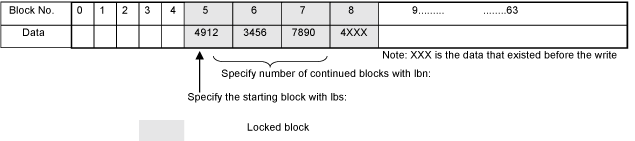
When writing 13-byte data "4912345678904" to Tag-it HF-I RFID tag from block 5 and lock the 4 continuous blocks from block 5 at the same time (with b "Ignore RFID tag error" omitted)
<A>
<V>50<H>50<BD>3020654912345678904
<RK>3,D13,4912345678904,wsb:5,lbs:5,lbn:4
<Q>1
<Z>
Tag-it HF-I data after executing the command
Coding sample 6 (data format set to ASCII)
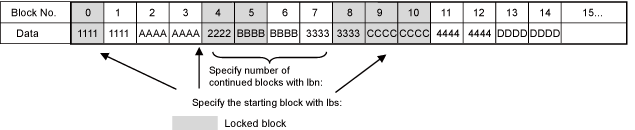
When writing 64 byte data of "11111111AAAAAAAA22222222BBBBBBBB33333333CCCCCCCC44444444DDDDDDDD," and locking one block from block 0 (read only), locking two blocks from block 4 (read only), locking three blocks from block 8 (read only) in ICODE SLIX tag.
<A>
<V>50<H>50<XM> READ-LOCK:SET2
<RK>2,D64,11111111AAAAAAAA22222222BBBBBBBB33333333CCCCCCCC44444444DDDDDDDD,ict:00,lbs:
0,lbn:1,lbs:4,lbn:2,lbs:8,lbn:3
<Q>1
<Z>
ICODE SLIX tag data after executing the command
Coding sample 7 (data format set to ASCII)
When locking one block from block1 (read only) in ICODE SLIX tag.
<A>
<V>50<H>50<XM> READ-LOCK:SET2
<RK>2,D0,,ict:00,lbs:1,lbn:1
<Q>1
<Z>
Coding sample 8 (data format set to ASCII)
When writing 13-byte data "4912345678904" to Tag-it HF-I RFID tag, setting EAS bit to ON and writing 10H to AFI. (with b "Ignore RFID tag error" omitted)
<A>
<V>50<H>50<XM>4912345678904 and EAS:SET AFI:10H
<RK>2,D13,4912345678904,eas:1,afi:10
<Q>1
<Z>
Coding sample 9 (data format set to ASCII)
When setting EAS bit to ON and writing 10H to AFI without changing tag registration data of ICODE SLI. (data array to write n...n omitted)
<A>
<V>50<H>50<XM>EAS:SET AFI:10H
<RK>2,D0,,eas:1,afi:10
<Q>1
<Z>
Coding sample 10 (data format set to ASCII)
When writing 8byte data of "F012345F" in RFID tag of ICODE SLIX2 tag, and applying read/write protect to blocks 0 and 1 in user memory.
<A>
<V>50<H>50<XM>EAS:SET AFI:10H
<RK>2,D8,F012345F,ict:01,pw0:FFFFFFFF,pw1:FFFFFFFF,pps:0003,pps:0020
<Q>1
<Z>
Coding sample 11 (data format set to ASCII)
In coding example 10, if user memory is unlocked to write data (password set when locked) against the tag with user memory where read/write protect has been applied (ICODE SLIX2).
<A>
<V>50<H>50<XM>EAS:SET AFI:10H
<RK>2,D8,FF1234FF,ict:01,aw0:FFFFFFFF,aw1:FFFFFFFF
<Q>1
<Z>
Coding sample 12 (data format set to ASCII)
When writing 13-byte data "4912345678904" to my-d RFID tag in accordance with ISO15963 with b "Ignore RFID tag error" (omitted)
<A>
<V>50<H>50<XM>4912345678904 by ISO15693 command
<RK>5,D13,4912345678904,iso:1
<Q>1
<Z>
Coding sample 13 (data format set to ASCII)
When the EAS bit is turned ON and 10H is written in the AFI area and 1FH in the DSFID area without changing the recorded data of the ICODE SLIX2 tag, and the EAS bit, AFI area and DSFID area are locked permanently. (b, Format in which RFID tag error ignore specification is omitted)
<A>
<V>50<H>50<XM>4912345678904 and EAS:SET AFI:10H DSFID:1FH
<RK>2,D0,,ict:1,eas:1,afi:10,dsf:1F,eal:1,afl:1,dsl:1
<Q>1
<Z>
Coding sample 14 (data format set to ASCII)
Page protection (user memory division) from the second block without changing the recorded data of ICODE SLIX2 tags. A password is required to read the second half of the user memory. (b, Format in which RFID tag error ignore specification is omitted)
<A>
<V>50<H>50<XM>4912345678904 by ISO15693 command
<RK>2,D0,,ict:01,pw0:0F0F0F0F,pw1:0F0F0F0F,pps:0000,pps:0021
<Q>1
<Z>
Supplemental explanation
- This command allows printing for continuous printing, cutter printing, dispenser printing and tear-off. However, when you specify cutter, dispenser motion No.2 and tear off, tag information write is available but information return will not be available.
- This command cannot be specified multiple times in between <A> (start of data transmission) through <Z> (end of data transmission). Neither can it be specified together with <IP0> (EPC code write) command.
- Contents of sequential printing or calendar cannot be written as information to the tag.
- The sent information and written information are verified before printing when information is written to tag with this command.
- The default value of parameter b is 0 (stop without ignoring tag error).
- If printing object doesn't exist for the print job that includes this command, printer only writes for RFID and doesn't feed label. The buzzer will sound 6 times if it fails to write to tag. If successful, the buzzer is sounded 2 times but does not feed the label. If you want to feed or print as blank label specify 1 for the "fsw: feed without printing" field.
- If 0 is specified in the fsw: parameter for the item without printing data: when sending this command, send it when the printer stops printing and the printing items are not available in the printer.
- Refer to the following chart if you want to specify the alphabet "A" in ASCII/HEX data formats.
Mode ASCII HEX Data 'A' "41" Code 41H 34H, 31H