[ESC+RK] RFID Write (FeliCa) [SX]
Hexadecimal code
| ESC | <1B>16 |
|---|---|
| RK | <52>16<4B>16 |
Parameter
Refer to Parameters page
Initial value
None
Valid range and term of command
| When power switch is OFF | The set command will not be maintained. |
| Valid range within items | The set parameter becomes invalid. |
| Valid range between items | The set parameter becomes invalid. |
Function
Specify data to write to FeliCa Lite and FeliCa Lite-S tags.
This command also write to the system area (one time output).
Format
When setting NFC (NDEF) format user data
<RK>a(,b),D0,(,rga:g...g)(,rgb:h...h)(,rgc:i...i)(,sdk:jj..jj)(,ckv:kkkk)(,df1:llll)(,df2:oooo) (,eid:pp..pp)(,lck:tt..tt)(,lsy:uu)(,nfc:q)(,spl:x)(,ptl:xx)(,ecd:x)(,lgc:aaaaa...aaaa) (,idt:xxx...xxx)(,ndd:mmmm,nnnnn...nnnn)(,hma:xxxxxxxxxxxx)(,dnm:aaaaa...aaaa) (,dcl:xxxxxx)(,scl:xxxx)(,ver:x,x)(,rfb:x)(,ssi:xxx,aaa...aaa)(,nky:xxx,aaa...aaa) (,atp:xxxx)(,etp:xxxx)(,fsw:r)
When setting free format user data / when there is no user data
<RK>a(,b),Dmmmm,n...n(,wsb:ee)(,blt:f0,f1...,f12,f13)(,rga:g...g)(,rgb:h...h)(,rgc:i...i) (,sdk:jj..jj)(,ckv:kkkk)(,df1:llll)(,df2:oooo)(,eid:pp..pp)(,lck:tt..tt)(,lsy:uu) (,nfc:q)(,fsw:r)
Note: Typical parameters are shown in the format examples above. Refer to the next item for detailson the parameters.
-
Parameter
| Specification of inlay type | |
|---|---|
| a |
Valid range for models with UF-S923S/UF-S959S module: 4
4: FeliCa Lite / FeliCa Lite-S |
| Ignore RFID tag error (omissible) | |||||||||||||||||
|---|---|---|---|---|---|---|---|---|---|---|---|---|---|---|---|---|---|
| b |
Note 1: If this parameter is omitted, the number of retries set under the menu Interfaces-> RFID->Retries ([DC2]PA's identifier IF, MAX_RETRY_LABEL) is applied instead. Note 2: Do not omit this parameter or change its value, in the middle of successive <RK> command items. Also, do not send a <TU> command item continuously after a <RK> command item with this parameter. They will result in not guaranteed operation when a tag error occurs. |
||||||||||||||||
| Data input format + number of data to write in bytes | ||
|---|---|---|
|
Dmmmm
or dmmmm |
Number of data to write
"D" or "d" shows that this field is for the number of data to write. Capital "D" indicates that the data is in ASCII, lower-case "d" indicates the data is in HEX. Specify the length of data in bytes with the number (mmmm) that comes after "D" or "d". |
Specifies the number of bytes for the next parameter "n: data array to write".
This portion should be written in bytes, so the number specified for this field does not change regardless of data format, whether ASCII or HEX. Valid range: FeliCa Lite/FeliCa Lite-S (a=4): "0-224" Note: Command error occurs if you specify a value that exceeds the maximum. Specify 0 if the data of clutch pad is not specified, and do not specify anything for the next [n:Write Data] except for a comma only at the end. Specify 0 if parameters related to NFC (NDEF) are used, and do not specify anything for the next [n:Write Data] except for a comma only at the end. |
| Data array to write | |||
|---|---|---|---|
| n | Data array to write | The character code and maximum number of characters depends on the data input/output format (ASCII/HEX) as below: | |
| ASCII |
Range of available character codes: (00H) - (FFH)
Valid number of characters: FeliCa Lite/FeliCa Lite-S (a=4): 0-224 characters 1 character as a step can be specified. |
||
| HEX |
Range of available character codes:
0 (30H) - 9 (39H), A (41H) - F (46H) Valid number of characters: FeliCa Lite/FeliCa Lite-S (a=4): 0-448 characters Specify it with the multiples of 2 digits. |
||
Parameters from here can be specified in any order.
| Parameters related to specifying block to start writing (omissible) | ||||||||||
|---|---|---|---|---|---|---|---|---|---|---|
| wsb: | Specify block to start writing |
Specifies the block to start writing the data. The 0th block is specified
if
omitted. Block is a unit to write to user memory. The following values in the table
are
allowed based
on the type of inlays. A maximum up to a 2-digit decimal can be specified, but a
parameter error occurs if it
exceeds the maximum amount for the specified inlay (14 and above). See the following
table.
Cannot be used together with blt:. Cannot be used together with parameters related to NFC (NDEF). |
||||||||
| Parameters related to write block list (omissible) | ||||||||||||||||
|---|---|---|---|---|---|---|---|---|---|---|---|---|---|---|---|---|
| blt: | Write block list |
It is possible to write to block of uncontinuous data when specifying a block list
format
which block number is delimited by comma.
The scratch pad (user area) of FeliCa Lite/FeliCa Lite-S comprises 14 blocks, each block can be specified to 0 - 13. The number of the block list is calculated as 16 bytes per block, with the condition that the data length specified by D (or d) parameter fulfills the following relation: number of the block list = specified data length ÷ 16 (+1 if there is remainder) For example, if the data length specified by D (or d) parameter is 52 bytes, although 52÷16=3, the number should be 3+1=4 as there is remainder. If 52 bytes are divided into 4 sets of 16 byte and write the data to each 0, 2, 8, 13 block, specify as blt:0,2,8,13. In the 4th block, the area after the remaining data will be filled with NULL. E.g.: The scratch pad data after executing the example above
Note 1: The ・・・・ area is written with NULL. Note 2: No change to the data which block is not specified. Note 3: This data is an example for describing RFID command output. Cannot be used together with wsb:. Cannot be used together with parameters related to NFC (NDEF). |
||||||||||||||
| Parameters related to subtraction register (omissible) | ||
|---|---|---|
| rga: | Specify the subtraction register A. |
Set a decimal from 0-4,294,967,295.
The register value for inlay shipping is 4,294,967,295. Write is possible only when the setting value is below the value stored in the register. (*1) |
| rgb: | Specify the subtraction register B. |
Set a decimal from 0-4,294,967,295.
The register value for inlay shipping is 4,294,967,295. Write is possible only when the setting value is below the value stored in the register. (*1) |
| rgc: | Specify the subtraction register C. |
Set a fixed 16-digit hexadecimal. Specify an even number for the number of digit.
The hexadecimal for inlay shipping is FFFFFFFFFFFFFFFF. This register without subtraction function is regarded as normal memory. |
- When writing a value larger than the original data in subtraction register A or B, VERIFY TAG ERR error will occur.
| Parameters related to individualized master key (omissible)
*
Specify this parameter to automatically set the individualized card key based on the card key block.
|
||
|---|---|---|
| sdk: | Specify the individualized master key. |
Set a fixed 48-digit hexadecimal.
The individualized card key cannot be set if omitted. Note: If the individualized master key leaks out, the "individual key" for all cards can be created easily. As such, manage and use the individualized master key in a fully secured environment. |
| Parameters related to card key version (omissible) | ||
|---|---|---|
| ckv: | Specify the card key version. |
Set a fixed 4-digit hexadecimal.
With sdk: specified and ckv: omitted, the card key version is written as 0000. |
| Parameters related to data format code (omissible)
Note: A parameter error will occur if df1: and df2: are specified together. df2: can be used only for FeliCa Lite. |
||
|---|---|---|
| df1: | Data format code case 1 |
Set a fixed 4-digit hexadecimal.
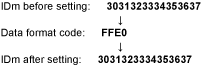
Even if this parameter is specified, the data is written to the ID block only. The IDm of Polling response is not changed as shown below. E.g.:
|
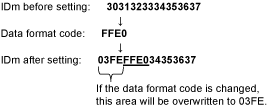
| df2: | Data format code case 2 |
Set a fixed 4-digit hexadecimal.
If this parameter is specified, the IDm of Polling response is changed as shown below. E.g.:
|
| Parameters related to ID block random code (omissible) | ||
|---|---|---|
| eid: | ID block random code | Set a fixed 12-digit hexadecimal. |
Note
By specifying the parameters related to data format code (df1:, df2:) and parameters related to ID block random code (eid:), the IDm of Polling response and ID block value are updated as shown below.
| Data format code | Case 1 (df1: specified or df1: and df2: omitted) | Case 2 (df2: specified) (Only when using FeliCa Lite) |
|---|---|---|
| D_ID Block | 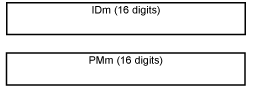 |
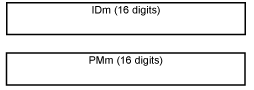 |
| Polling Response | 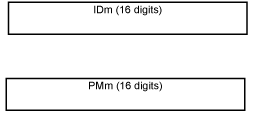 |
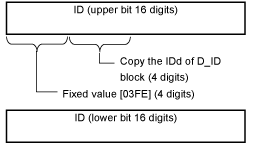 |
| ID Block | 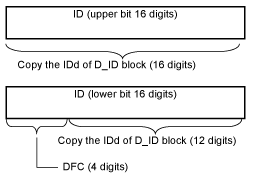 |
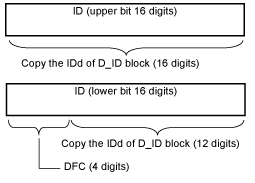 |
- If the data format code is not specified (df1: and df2: omitted), DFC is set to [0000].
- For FeliCa Lite-S, case 2 cannot be used according to the IC chip specification.
- The IDd copy process of D_ID block to ID block upper bit 16 digits is a feature available only when using FeliCa Lite. FeliCa Lite-S is registered during the manufacturing stage of IC chip.
- If the ID block random code is omitted, [000000000000] will be set.
| Parameters related to locking user block and subtraction register (omissible) | ||
|---|---|---|
| lck: | User block lock |
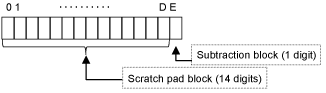
Set a fixed 15-digit binary.
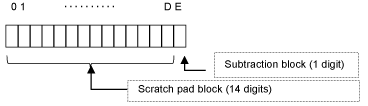
The bitmap image corresponds to the 14 scratch pad blocks (00H-0DH) and 1 subtraction block (0EH), and the block sequence is 00H-0EH from the left.
If this parameter is specified, the block specified to 1 can be locked (read-only). Specified the block not to be locked to 0. Note that once you lock the blocks, the locked blocks become read-only and you cannot unlock them. |
| Parameters related to system block lock (omissible) | ||
|---|---|---|
| lsy: | System block lock |
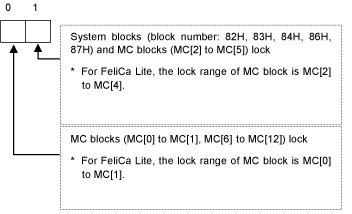
Set a fixed 2-digit binary.
If this parameter is specified, the system block specified to 1 can be locked. Specified the block not to be locked to 0. Note that once you lock the blocks, the locked blocks become read-only and you cannot unlock them. |
| Parameters related to read after authentication of user
block
and subtraction register
(omissible)
Note: can be used only for FeliCa Lite-S. |
||
|---|---|---|
| aar: | Read after authentication of user block |
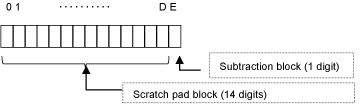
Set a fixed 15-digit binary.
The bitmap image corresponds to the 14 scratch pad blocks (00H-0DH) and 1 subtraction block (0EH), and the block sequence is 00H-0EH from the left.
If this parameter is specified, read after authentication can be performed for the block specified to 1. Specify the block that does not require read after authentication to 0. Note that once you set to 1, the block cannot be set back to 0. |
| Parameters related to write after authentication of user
block
and subtraction register
(omissible)
Note: can be used only for FeliCa Lite-S. |
||
|---|---|---|
| aaw: | Write after authentication of user block |
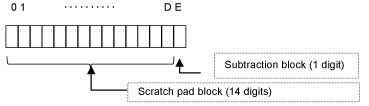
Set a fixed 15-digit binary.
The bitmap image corresponds to the 14 scratch pad blocks (00H-0DH) and 1 subtraction block (0EH), and the block sequence is 00H-0EH from the left.
If this parameter is specified, write after authentication can be performed for the block specified to 1. Specify the block to 0 when authentication is not required for write. Note that once you set to 1, the block cannot be set back to 0. |
| Parameters related to write (MAC inclusive) of user block
and
subtraction register
(omissible)
Note: can be used only for FeliCa Lite-S. |
||
|---|---|---|
| mac: | Write (MAC inclusive) of user block |
Set a fixed 15-digit binary.
The bitmap image corresponds to the 14 scratch pad blocks (00H-0DH) and 1 subtraction block (0EH), and the block sequence is 00H-0EH from the left.
If this parameter is specified, write (MAC inclusive) can be performed for the block specified to 1. Specify the block to 0 when MAC is not required for write. Note that once you set to 1, the block cannot be set back to 0. |
| Parameters related to write (MAC inclusive) of system block
(omissible)
Note: can be used only for FeliCa Lite-S. |
||
|---|---|---|
| msy: | Write (MAC inclusive) of system block |
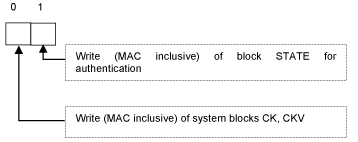
Set a fixed 2-digit binary.
If this parameter is specified, write (MAC inclusive) can be performed for the system block specified to 1. Specify the block to 0 when MAC is not required for write. Note that once you set to 1, the block cannot be set back to 0. |
| Parameters related to NFC (NDEF) support (omissible) | ||||||||
|---|---|---|---|---|---|---|---|---|
| nfc: | NFC (NDEF) support |
Use for handling record with NDEF (NFC Data Exchange Format) stipulated by NFC
Forum.
* Set to respond as NFC Type3 Tag.
|
||||||
| Detailed parameters of NFC (NDEF) support (omissible) | |||||||||||||||||||||
|---|---|---|---|---|---|---|---|---|---|---|---|---|---|---|---|---|---|---|---|---|---|
| ndf: | Specifying NFC (NDEF) format |
Specify this parameter when you set data in NDEF (NFC Data Exchange Format) format
stipulated
by NFC forum.
|
|||||||||||||||||||
| spl: | Specify format of detailed record |
Furthermore, specify the user data format in the case of ndf:3.
* For smart poster, make sure to specify the URI record. As other records are treated as options, specify if necessary. |
|||||||||||||||||||
| ptl: | Protocol |
For ndf:1 or ndf:3 (spl:1), specify the protocol (scheme) corresponding number to
1-3
digit
decimal.
The valid range is 1-255 (refer to the table of "Setting value of protocol (ptl:)" in [ESC+RK] RFID Write (ISO/IEC14443 TypeA)). * Considering the extensibility of the function, only the valid range is checked instead of its content. |
|||||||||||||||||||
| ecd: | Character code |
For ndf:2 or ndf:3 (spl:2), specify the character code.
|
|||||||||||||||||||
| lgc: | Language code |
For ndf:2 or ndf:3 (spl:2), specify the name that complies with RFC5646 to 2-63
digit.
Usable characters are 0-9, A-Z, a-z and - (hyphen). E.g.: French (fr), Japanese (ja), English (en), American English (en-US) |
|||||||||||||||||||
| idt: | Icon data type |
For ndf:3 (spl:4), specify the icon data type to MIME type that complies with
RFC2046. 1
- 64
digits.
E.g.: PNG image⇒[image/png] |
|||||||||||||||||||
| ndd: | Write user data |
Specify user data. Command error will occur if this is not specified. The size
information
for the data area is required before the data. For example, if the data size was 64,
it
should be specified as ndd:64,abcde...
|
|||||||||||||||||||
| ver: | Version |
For ndf:4-6, specify the handover version number to decimal.
Specify major and minor numbers delimited by a period character. For example, specify as ver:2.1 if the major number is 2 and minor number is 1. Note: It is possible to specify 2 versions when ndf:6. One will be reflected to Bluetooth record, and the other will be reflected to Wi-Fi record. The version will not be reflected to Wi-Fi record if you have specified only one. * Check items shall be limited to if the number of digits are 3-5 and if the major/minor numbers are 15 or smaller. Number of periods shall be limited as one. |
|||||||||||||||||||
| hma: | MAC Address for handover |
For ndf:4-6, specify the MAC address to a fixed 12-digit hexadecimal.
Note: It is possible to specify 2 MAC addresses when ndf:6. One will be reflected to Bluetooth record, and the other will be reflected to Wi-Fi record. The version will not be reflected to Wi-Fi record if you have specified only one. |
|||||||||||||||||||
| dnm: | Device name |
For ndf:4 or ndf:5 - 6 (wcc:1), specify the device name.
Specify a string within 16 characters from 0-9, A-Z, a-z, - (hyphen) and _ (underscore). |
|||||||||||||||||||
| dcl: | Class of Device |
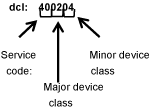
For ndf:4, specify the device class to a fixed 6-digit hexadecimal.
* Considering the extensibility of the function, only the digit number is checked instead of its content. Specify service code for the first 2 digits (refer to "Service code of the device class" table in [ESC+RK] RFID Write (ISO/IEC14443 TypeA)). Specify major device class for 3, 4 digits and the last 2 digits for minor device class (refer to "Major device class and minor device class of the device class" table in [ESC+RK] RFID Write (ISO/IEC14443 TypeA)). E.g.
|
|||||||||||||||||||
| scl: | Service Class UUID |
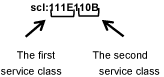
For ndf:4, specify more than 1 service class (refer to "Service class" in [ESC+RK] RFID Write (ISO/IEC14443 TypeA)).
Specify to hexadecimal which digit is 4's multiples. * Considering the extensibility of the function, only the digit number is checked instead of its content. E.g.
Up to 8 service classes can be specified. |
|||||||||||||||||||
| rfb: | RF Bands |
For ndf:5-6, specify the wireless frequency band when using Wi-Fi to a fixed 2-digit
hexadecimal.
* Number of digits only shall be checked instead of checking the entire contents, considering the function scalability. |
|||||||||||||||||||
| ssi: | SSID |
For ndf:5-6, specify the recognition name of the access point to 1 - 32 digit.
Usable characters are 0-9, A-Z, a-z and the following symbols: ! " # $ % & ' ( ) * + , - . / : ; < = > ? @ [ \ ] ^ _ ` { | } ~ * Space cannot be used. The size information of the front data delimited by a comma is necessary. For example if the data size is 32, specify as ssi:32,abcde... |
|||||||||||||||||||
| nky: | Network Key |
For ndf:5-6, specify the network key of the access point to 8 - 63 digit.
Usable characters are 0-9, A-Z, a-z and the following symbols: ! " # $ % & ' ( ) * + , - . / : ; < = > ? @ [ \ ] ^ _ ` { | } ~ * Space cannot be used. The size information of the front data delimited by a comma is necessary. For example if the data size is 8, specify as nky:8,AbCdEfGh. |
|||||||||||||||||||
| atp: | Authentication Type |
For ndf:5-6, specify the authentication type of the access point to a fixed 4-digit
hexadecimal.
Valid range: 0001-FFFF (refer to "Setting value of the authentication type" table in [ESC+RK] RFID Write (ISO/IEC14443 TypeA).) * Considering the extensibility of the function, only the digit number is checked instead of its content. |
|||||||||||||||||||
| etp: | Encryption Type |
For ndf:5-6 (wcc:0), specify the encryption type of the access point to a fixed
4-digit
hexadecimal.
Valid range: 0001-FFFF (refer to "Setting value of the encryption type" table in [ESC+RK] RFID Write (ISO/IEC14443 TypeA).) * Considering the extensibility of the function, only the digit number is checked instead of its content. |
|||||||||||||||||||
|
|||||||||||||||||||||
| Parameters related to feed control (omissible) | ||||||||||
|---|---|---|---|---|---|---|---|---|---|---|
| fsw: | Feed without printing |
Normally, RFID write print jobs that don't include print data writes but don't feed
label.
(Except for cases with tag offset as default)
If don't feed, Short buzzer will sound 2 times when write is successful. Short buzzer will the sound 6 times when it fails to write. |
||||||||
Coding example 1 (data input format is set to ASCII)
Record 13 bytes character of [4912345678904] on the scratch pad
A format omitting RFID tag error ignore
<A>
<V>50<H>50<BD>3020654912345678904
<RK>4,D13,4912345678904
<Q>2
<Z>
Coding example 2 (data input format is set to ASCII)
Record 13 bytes character of [4912345678904] from block 5 on the scratch pad
(A format omitting b,RFID tag error ignore)
<A>
<V>50<H>50<BD>3020654912345678904
<RK>4,D13,4912345678904,wsb:5
<Q>1
<Z>
The scratch pad data after executing the example

Coding example 3 (data input format is set to ASCII)
Record 13 bytes character of [4912345678904] from block 5 on the scratch pad, and lock the specified block
(A format omitting b,RFID tag error ignore)
<A>
<V>50<H>50<BD>3020654912345678904
<RK>4,D13,4912345678904,wsb:5,lck:0010010010000000
<Q>1
<Z>
The scratch pad data after executing the example

Coding sample 4
An example of rewriting only DFC (Data Format Code) to [FFE0H] without printing on the surface nor changing the content of the scratch pad.
* In this case too, data is written to ID block.
<A>
<RK>4,D0,,df2:FFE0,fsw:1
<Q>10
<Z>
Coding sample 5
An example to record a URI "http://www.sato.com" of NFC (NDEF) format
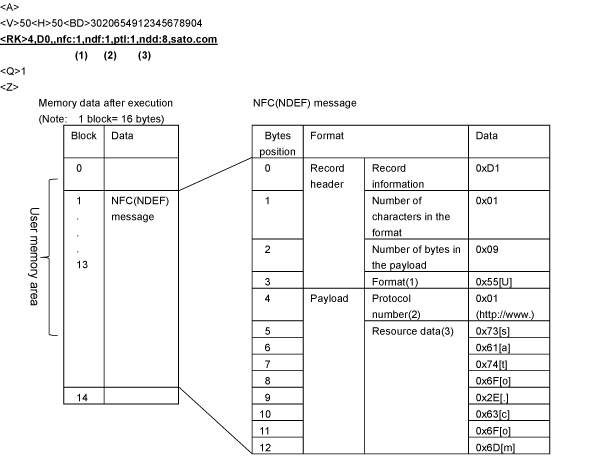
Coding sample 6
When recording 0byte character of "" and specifying subtraction register value at "4294967294" in scratch pad.
<A>
<V>50<H>50<BD>3020654912345678904
<RK>4,D0,,rga:4294967294
<Q>1
<Z>
Note
- This command allows printing for continuous printing, cutter printing, dispenser printing and tear-off.
- This command cannot be specified multiple times in between <A> (start of data transmission) through <Z> (end of data transmission). Neither can it be specified together with <IP0> (EPC code write) command.
- Contents of sequential printing or calendar cannot be written as information to the tag.
- The sent information and written information are verified before printing when information is written to tag with this command.
- The default value of parameter b is 0 (stop without ignoring tag error).
- If printing object doesn't exist for the print job that includes this command, printer only writes for RFID and doesn't feed label. The buzzer will sound 6 times if it fails to write to tag. If successful, the buzzer is sounded 2 times but does not feed the label. If you want to feed or print as blank label specify 1 for the "fsw: feed without printing" field.
- If 0 is specified in the fsw: parameter for the item without printing data: when sending this command, send it when the printer stops printing and the printing items are not available in the printer.
- Refer to the following chart if you want to specify the alphabet "A" in ASCII/HEX data formats.
Mode ASCII HEX Data 'A' "41" Code 41H 34H,31H - If power save mode is enabled, NAK is returned until printer wakes up.