[ESC+TU] RFID Printing Tag Data (ISO/IEC15693)
HEX code
| ESC | <1B>16 |
|---|---|
| TU | <54>16<55>16 |
Parameter
a(,n...n)
Default Value
Nil
Valid range and term of command
| When turning off the power switch | The set command is not maintained. |
| Valid range within item | The set parameter is in effect until a new specification is made. |
| Valid range between items | The set parameter becomes invalid. |
Function
Reads UID data from RFID tag and develops to specified direction to make it possible to print on label.
Format
<TU>a(,n...n)
-
Parameters
a = To use this functionality or not
1: Read UID data and start using
0: Cancel use
n = ID that is converted to UID in the data area of each command for the ID in use (only when a=1).
Character size: 4-16 bytes
Character type: Any (except for CR/LF code and cancel code)
(All parameters should be in the ASCII format)
Coding Sample
A sample using SATO as ID
<A>
<TU>1,SATO
<%>0
<V>0410
<H>0090
<P>00
<L>0101
<XM>SATO
<%>0
<V>0060
<H>0040
<D>102120*SATO*
<%>0
<V>0195
<H>0055
<P>00
<L>0101
<XM>*SATO*
<%>1
<V>0595
<H>0520
<D>101060*SATO*
<TU>0
<%>1
<V>0595
<H>0035
<P>00
<L>0101
<XM>SATO
<Q>00001
<Z>
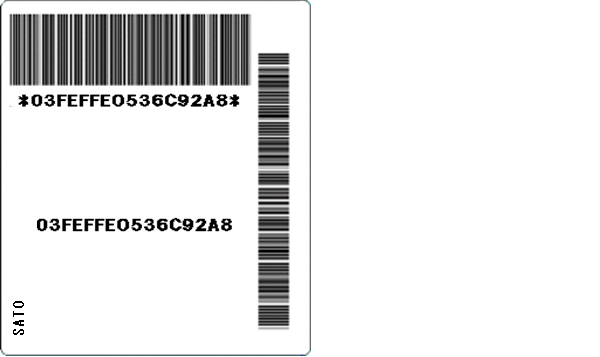
UID format
UID (UID) 16-digit hexadecimal sequence is the following configuration.

The above figures is an example.
Valid command
Font
<X20>
<X21>
<X22>
<X23>
<X24>
<XM>
<XS>
<XU>
<XB>
<XL>
<RH>
<$>
<$=>
<RD>
<U>
<S>
<M>
<WB>
<WL>
<OA>
<OB>
Barcode
<B>
<BC>
<BG>
<BD>
<BZ>
<D>
<2D10>
<2D12>
<2D20>
<2D30>
<2D31>
<2D32>
<2D50>
<DN>
<DS>
Command that cannot use in combination with
Command that associated with reediting
<F>
<(>
<&>
</>
<0>
<WD>
<PZ>
<RM>
Registration
<&S>
<&R>
<YS>
</N>
<YR>
</D>
Supplemental explanation
- If you specify reading data and start use (<TU>1), specify cancel use (<TU>0) within the same print job if.
- Only one pair of this command (<TU>1, <TU>0) can be specified in one print job.
- You cannot specify multiple labels for print jobs that include this command. Even if you specify 2 or more labels with <Q> command, it will be interpreted as 1.
- If more than one <TU>1 exists in the same item or more than one <TU>0 exists after <TU>1, a command error will occur.(Supported on CL4NX 1.15.6 or later, CT4-LX/HC4-LX 6.7.4 or later, CL4-SXR/CL6-SXR.)
- In the de-utilization (<TU>0) command, the inclusion of the (,n...n) parameter or later will result in a command error.
- This command cannot be used in combination with other RFID commands.
-
When you specify the user ID by using <DN> in the data part during the use of 2D codes, specify the number of characters of the user ID in the number of data items.
Example: <TU>1,SATO
<DN>0004,SATO - This command will not be executed while the printer is printing. It will be executed after the print is complete.
- This command is enabled in sequential printing, cutter (motion 1), dispenser (motion 1).
It is not available when in Tear-off mode, cutter mode (motion 2) and dispenser mode (motion 2). - This command will not work correctly if the tag offset is set anywhere other than default position.
In particular, sending this command with the tag offset set to a negative value and the 'Encoding Action' set to 'Normal Action' is considered a command error because of the high possibility of risk to the operation.(CL4NX/CL6NX 1.15.6 or later, CT4-LX/HC4-LX 6.7.4 or later, CL4-SXR/CL6-SXR; Other models aren't supported.) - In case if tag data could not be read, error message will be printed and will retry with the next label or discard depending on the retry/release setting.
- This command does not support reprinting with reprint command<C>, external reprint signal or reprint key.
- Do not specify 2 for parameter a when using ISO/IEC 15693 tag. Two is dedicated for ISO/IEC14443 TypeA. So the number of UID readout digits will be limited to 14.
- The barcode types allowed in <B> (ratio 1:3) are "1: CODE39", "C: CODE93", and "G: CODE128". In addition, the only barcode type allowed in <D> (ratio 1:2) and <BD> (ratio 2:5) is "1: CODE39".
- QR code <2D30>, <2D31> are available, but they cannot be specified in numerical mode and Kanji mode. Micro QR code are not available due to limitations in the number of data.
- The maximum number of print elements (valid commands that include ID) to be converted for this command is 20. Avoid exceeding this maximum. When exceeded, the exceeded print element may become erroneous data.
-
The available type of ANK character font with <RH> are as follows under the current specification:
SATO CG Sleek
SATO CG Stream
SATO OCRA
SATO 0
SATO ALPHABC
SATO BETABI
SATO FOLIOB
SATO FUTURAMC
SATO GAMMA
SATO OCRB
SATO SANS
SATO SERIF
SATO VICA