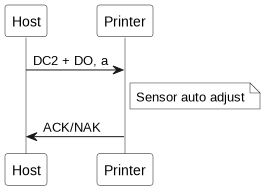
[DC2+DO] Sensor Auto Adjust
CL4NX
CL6NX
CL4NX-J
CL6NX-J
PW208/PW208m
PW208NX/PW208mNX
FX3-LX
CT4-LX/HC4-LX
PW4NX
LR4NX-FA
S84NX/S86NX
CL4-SXR
CL6-SXR
HEX code
| DC2 | <12>16 |
|---|---|
| DO |
<44>16<4F>16 |
Parameter
,a
Default Value
None
Valid range and term of command
| When turning off the power switch | - |
| Valid range | - |
| Printer operation in progress | The command cannot be received during the printer operation. ([NAK] return) |
| Paper sensor information acquisition in progress | The command cannot be received during paper sensor information acquisition. ([NAK] return) |
| Error | Commands can be received even if an error is occurring. |
| Unauthentication | Commands can be received even if authentication is not in progress using the [DC2+PS] command. |
Command Valid Range and Period [CL4-SXR/CL6-SXR]
| When turning off the power switch | - |
| Valid range | - |
| Printer operation in progress | The command cannot be received during printing operation. ([NAK] return) |
| Error | The command cannot be received during error occurrence. ([NAK] return) |
| When the settings screen is displayed | The command cannot be received when the settings screen is displayed. |
| Unauthentication | Commands can be received even if authentication is not in progress using the [DC2+PS] command. |
Function
The sensor automatic adjustment is executed, and the return data is sent when the adjustment is completed. (S84NX/S86NX: One LCD function)
Format
[DC2]DO,a
Parameters: S84NX/S86NX
| Symbol | Parameter name | Valid range | Acquisition method |
|---|---|---|---|
| a | Sensor type |
1: I-mark 2: Gap 3:I-mark/Gap (S84NX/S86NX) 、I-mark/Gap/Gap2 (CL4-SXR/CL6-SXR) 4:Gap2 *CL4-SXR/CL6-SXR only 5:Top *CL4-SXR/CL6-SXR only |
One character fixed acquisition |
Return data format (normal)
[ACK]<06>16
Return data format (when a command error occurs)
[NAK]<15>16
Exception processing
| Parameter name | Exception condition: A value outside the range is specified |
Exception condition: When it cannot be executed |
|---|---|---|
| Sensor type | Command error | Command error |
| Terminology | Description |
|---|---|
| Command error | The data received after a command error is determined is not considered as a parameter of this command. |
Supplementary Explanation
- A command error will also occur if automatic sensor adjustment fails due to head opening or sensor cover opening.
- Before use, check that the sensor cover is closed, the print head is closed, and the sensor is not in operation, depending on the status of the device.
Sequence