[DC2+DQ] Operation Command
HEX code
| DC2 | <12>16 |
|---|---|
| DQ |
<44>16<51>16 |
Parameter
,a...a[EOT]
Default Value
None
Valid range and term of command
| When turning off the power switch | - |
| Valid range | - |
| Printer operation in progress | The command can use even while the printer is running. |
| Error | Commands can be received even if an error is occurring. |
| Unauthentication | Commands can be received even if authentication is not in progress using the [DC2+PS] command. |
Function
Raises an event directly by the operation. (S84NX/S86NX: One LCD function)
Format
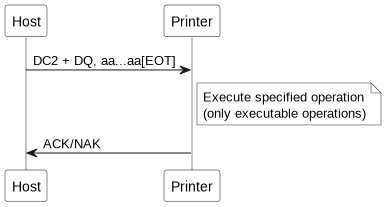
[DC2]DQ,a...a[EOT]
Parameters: S84NX/S86NX
| Symbol | Parameter name | Valid range | Acquisition method |
|---|---|---|---|
| a...a | operation |
ONLINE [go online] OFFLINE [go offline] IGNORE_ERROR [ignore error] FEED [paper feed] CANCEL [data cancel] CANCEL_JOB [current job cancel] RESET_CLEAN [reset clean counter] RESET_PLATEN [reset platen counter] RESET_TPH [reset print head replace counter] RESET_BELT_GEARBOX [reset timing belt (gear box) counter] RESET_BELT_RIBBON [reset timing belt (ribbon) counter] RFID_ERR_RETRY [RFID error retry] RFID_ERR_CANCEL [RFID error cancel] REPRINT [reprint] RESUME [unpause] RESET_EXTNOTI1 [Reset Feature enhancement notification 1 counter] RESET_EXTNOTI2 [Reset Feature enhancement notification 2 counter] RESET_EXTNOTI3 [Reset Feature enhancement notification 3 counter] |
Acquire up to [EOT] |
Return data format (normal)
[ACK]<06>16
Return data format (when a command error occurs)
[NAK]<15>16
Exception processing
| Parameter name | Exception condition: When it cannot be executed |
Exception condition: State in which the directive cannot be executed |
|---|---|---|
| Identifier | Command error | Command invalid |
| Terminology | Description |
|---|---|
| Command error | The data received after a command error is determined is not considered as a parameter of this command. |
| Command invalid | Ignore the command. No error. |
Supplementary Explanation
- The time interval for continuous use of this command shall be 1000 milliseconds or more.
- When issuing a status change command, the status shall be confirmed on the host and the execution result shall be confirmed.
- The reset command cannot clear the notification display on the panel.
(RESET_CLEAN, RESET_PLATEN, RESET_CUTTER, RESET_TPH, RESET_BELT_GEARBOX, RESET_BELT_RIBBON, RESET_EXTNOTI1, RESET_EXTNOTI2, RESET_EXTNOTI3) - The reset command will be ignored when the printer is online state. In this case,
[ACK]<06>16 will be returned.
(RESET_CLEAN, RESET_PLATEN, RESET_CUTTER, RESET_TPH, RESET_BELT_GEARBOX, RESET_BELT_RIBBON, RESET_EXTNOTI1, RESET_EXTNOTI2, RESET_EXTNOTI3) - Error that can be canceled by this command
IGNORE_ERROR: Head error. Forcibly clears the head error and resumes printing.
RFID_ERR_RETRY: Retry with RFID error.
RFID_ERR_CANCEL: Release RFID error.
OFFLINE: Errors that can be used offline to clear the error.
CANCEL_JOB: Errors that can be used to release the error item.
Sequence