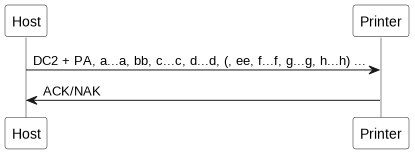
[DC2+PA] Printer Setting Command
HEX code
| DC2 | <12>16 |
|---|---|
| PA | <50>16<41>16 |
Parameter
,a...a,bb,c...c,d...d(,ee,f...f,g...g)...
Default Value
None
Valid range and term of command
| When turning off the power switch | The set parameter is maintained. |
| Valid range | The set parameter is valid until the next setting. |
| Printer operation in progress | The command cannot be received during the printer operation. ([NAK] return) |
| Error | Commands cannot be received even if an error is occurring. ([NAK] return) |
| Unauthentication |
Commands cannot be received even if authentication is not in progress using the [DC2+PS] command. ([NAK] return) |
Command Valid Range and Period [CL4-SXR/CL6-SXR]
| When turning off the power switch | The set parameter is maintained. |
| Valid range | The set parameter is valid until the next setting. |
| Printer operation in progress | The command cannot be received during printing operation. ([NAK] return) |
| Error | The command cannot be received during error occurrence. ([NAK] return) |
| When the settings screen is displayed | The command can be received when the settings screen is displayed. |
| Unauthentication |
Commands cannot be received even if authentication is not in progress using the [DC2+PS] command. ([NAK] return) |
Function
These are commands to save printer settings.
Format
[DC2]PA,a...a,bb,c...c,d...d(,ee,f...f,g...g)...
Data sample)
[DC2]PA,87,CA,35,SPEED:2
LABELV:12345
LABELH:456
,SB,39,ZEROSLASH:0
SHOTAI:0
PROPORTIONAL:0
Parameters: CL4NX/CL6NX
| Symbol | Parameter name | Valid range | Acquisition method |
|---|---|---|---|
| a | Total number of data in bytes * Total number of data in bytes after parameter "b". Does not include the comma in between parameter "a" and "b". |
0 to 524277 | Acquire until "," |
| b(e...) | Identifier | AS: Auto Switch Group CA: Common settings CB: Notification system II: IEEE1284 settings IR: RS-232C settings IL: LAN settings IU: USB settings IW: WLAN settings IB: Bluetooth settings IE: EXT settings IF: RFID settings IN: NFC settings SB: SBPL settings SZ: SZPL settings SI: SIPL settings SD: SDPL settings ST: STCL settings SE: SEPL settings SA: AEP settings |
Acquire fixed two-character |
| c(f...) | Data size of settings in bytes The size of setting information is equivalent to the bytes by section from parameter d. The comma in between the sections is not included. |
0 to 524277 | Acquire until "," |
| d(g...) |
Setting data * text format * Items that need to be encrypted to perform encryption |
Refer to the following the format. | Data sized of setting information |
Parameters: CL4-SXR/CL6-SXR Series
| Symbol | Parameter Name | Valid Range | Acquisition Method |
|---|---|---|---|
| a |
Total Data Byte Count * This is the total byte count from parameter b onwards. The comma between parameters a and b is not included. |
0 to 524277 | Acquire up to "," |
| b(e…) | Identifier | AS: Group Auto Switch CA: Common Settings CB: Notification Function IR: RS-232C Settings IL: LAN Settings IU: USB Settings IW: WLAN Settings IB: Bluetooth Settings IE: EXT Settings IF: RFID Settings IN: NFC Settings SB: SBPL Settings SZ: SZPL Settings SI: SIPL Settings SD: SDPL Settings SG: SPGL Settings SM: SMGL Settings SA: AEP SettingsPS: Media Profile |
Fixed acquisition of 2 characters |
| c(f…) | Configuration Information Data Size This is the byte count per section from parameter d onwards. Commas between sections are not included. |
0 to 524277 | Acquire up to "," |
| d(g…) |
Configuration Information Data * Text format * Items that require encryption should be encrypted |
Refer to the following [Configuration Information Data] | As per Configuration Information Data Size |
Parameters: PW2 series
| Symbol | Parameter name | Valid range | Acquisition method |
|---|---|---|---|
| a | Total number of data in bytes * Total number of data in bytes after parameter "b". Does not include the comma in between parameter "a" and "b". |
0 to 524277 | Acquire until "," |
| b(e...) | Identifier | CA: Common settings CB: Notification system IL: LAN settings IU: USB settings IW: WLAN settings IB: Bluetooth settings IN: NFC settings*1 SB: SBPL settings SZ: SZPL settings*1 SI: SIPL settings*1 SD: SDPL settings*1 ST: STCL settings*1 SC: SCPL settings*1 SP: SPOS settings SA: AEP settings*1
|
Acquire fixed two-character |
| c(f...) | Data size of settings in bytes The size of setting information is equivalent to the bytes by section from parameter d. The comma in between the sections is not included. |
0 to 524277 | Acquire until "," |
| d(g...) |
Setting data * text format * Items that need to be encrypted to perform encryption |
Refer to the following the format. | Data sized of setting information |
Parameters: PW4NX
| Symbol | Parameter name | Valid range | Acquisition method |
|---|---|---|---|
| a | Total number of data in bytes * Total number of data in bytes after parameter "b". Does not include the comma in between parameter "a" and "b". |
0 to 524277 | Acquire until "," |
| b(e...) | Identifier | CA: Common settings CB: Notification system IL: LAN settings IU: USB settings IW: WLAN settings IB: Bluetooth settings IN: NFC settings SB: SBPL settings SZ: SZPL settings SI: SIPL settings SD: SDPL settings SC: SCPL settings |
Acquire fixed two-character |
| c(f...) | Data size of settings in bytes The size of setting information is equivalent to the bytes by section from parameter d. The comma in between the sections is not included. |
0 to 524277 | Acquire until "," |
| d(g...) |
Setting data * text format * Items that need to be encrypted to perform encryption |
Refer to the following the format. | Data sized of setting information |
Parameter: FX3-LX series
| Symbol | Parameter name | Valid range | Acquisition method |
|---|---|---|---|
| a | Total number of data in bytes * Total number of data in bytes after parameter "b". Does not include the comma in between parameter "a" and "b". |
0 to 524277 | Acquire until "," |
| b(e...) | Identifier | CA: Common settings CB: Notification system*1 IL: LAN settings IU: USB settings IW: WLAN settings IB: Bluetooth settings IN: NFC settings SB: SBPL settings SZ: SZPL settings SI: SIPL settings*1 SD: SDPL settings*1 ST: STCL settings*1 SE: SEPL settings*1 SA: AEP settings*1
|
Acquire fixed two-character |
| c(f...) | Data size of setting information The size of setting information is equivalent to the bytes by section from parameter d. The comma in between the sections is not included. |
0 to 524277 | Acquire until "," |
| d(g...) |
Setting data * text format * Items that need to be encrypted to perform encryption |
Refer to the [Setting information data] | Data sized of setting information |
Parameter: CT4-LX/HC4-LX series
| Symbol | Parameter name | Valid range | Acquisition method |
|---|---|---|---|
| a | Total number of data in bytes * Total number of data in bytes after parameter "b". Does not include the comma in between parameter "a" and "b". |
0 to 524277 | Acquire until "," |
| b(e...) | Identifier | AS: Auto Switch Group CA: Common settings CB: Notification system IR: RS-232C settings IL: LAN settings IU: USB settings IW: WLAN settings IB: Bluetooth settings IF: RFID settings IN: NFC settings SB: SBPL settings SZ: SZPL settings SI: SIPL settings SD: SDPL settings ST: STCL settings SE: SEPL settings SA: AEP settings PS: Media profile settings |
Acquire fixed two-character |
| c(f...) | Data size of setting information The size of setting information is equivalent to the bytes by section from parameter d. The comma in between the sections is not included. |
0 to 524277 | Acquire until "," |
| d(g...) |
Setting data * text format * Items that need to be encrypted to perform encryption |
Refer to the [Setting information data] | Data sized of setting information |
Parameters: LR4NX-FA
| Symbol | Parameter name | Valid range | Acquisition method |
|---|---|---|---|
| a | Total number of data in bytes * Total number of data in bytes after parameter "b". Does not include the comma in between parameter "a" and "b". |
0 to 524277 | Acquire until "," |
| b(e...) | Identifier | AS: Auto Switch Group CA: Common settings CB: Notification system II: IEEE1284 settings IR: RS-232C settings IL: LAN settings SB: SBPL settings SZ: SZPL settings SI: SIPL settings SD: SDPL settings SA: AEP settings SO: LR settings |
Acquire fixed two-character |
| c(f...) | Data size of settings in bytes The size of setting information is equivalent to the bytes by section from parameter d. The comma in between the sections is not included. |
0 to 524277 | Acquire until "," |
| d(g...) |
Setting data * text format * Items that need to be encrypted to perform encryption |
Refer to the following the format. | Data sized of setting information |
Parameters: S84NX/S86NX
| Symbol | Parameter name | Valid range | Acquisition method |
|---|---|---|---|
| a | Total number of data in bytes * Total number of data in bytes after parameter "b". Does not include the comma in between parameter "a" and "b". |
0 to 524277 | Acquire until "," |
| b(e...) | Identifier | AS: Auto Switch Group CA: Common settings CB: Notification system IR: RS-232C settings IL: LAN settings IU: USB settings IW: WLAN settings IE: EXT settings IF: RFID settings IN: NFC settings SB: SBPL settings SZ: SZPL settings SI: SIPL settings SD: SDPL settings SA: AEP settings |
Acquire fixed two-character |
| c(f...) | Data size of settings in bytes The size of setting information is equivalent to the bytes by section from parameter d. The comma in between the sections is not included. |
0 to 524277 | Acquire until "," |
| d(g...) |
Setting data * text format * Items that need to be encrypted to perform encryption |
Refer to the following the format. | Data sized of setting information |
Setting data format
"Name of setting item" + ":" + "Setting data" + "Line feed (0DH, 0AH)"
h...h:i...i[CR][LF](j...j:k...k[CR][LF])...
Setting data
| Symbol | Parameter name | Valid range | Acquisition method |
|---|---|---|---|
| h(j...) | Setting item | See Settings Table | Valid until ":" |
| i(k...) | Setting data | See Settings Table | Valid until "[CR][LF]" |
Data sample)
SPEED:4
LEVEL:5
Return data format (normal)
[ACK]<06>16
Return data format (when a command error occurs)
[NAK]<15>16
Exception processing
| Parameter name | Exception condition: A value outside the range is specified |
Exception condition: The specified size and received size are different |
|---|---|---|
| Total number of data in bytes | Command Error | Command Error (*1) (*2) |
| Identifier | Invalid identifier (skip) | Command Error |
| Data size of settings in bytes | Command Error | Command Error (*3) |
| Setting item | Invalid setting item (skip) | - |
| Setting data | Invalid setting item (skip) | - |
- If the data size from the first identifier (bb) to the last data item doesn't match the data size of setting information, and the data size calculated from the format, a command error will occur.
- However, nothing will be returned until receiving the number of data equals to the total number of data bytes.
- If the data during the receipt of the setting information data size from the beginning of the setting information data is not ",", a command error occurs.
| Terminology | Description |
|---|---|
| Command Error | All items are not set. The data received after a command error is determined is not considered as a parameter of this command. |
| Invalid identifier | The corresponding setting information data (data equivalent to the succeeding setting information data size) is ignored. |
| Invalid item | The data of one item (data up to [CR] [LF]) is ignored. |
Exception processing (FX3-LX (International), PW4NX)
If the parameter b is "IL" and "IW", if the Wi-Fi setting is being changed (the wireless LAN module is loading), a command error will occur and NAK will be returned.
Supplementary Explanation
- If the sum of the total data size and configuration information data size does not match, an error will occur and they will not be set.
- If the data size of settings and data size of actual settings do not match, an error will occur and the value will not be set.
- Setting for each identifier and setting item can be omitted.
- Setting for each identifier and setting item can be in random order.
- When re-setting a setting with same identifier, the last value that was set will be enabled.
- If the value in setting was out of range, then the setting item will have an error and will be skipped.
- No malfunction will occur when a character string with the same name as the setting item was
set.
e.g.) When you set "DeviceName" as setting value for the setting item named "DeviceName". - Do not send this command when the printer is printing. Use this command in the standby status.
Supplementary explanation per model: S84NX/S86NX
- Enable while the printer is in error or printing.
- Even if the printer has print items, it is enabled.
Setting saving function
This command proceeds the setting when the item name and the setting value were specified basically. However, the problem may occur when the setting data are set in order of receiving the data.because the setting item can be omitted and set in random order. These items will be saved firstly and set after all the received data were analyzed.
The target items and their setting process are described as follows.
| Target item | Setting process | |||||||||||||
|---|---|---|---|---|---|---|---|---|---|---|---|---|---|---|
|
|
|||||||||||||
|
|
|||||||||||||
|
|
|||||||||||||
|
|
|||||||||||||
|
|
|||||||||||||
|
|
|||||||||||||
|
|
|||||||||||||
|
|
|||||||||||||
|
|
Sequence