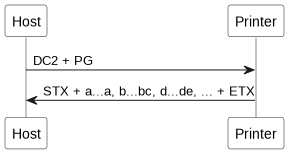
[DC2+PG] Printer Status Information Acquisition
HEX code
| DC2 | <12>16 |
|---|---|
| PG |
<50>16<47>16 |
Parameter
None
Default value
None
Valid range and term of command
| When turning off the power switch | - |
| Valid range | - |
| Printer operation in progress | The command can be received even during the printer operation. |
| Error | Commands can be received even if an error is occurring. |
| Unauthentication | Commands can be received even if authentication is not in progress using the [DC2+PS] command. |
Command Valid Range and Period [CL4-SXR/CL6-SXR]
| When turning off the power switch | - |
| Valid range | - |
| Printer operation in progress | The command can be received during printing operation. |
| Error | Commands can be received even if an error is occurring. However, the command cannot be received during a system error. ([NAK] return) |
| When the settings screen is displayed | The command can be received when the settings screen is displayed. |
| Unauthentication | Commands can be received even if authentication is not in progress using the [DC2+PS] command. |
Function
This command returns the printer status.
Format
[DC2]PG
Return data format (normal)
[STX]a...a,b...bc,d...de,...[ETX]
* There is no ", (comma)" before ETX
| Symbol | Parameter name | Valid range |
|---|---|---|
| a |
Total number of data byte * This is the total number of bytes after parameter b. The delimiting comma between parameters a and b, and the ETX are not included. |
Data size from the first identifier until before [ETX] |
| b(d) |
Printer status information name * Text format |
Refer to the printer status information list |
| c(e) |
Printer status information data * Text format |
Refer to the printer status information list |
Data Example)
[STX]40,PS0,RS0,RE0,PE0,EN00,BT0,Q000000,CS1,LG0[ETX]
Printer status information data list
| No. | Description | Printer status information name | Printer status information data |
|---|---|---|---|
| 1 | Printer status | PS |
0: Standby (waiting for receiving data) 1: Waiting for dispensing/print start signal input 2: Analyzing 3: Printing 4: Offline 5: Error 6: Applying * LR4NX-FA only 7: Passing * LR4NX-FA only |
| 2 | Receive buffer status | RS |
0: Buffer available 1: Buffer near full 2: Buffer full |
| 3 |
Ribbon status * Monitoring can be performed during printing and feeding The correct value cannot be acquired when the operation has stopped |
RE |
0: Ribbon present 1: Ribbon near end 2: No ribbon 3: Direct thermal model |
| 4 |
Media status * Monitoring can be performed during printing and feeding The correct value cannot be acquired when the operation has stopped |
PE |
0: Media present (including during startup) 1: Label near end 2: No media |
| 5 |
Error No. *1 |
EN |
00: Online * Not an error. Return is performed 01: Offline * Not an error. Return is performed 02: Machine error 03: Memory error 04: Program error 05: Setting information error (FLASH-ROM error) 06: Setting information error (EE-PROM error) 07: Download error 08: Parity error 09: Over run 10: Framing error 11: LAN timeout error 12: Buffer over 13: Head open 14: Paper end 15: Ribbon end 16: Media error 17: Sensor error 18: Print head error 19: Cover open error 20: Memory/Card type error 21: Memory/Card read/write error 22: Memory/Card full error 23: Memory/Card no battery error 24: Ribbon saver error 25: Cutter error 26: Cutter sensor error 27: Stacker full error 28: Command error 29: Sensor error at Power-On 30: RFID tag error 31: Interface card error 32: Rewinder error 33: Other error 34: RFID control error 35: Head density error * CL4-SXR/CL6-SXR is not available. 36: Kanji data error 37: Calendar error 38: Item No error 39: BCC error 40: Cutter cover open error 41: Ribbon rewind non-lock error 42: Communication timeout error 43: Sensor cover open error 44: No media error at Power-On 45: SD card access error 46: SD card full error 47: Head lift error 48: Overheat error (HEAD/Motor) / RFID overheat error (CT4-LX only) 49: SNTP time correction error 50: CRC error 51: Cutter motor error 53: Scanner reading error 54: Scanner checking error 55: Scanner connection error 56: Bluetooth Module error 57: EAP authentication error (EAP failed) 58: EAP authentication error (Timeout) 59: Battery error 60: Low Battery error 61: Low Battery error (Charging) 62: Battery not installed error 63: Battery temperature error 64: Battery deterioration error 65: Motor temperature error 66: Inside chassis temperature error 67: Jam error 68: SIPL Field full error 69: Power off error while charging 70: WLAN module error 71: Option inconsistency error 72: Bad battery error (Caution) 73: Bad battery error (Warning) 74: Power off error 75: NonRFID Warning Error 76: Barcode reader connection error 77: Barcode reading error 78: Barcode reading error (Verification start position abnormality) 79: Barcode verification error 80: NFC Module error 81: NFC Command error 114: Charge Error 128: Auto clone error 129: MFi chip module error 130: Unsupported tag error 131: Differ passcode or password error 132: Exceed address error 133: RTC module error 134: SRA motor unit error 135: Reserved 136: Non-support option error 137: Dispenser setup error 138: Battery lock error 139: Reserved 141: Printing was aborted halfway 142: Host receive error 144: RFID label pitch size error 145: Unauthorized access detected 147: EXT connector short 148: Cutter connector short 151: Head abnormality 152: USB-HUB overcurrent 153: RFID printing setting error |
| 6 | Battery status | BT |
0: Normal 1: Battery near end 2: Battery error |
| 7 | Remaining number of print | Q | 000000 to 999999: 6-digit remaining number of print |
| 8 | Command authentication status | CS |
0: Command authentication not required 1: Command authentication required * Only for models that support the [DC2+PS] command. |
| 9 | Login status | LG |
0: Logout 1: Login (manager) * Only for models that support the [DC2+PS] command. |
- Described error numbers contain errors which will never occur on this printer.
Return data format (when a command error occurs)
[NAK]<15>16
Supplemental explanation
- In the case of power supply, the battery status is always returned as 0: Normal.
- The media status is returned as "Media present" unless paper end has reached during printing.
- The correct value will be returned for receive buffer, ribbon end, media status, and battery when the error is updated.
Supplementary explanation per model: CL4-SXR/CL6-SXR
- Send the [DC2]PG command after at least 100 ms have elapsed since sending the print data. If less than 100 ms has elapsed, the response data for the [DC2]PG command may differ from the printer's actual behavior. The values above are approximate. The actual values vary depending on the type and settings of the communication interface, as well as the state of the communication environment.
Sequence