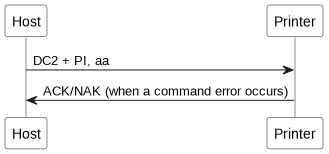
[DC2+PI] Application Change
HEX code
| DC2 | <12>16 |
|---|---|
| PI |
<50>16<49>16 |
Parameter
,aa
Default Value
None
Valid range and term of command
| When turning off the power switch | - |
| Valid range | - |
| Printer operation in progress | The command cannot be received during the printer operation. ([NAK] return) |
| Error | The command cannot be received while an error is occurring. ([NAK] return) |
| Unauthentication | Commands cannot be received even if authentication is not in progress using the [DC2+PS] command. ([NAK] return) |
| Others | Commands cannot be received other than when the screen is Online or Offline. ([NAK] return.) |
Command Valid Range and Period [CL4-SXR/CL6-SXR]
| When turning off the power switch | - |
| Valid range | - |
| Printer operation in progress | The command cannot be received during printing operation. ([NAK] return) |
| Error | The command cannot be received during error occurrence. ([NAK] return) |
| When the settings screen is displayed | The command cannot be received when the settings screen is displayed. |
| Unauthentication | Commands cannot be received even if authentication is not in progress using the [DC2+PS] command. ([NAK] return) |
Function
This command is used to switch applications such as SBPL and SZPL.
Format
[DC2]PI,aa
Parameters: CL4NX/CL6NX series, FX3-LX (International) , CT4-LX/HC4-LX series
| Symbol | Parameter name | Valid range | Acquisition method |
|---|---|---|---|
| aa | Identifier |
00: AUTO SB: SBPL SZ: SZPL SI: SIPL SD: SDPL ST: STCL SE: SEPL |
Two characters fixed acquisition |
Parameter: CL4-SXR/CL6-SXR series
| Symbol | Parameter name | Valid range | Acquisition method |
|---|---|---|---|
| aa | Identifier |
SB: SBPL SZ: SZPL SI: SIPL SD: SDPL SG: SPGL SM: SMGL |
Two characters fixed acquisition |
Parameter: PW2 series
| Symbol | Parameter name | Valid range | Acquisition method |
|---|---|---|---|
| aa | Identifier |
SB: SBPL SP: SPOS (reserve) SZ: SZPL*1 SI: SIPL*1 SD: SDPL*1 ST: STCL*1 SC: SCPL*1 |
Two characters fixed acquisition |
- PW208NX/PW208mNX only
Parameter: PW4NX
| Symbol | Parameter name | Valid range | Acquisition method |
|---|---|---|---|
| aa | Identifier |
00: AUTO SB: SBPL SZ: SZPL SI: SIPL SD: SDPL SC: SCPL |
Two characters fixed acquisition |
Parameters: LR4NX-FA
| Symbol | Parameter name | Valid range | Acquisition method |
|---|---|---|---|
| aa | Identifier |
00: AUTO SB: SBPL SZ: SZPL SI: SIPL SD: SDPL |
Two characters fixed acquisition |
Parameters: S84NX/S86NX
| Symbol | Parameter name | Valid range | Acquisition method |
|---|---|---|---|
| aa | Identifier |
00: AUTO SB: SBPL SZ: SZPL SI: SIPL SD: SDPL |
Two characters fixed acquisition |
Return data format (normal)
[ACK]<06>16
Return data format (when a command error occurs)
[NAK]<15>16
Exception processing
| Parameter name | Exception condition: A value outside the range is specified |
Exception condition: The specified size and received size are different |
|---|---|---|
| Identifier | Command error | Invalid receive data |
| Terminology | Description |
|---|---|
| Command error | The data received after a command error is determined is not considered as a parameter of this command. |
| Invalid receive data | The data corresponding to Byte 2 and thereafter of the identifier is ignored. |
Supplemental explanation
-
Setting value of the printer will be switched when switching the application. So, obtaining and saving the setting of the application before switching, then switching it, and then put it back to the original application, after that set it by previously saved settings, and it performs the operation before switching it.
e.g.) When switching the application such as SBPL - STCL - SBPL
Obtain and save the setting value of SBPL state (obtain the setting value by AIOT, [DC2]PB[EOT] and so on)Switch the application to STCL.Switch the application to SBPL.Set the setting value obtained and saved in the step 1. - Please send this command in a state which the printer is not working anything in Offline or
Online standby state waiting state.
The result of this command sent in pause status during cancellation is not guaranteed. In such case, restart the printer. - AUTO mode will not be available unless you reboot after switching to AUTO mode.
The printer works with the application before the change until it reboots.
Sequence