[DC2+PJ] RFID Read (ISO/IEC15693)
HEX code
| DC2 | <12>16 |
|---|---|
| PJ |
<50>16<4A>16 |
Parameter
,aa(,bb)(,cc )(,NO)
Default Value
None
Command Valid Range and Period
| When power switch is turned off | - |
| Valid range | - |
| Printer operation in progress | The command cannot be received during the printer operation. ([NAK] return) |
| Error | Commands can be received even if an error is occurring. |
| Unauthentication | Commands can be received even if authentication is not in progress using the [DC2+PS] command. |
Command Valid Range and Period [CL4-SXR/CL6-SXR]
| When power switch is turned off | - |
| Valid range | - |
| Printer operation in progress | The command cannot be received during printing operation. ([NAK] return) |
| Error | The command cannot be received during error occurrence. ([NAK] return) |
| When the settings screen is displayed | The command cannot be received when the settings screen is displayed. ([NAK] return) |
| Unauthentication | Commands can be received even if authentication is not in progress using the [DC2+PS] command. |
Function
The data of the RFID tag corresponding to ISO/IEC15693 is sent back to the host.
Format
Basic format
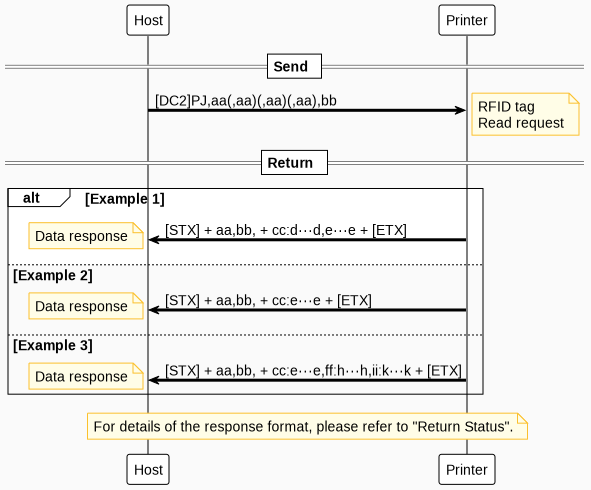
[DC2]PJ,aa(,aa)(,aa),bb
Format when there is no particular need for data modification
[DC2]PJ,aa(,aa)(,aa),NO
Format for using "TO", "TP", or "LG" for option identifier bb
(CL4NX 1.15.6 or later / CT4-LX 6.7.4 or later)
[DC2]PJ,aa(,aa)(,aa),bb(,cc),NO
Parameter
| Symbol | Parameter name | Valid range | Description |
|---|---|---|---|
| a |
Identifier
2 characters fixed acquisition * Multiple specifications possible (1 to 3) |
H1: User data | Add USER data to read out. |
| H2: UID data | Add UID data to read out. | ||
| H3: Option flag data (DSFID data+AFI data+EAS bit) |
Add option flag data to the read target. | ||
| HA: All data (User data+UID data+Option flag data) |
Add all data to the read target | ||
| b |
Option identifier
2 characters fixed acquisition * Multiple specifications not allowed (must be 1) * Reflected when user data is returned. |
AS: Data output format(ASCII) | Since ASCII format is default for HF band, specifying this does not change reply data |
| HX: Data output format (HEX) | Reply data will be in HEX format only for USER area | ||
| AI: Read my-d in accordance with ISO, data output form(ASCII) | Only when using my-d | ||
| HI: Read my-d in ISO compliance, data output format(HEX) | Only available when using my-d |
*If you do not need to specify *bb (option identifier), place "NO" in bb.
*If the data output format is not specified for parameter b, ASCII format will be used.
*The data output format specified by parameter b is applied only to user data.
Format when using "TO", "TP", or "LG" in Option identifier bb
(CL4NX 1.15.6 or later / CT4-LX 6.7.4 or later)
| Symbol | Parameter name | Valid range | Description |
|---|---|---|---|
| a |
Identifier
2 characters fixed acquisition * Multiple specifications possible (1 to 3) |
H1: User data | Add user data to read target. |
| H2: UID data | Add UID data to read target. | ||
| H3: Option flag data (DSFID data+AFI data+EAS bit) |
Adds option flag data to the read target. Cannot be used when LG is specified |
||
| HA: All data (User data+UID data+Option flag data) |
Add All data to read out. Not available when "LG" is specified |
||
| b |
Option identifier
Two characters fixed acquisition. * Multiple specifications not allowed (One only) |
TO: After transporting by tag offset amount and reading, returns to original position and sends reading result. | It does not work during printing and offline operation, and [NAK] reply is returned. |
| TP: After transporting by tag offset amount and reading, performs remaining label transport and sends reading result after stopping at next label. | It does not work during printing and offline operation, and [NAK] reply is returned. | ||
| LG: Request for RFID operation log | When this command with this option specified is sent after setting <RU>,02, it becomes a trigger for acquiring RFID operation log according to this command's reply format. | ||
| c |
Option identifier 2
2 characters fixed acquisition * Multiple specifications not allowed (must be 1) * Reflected when user data is returned. |
AS: Data output format (ASCII) | Since ASCII format is default for HF band, specifying this does not change reply data. |
| HX: Data output format (HEX) | Reply data will be in HEX format only for USER area. | ||
| AI: Read my-d in ISO compliance, data output format(ASCII) | Only available when using my-d. Cannot be used when LG is specified |
||
| HI: Read my-d in ISO compliance, data output format(HEX) | Only available when using my-d. Cannot be used when LG is specified |
*Please add "NO" to the end of Option identifier 2. "NO" is required even if Option identifier 2 is not specified.
Return data format (Success case)
[STX]a…a,b…b[ETX]
Return data
| Symbol | Parameter name | Valid range |
|---|---|---|
| a |
Total number of data byte * Total byte count from parameter b onwards. Does not include comma separator between parameters a and b, or ETX. * Since unit is bytes, this field number does not change whether data input/output format is ASCII or HEX. |
Data size from first memory data to before [ETX] Maximum 4 digits |
| b | Memory data | Refer to [Reply status/format] below. |
Return status format
Current inlay type+","+RFID data
| Description | |
|---|---|
| Current inlay type |
02: ICODE 03: Tag-it 05: my-d 06: RFID tag none/reading error 11: Fudan |
| RFID data | Refer to "Data format of RFID data" below. |
RFID Data Format
-
When the command is issued specifying "H1" (user data) for the identifier
cc:d…d,e…e
Symbol Parameter name Description c Identifier UD: User data (ASCII)
ud: User data (HEX)
d Data byte count Since unit is bytes, this field number does not change whether data input/output format is ASCII or HEX. e Data Refer to [Maximum Reply Data] below. -
When the command is issued specifying "H2" (UID data) for the identifier
cc:e...e
Symbol Parameter name Description c Identifier UI: UID data e Data Refer to [Maximum Reply Data] below -
When the command is issued specifying "H3" (option flag data) for the identifier
cc:e...e,ff:h...h,ii:k...k
Symbol Parameter Name Description c / f / i Memory specification DS: DSFID data
AF: AFI data
EA: EAS bit
e / h / k Data Refer to [Maximum Reply Data] below
Maximum return data
| Command identifier | Current inlay type | Return number of bytes |
|---|---|---|
| H1: USER data | 02: ICODE |
316 (ASCII) 632 (HEX) |
| 03: Tag-it |
256 (ASCII) 512 (HEX) |
|
| 05: my-d |
(Custom) 1000 (ASCII) 2000 (HEX) |
|
|
(ISO) 992 (ASCII) 1984 (HEX) |
||
| 11: Fudan |
(FM13HF01) 128 (ASCII) 256 (HEX) |
|
|
(FM13HF02N) 248 (ASCII) 496 (HEX) |
||
| H2: UID Data |
02: ICODE 03: Tag-it 05: my-d 11: Fudan |
16 (HEX) |
|
H3: Option flag data (DSFID data+AFI data+EAS bit) |
02: ICODE 03: Tag-it 05: my-d 11: Fudan |
Both of DSFID data,AFI data,EAS bit 2(HEX) |
Return data format (Error case)
Exception processing
| Error Code | Error Name | Contents |
|---|---|---|
| [NAK](0x15) | Command error | If a command error is detected due to an out-of-range value being specified, any subsequent received data will not be considered as parameters for this command. |
| Warning when displaying menu | If this command is executed in the "Menu display state" setting mode, an error will occur. | |
| Warning during offline |
(CL4NX 1.15.6 or later / CT4-LX 6.7.4 or later) If executed when using "TO" or "TP" an error will occur. |
|
| '0' (0x30) | Other errors (*1) |
(CL4NX 1.15.6 or later / CT4-LX 6.7.4 or later) When "TO" or "TP" is used and a mechanical error occurs in label transfer, a failure status is returned. *1: '0': If other errors occur, use [DC2+PG] (Get Printer Status Information) to obtain detailed error factors. |
| '1' (0x31) | Head open | |
| '2' (0x32) | Paper end | |
| '3' (0x33) | Ribbon end | |
| '4' (0x34) | Media error | |
| '5' (0x35) | Sensor error | |
| '6' (0x36) | Head error | |
| '7' (0x37) | Cover open | |
| '8' (0x38) | RFID Tag Error |
Sample of "Coding and status reply" 1 (format set to ASCII)
When '4912345678904' and DSFID code 55H, AFI code 10H, and EAS bit 1 are recorded in the RFID tag of ICODE SLI of "E004010001D9CA2D", UID :.
| Send Command | Return Status |
|---|---|
| [DC2]PJ,H1,AS | [STX]22,
02,
UD:13,4912345678904[ETX]
|
| [DC2]PJ,H1,H3,AS | [STX]40,
02,
UD:13,4912345678904,
DS:55,AF:10,EA:01[ETX]
|
Sample of "Coding and status reply" 2 (format set to HEX)
When '4912345678904' is recorded in the RFID tag of Tag-it HF-I of "E00700002AC1E2BF", UID:.
(Data is not set to the optional flag data.)
| Send Command | Return Status |
|---|---|
| [DC2]PJ,H1,HX | [STX]22,
03,
ud:13,34393132333435363738393034[ETX]
|
| [DC2]PJ,H1,H2,HX | [STX]19,
03,
ud:13,34393132333435363738393034,
UI:E00700002AC1E2BF[ETX]
|
Sample of "Coding and status reply" 3
When '4912345678904' and DSFID code 55H, AFI code 10H, and EAS bit 1 are recorded in the RFID tag of ICODE SLI of "E004010001D9CA2D", UID :.
| Send Command | Return Status |
|---|---|
| [DC2]PJ,H2,NO | [STX]22,
02,
UI:E004010001D9CA2D[ETX]
|
| [DC2]PJ,H3,NO | [STX]20,
02,
DS:55,AF:10,EA:01[ETX]
|
| [DC2]PJ,H2,H3,NO | [STX]40,
02,
UI:E004010001D9CA2D,
DS:55,AF:10,EA:01[ETX]
|
Sample of "Coding and status reply" 4 (format set to ASCII)
When there is not an RFID tag or when an RFID tag is bad.
| Send Command | Return Status |
|---|---|
| [DC2]PJ,H1,AS | [STX]2,
06[ETX]
|
| [DC2]PJ,H1,H3,AS | [STX]2,
06[ETX]
|
| [DC2]PJ,HA,AS | [STX]2,
06[ETX]
|
Supplemental explanation
- This command cannot be used in combination with commands other than <A> and <Z>.
-
This command is effective during continuous, cutter (operation 1), and peel (operation 1).
It cannot be used in tear-off mode, cutter (operation 2), or peel (operation 2).
(The following applies to CL4NX 1.15.6 or later / CT4-LX 6.7.4 or later)
However, when using the TO/TP/LG options, reading is possible even in tear-off mode, cutter (operation 2), and peeling (operation 2).
- This command will not work properly when tag offset is set to position other than initial value.
- Since this command cannot be received during printing, information cannot be obtained when sequential number specification or multiple print quantity specification is used.
- It takes about 5 seconds from sending this command until all reply status is returned to host. When port is disconnected before all reply status is returned to host, tag information is not returned correctly and data other than reply status format is returned, so please operate after selecting data.
- Please do not send other commands or data until all status of specified size is received by host after sending this command.
- Please send this command when printer printing is stopped and no print items remain in printer.
-
Refer to the following chart if you want to specify the alphabet "A" in ASCII/HEX data formats.
Data input and output form Data: 'A' ASCII Mode 'A' (0x41) HEX Mode "41" (0x34,0x31) - For my-d tag, custom mode is read by default. However, in order to force read with ISO mode, specify "AI" and "HI" as an option. "AI" stands for ASCII format and "HI" stands for HEX format data reply.
- Only my-d tags can be specified for options "AI" and "HI". If you specify other than my-d, the options will be identified as "AS" and "HX".
- If the printer is a low power consumption mode is enabled, until it wakes up will return a [NAK].
-
This command can be received in "Online" or "Offline" mode. This command cannot be received in the "Menu Display State" setting mode.
(The following are supported by CL4NX 1.15.6 or later / CT4-LX 6.7.4 or later)
However, if "TO", "TP" parameters are used while offline, an error occurs.
Sequence
About [DC2+PJ] Parameter "Option identifier": "TO," "TP," "LG"
(CL4NX 1.15.6 or later / CT4-LX 6.7.4 or later supported)
Detailed information of option identifier TO/TP/LG is described below.
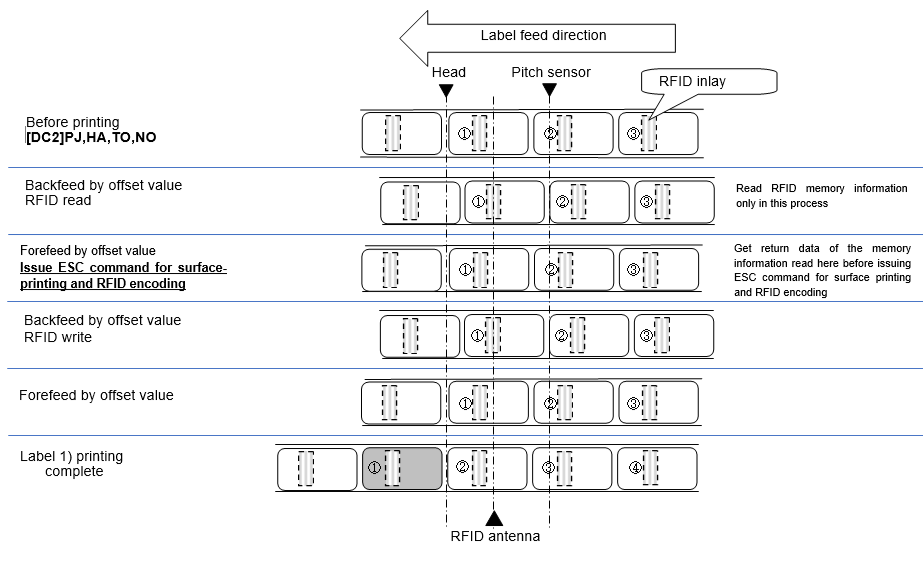
If "TO option: feed a label by tag-offset distance, read it, and return the label to the initial position" is specified.
Feeds a label by tag-offset distance, reads it, and returns the label to the initial position.
This mode works when both "Normal Action" and "Feed Action" is specified for encoding For both "Normal Action" and "Feed Action" is specified, tag offset will be below range and this mode can be used within that range.
| Printer model | Tag offset valid range |
|---|---|
| CL4NX | -15mm~15mm (*1) |
| CT4-LX | -25mm~25mm (*1) |
- Only positive values unless operation mode is continuous
Supplementary explanation
- Assume the sequence of surface printing after encoding RFID labels.
- Ensure to get return data before issuing ESC command for surface printing and RFID encoding.
- If "Normal Action" is specified for encoding mode, error will be returned if the tag offset value exceeds CL4NX: 15mm/ CT4-LX:25mm ([NAK] response).
- In order to avoid print pause every time RFID tag error occurs, set "release" for RFID retrial mode and enter big enough value for RFID re-print time. The max value is "9" times. In this case, if tag error occurs nine times in a row, the process stops at the tag error screen. As sequence process of surface printing and RFID encoding expected after reading RFID label, retry process must be prohibited.
- Return code of refusal response of this command [NAK](15H) but if mechanical trouble occurs with label feeding when TO option is used, the status code will be returned according to [return data format(abnormal time)].
- Even in an environment where external signals are enabled, the start of processing operation of this command TO option cannot be controlled by the print start signal (PRIN). Also, the completion of the processing operation of this command TO option cannot be reflected in the output of the print end signal (PREND). (CL4NX)
- Data readout reflecting tag offset is possible even when the print mode is cut & print. (However, CL4NX: 0mm~15mm / CT4-LX: 0mm~25mm)
Use example of option identifier "TO"
Below figure shows an example for continuous printing when "Feed Action" is specified for encoding mode, with minus tag offset.
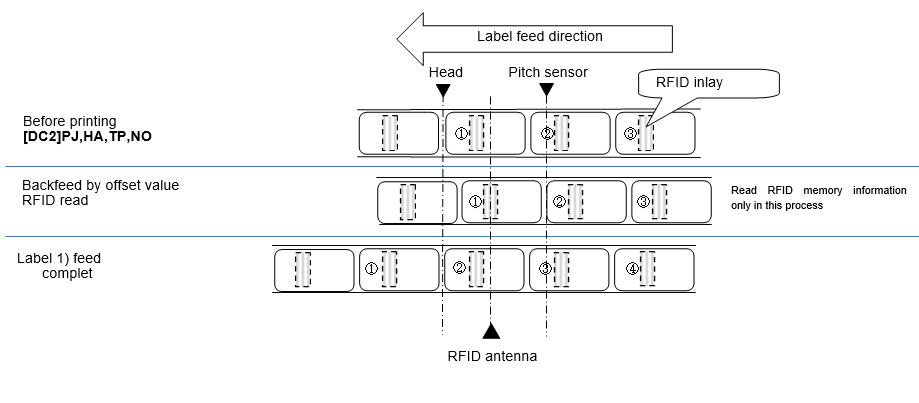
If "TP: option: feed a label by tag-offset distance, read it, and feed the rest of the label to" is specified
According to tag offset, feed the RFID label by the tag offset value to read the RFID data.
The rest of the label will be fed and the process stops at the next label. RFID data will be returned when the process stops.
This mode works when both "Normal Action" and "Feed Action" is specified for encoding and valid for reading only.
| Printer | Encoding Action=Normal Action | Encoding Action=Feed Action |
|---|---|---|
| CL4NX | -15mm~240mm (*1) | -15mm~15mm (*1) |
| CT4-LX | -25mm~240mm (*1) | -25mm~25mm (*1) |
- Only positive values unless operation mode is continuous
Supplementary explanation
- Ensure to get return data before issuing ESC command for surface printing and RFID encoding.
- When performing log-accumulation process via <RU>, if read process is performed by this command option, the log will be accumulated in sync with the label feeding.
- Return code of refusal response of this command [NAK](15H) but if mechanical trouble occurs with label feeding when TP option is used, the status code will be returned according to [return data format(abnormal time)].
- In an environment where external signals are enabled, the start of processing operation of this command TP option can be controlled by the print start signal (PRIN). In addition, the completion of the processing operation of this command TP option is reflected in the print end signal (PREND) output. (CL4NX)
- When the print mode is "cut & print", the data is read out as 0mm even if the tag offset is set.
Use example of option identifier "TP"
Below figure shows an example for continuous printing when "Feed Action" is specified for encoding mode, with minus tag offset.
To get logs by adding LG option
LG option can be used together with <RU>,02 to get log data in the compatible format with reply format of [DC2+PJ].
It is a command option to trigger of getting log data, and label feeding is not restricted like the aforementioned TO, TP option.
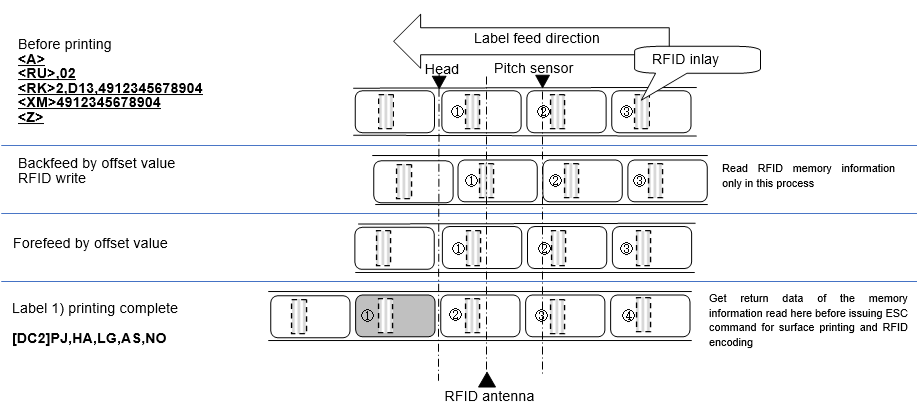
By sending <RU>,02 before using this command, log data will be acquired and accumulated per label issuance. By specifying RFID data type after RFID items is issued and sending the data with this LG option added, log data will be acquired in the replay format of [DC2+PJ].
Supplementary explanation
- Ensure to get return data before issuing ESC command for surface printing and RFID encoding.
- When using tags without USER memory or when USER memory logging is not required, select the item that does not include USER in "Interface" -> "RFID" -> "Log RFID Data" -> "Data To Record" Incorrect selection may result in reduced throughput or issuance failure.
- When acquiring logs, set the memory area elements specified by this command to match the memory area elements selected in "Interface" -> "RFID" -> "Log RFID Data" -> "Data To Record". If this selection is inappropriate, necessary data will be missing from the log data.
- Log acquisition of USER memory data specified by the LG option is performed according to the "Logging Start Address" and "Logging Size" in "Interface" -> "RFID" -> "Log RFID Data". These values are inserted into the log data in a 4-digit fixed format with 0 padding, accompanied by the identifiers "LA:" and "LS:".
-
When acquiring RFID operation logs specified by LG options, the difference in data return operations based on the "Log RFID Data" enable/disable setting in "Interface" -> "RFID" -> "Log RFID Data" is basically the same as when collecting logs with the <RU>,01 and [DC2]PK commands.
If "Log RFID Data" is enabled: up to 100 logs of the latest RFID log for the issued RFID items, and acquired log data will be scrapped.
If "Log RFID Data" is disabled: only one log data of the last issued RFID item will be accumulated, and one log of the latest data will be acquired if this LG option is added and sent. The last issued log data will be retained after the data is acquired and can be repeatedly read.
Coding example
*When "Data To Record" in "Interface" -> "RFID" -> "Log RFID Data" is set to "UID/USER," "Logging Start Address" is set to 0, and "Logging Size" is set to 8.
<A>
<RU>,02
<RK>2,D13,4912345678904
<XM>4912345678904
<z>
Use example of option identifier "LG"
Below figure shows an example for continuous printing when "Feed Action" is specified for encoding mode, with minus tag offset.
| Send command | Return status |
|---|---|
| [DC2]PJ,HA,LG,AS,NO | [STX]72,
02,
UD:8,49123456,
UI:E004010001D9CA2D,
DS:55,AF:10,EA:01,
LA:0000,
LS:0008[ETX]
* By making LG the first option, subsequent extended options AS, HX can be specified, and termination with NO is required |