[DC2+PK] RFID Data Log Return Request (ISO/IEC14443 TypeA) [NX/LX]
HEX code
| DC2 | <12>16 |
|---|---|
| PK |
<50>16<4B>16 |
Parameter
None
Default value
None
Valid range and term of command
| When turning off the power switch | - |
| Valid range | - |
| Printer operation in progress | The command cannot be received during printing operation. ([NAK] return) |
| Error | Commands can be received even if an error is occurring. |
| Unauthentication | Commands can be received even if authentication is not in progress using the [DC2+PS] command. |
Function
The <RK> command returns the result of writing to the RFID tag and the specified memory.
Format
[DC2]PK
[DC2]PK return data format (normal)
[STX]a...a,b,c,d...d[CR][LF][ETX]
Return data
| Symbol | Parameter name | Valid range |
|---|---|---|
| a |
Total number of data byte * This is the total number of bytes after parameter b. The delimiter comma between parameters a and b, and ETX are not included. |
Data size from the first write result status to before [ETX] Maximum 5 digits |
| b |
Write result status |
0: Write failure 1: Write success * Text format |
| c | Error symbol |
N: No error D: UID read error S: USER memory write error O: Parameter setting errors other than UID, USER A: All errors Note: Specified in text format |
| d | Memory return data |
Refer to [UID/USER return data] as below * Text format |
Error Symbols when RFID Errors Occur
Errors related to RFID are displayed on the following error screen. Error messages are displayed at the top center of the screen, and error icons are displayed to the left of the screen center. The error number is displayed to the right of the error icon, and below the icon is a description of the error and an explanation of what to do about it.
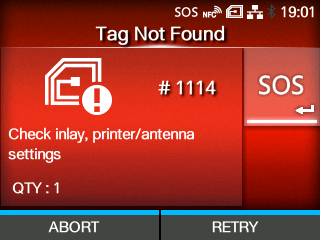
* Example of CL4NX/CL6NX screen.
| Error No | Error display | Error print | Error symbols |
|---|---|---|---|
| 1114 |
Tag Not Found |
TAG NOT FOUND | A: All errors |
| 1115 |
Write Tag Error |
WRITE TAG ERROR |
S: USER error O: Other error |
| 1116 |
Failed to read the tag data |
READ TAG ERROR |
D: UID error S: USER error O: Other error |
| VERIFY UID ERROR | O: Other error | ||
| 1117 |
Write Tag Error |
PROTECT TAG ERR | O: Other error |
| 1118 |
Write/Read values are not consistent |
VERIFY TAG ERR |
S: USER error O: Other error |
| 1119 |
Failed to lock the data |
LOCKING ERROR | O: Other error |
| 1120 |
Wrong tag UID is read |
WRONG TID ERROR | O: Other error |
| 1121 |
Multiple tags are detected |
MULTI TAGS ERROR | O: Other error |
| 1123 |
Write Tag Error |
READ ONLY ERROR |
O: Other error |
| 1124 |
Wrong Tag type |
DIFFER TAG KIND | O: Other error |
| 1125 |
Internal Error |
LOST HANDLE ERR | O: Other error |
| 1126 |
Not enough power |
POWER NOT ENOUGH | O: Other error |
| 1129 |
Unsupported tag error |
UNSUPPORTED TAG | O: Other error |
| 1131 |
Exceed address error |
ADDRESS EXCEED | O: Other error |
Format of UID/USER return data
"Specify memory" + ":" + "Data " + "Line feed (0DH, 0AH)"
ee:f...f(,gg:h...h)[CR][LF]
Specifying the memory to be record
For memory specification settings, refer to DATA_TO_RECORD in the [RFID] section of the list of configuration items.
A setup example of [DC2]PA is shown below.
[DC2]PA,24,IF,18,DATA_TO_RECORD:1[CR][LF]To configure the above settings in the settings menu, go to "Interface"->"RFID"->"RFID Log"->"Data to Record".
UID/USER Return data
| Symbol | Parameter name | Valid range |
|---|---|---|
| e(g...) | Specify memory |
UD: UID U2: USER UD_U2: UID / USER |
| f(h...) |
Data * Text format |
Maximum 4240 digits UID: 14 digits USER: 4096 digits LA: Logging Start Address(USER memory) LS: Logging Size(USER memory) |
Return data format (when a command error occurs)
[NAK]<15>16
Exception processing
| Parameter name | Exception condition: A value outside the range is specified |
Exception condition: The specified size and received size are different |
|---|---|---|
| Identifier | Command error | Identifier |
| Terminology | Description |
|---|---|
| Command error | The data received after a command error is determined is not considered as a parameter of this command. |
| Invalid receive data | The data corresponding to Byte 2 and thereafter of the identifier is ignored. |
Coding Sample
<A>
<RU>01
<RK>2,D13,4912345678904
<XM>4912345678904
<Z>
<RU>,01 sequence
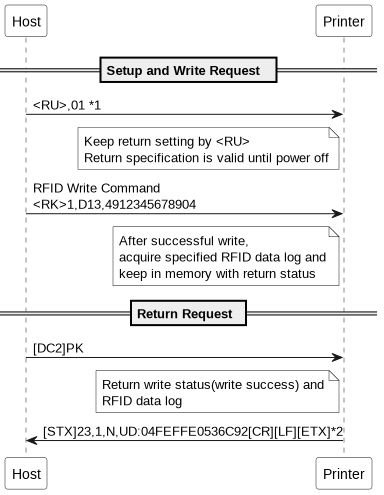
- Most common commands such as <A>, <Z> are not described in the above diagram.
- UID are set for RFID data recording.
- The returned data is an example. Actual values vary depending on the tag.
Sample of status reply
When [DC2]PK is received using a tag with 04123456789ABC of UID.
- Data To Record: UID
- Success
- UID reading was not done
1,N,UD:044C80000003150,U,UD: - Data To Record: USER
- Success
- USER memory write failure
1,N,US:34393132333435363738393034,LA:0,LS:130,S,US:,LA:0,LS:13 - Data To Record: UID / USER
- Success
- USER memory write failure(*1)
1,N,UD:044C8000000315,US:34393132333435363738393034,LA:0,LS:130,S,UD:,US:,LA:0,LS:13
- If the USER memory write fails, Firmware will not read the UID.
Supplementary Explanation
- For RFID data logging, select "Log RFID Data" and "Data To Record" and "Logging Start Address" and "Logging Size" in "Interface" > "RFID" > "Log RFID Data".
- When Log RFID Data is enabled, up to 100 RFID data log storage areas that store all of the UID/USER will be saved in the printer's RAM to store data logs. When all buffers are filled with data logs, new data logs are stored overwriting the oldest data logs.
- When Log RFID Data is enabled, log data is returned in order of oldest to oldest upon receipt of a [DC2]PK. All buffers are cleared after the data is returned.
- If Log RFID Data is disabled, only one RFID data log is returned. The RFID data log is not cleared after it is returned due to the reception of [DC2]PK.
- The printer operation for the <RK> command is to write data to the tag, followed by reading the UID/USER. Therefore, the writing result, UID/USER are returned when [DC2]PK is received after RFID writing.
- Since data writing and reading of UID/USER are performed separately, even if writing succeeds, if reading of UID/USER fails, the data will be returned without any data.
- The returned UID/USER data is limited to 4240 characters.
- If <RU>,00 is set, the entire log buffer is cleared.
- When only RFID writing is performed without printing data, the RFID data log is not recorded.
- All RFID data logs are lost when the printer is turned off.
- If the RFID data log contains personal information, please handle it carefully to avoid security issues.