[DC2+PR] Feature Enhancement Notification Setting
Hex code
| DC2 | <12>16 |
|---|---|
| PR |
<50>16<52>16 |
Parameter
a...a,b,(c...c)(d...d)...(i...i)
Initial value
N/A
Valid range and term of command
| When the power is OFF | Setting value will be retained. |
| Valid range | Setting value will be valid until the next command is received. |
| During printer operation | Command will not be accepted during printing. (Returns [NAK]) |
| When getting label sensor information | Does not accept command when getting label sensor information. (Returns [NAK]) |
| When error is happening | Does not accept command when error is happening. (Returns [NAK]) |
| Unauthentication | Commands can be received even if authentication is not in progress using the [DC2+PS] command. |
Specify a message to display for feature enhancement notification.
Feature enhancement notification
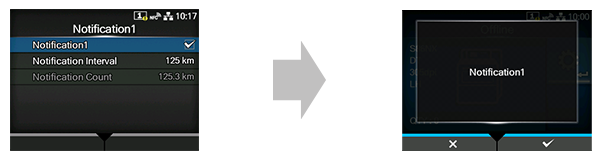
When the current mileage reaches the distance displayed in the screen, feature enhancement notification message will be shown.
Example of using the notification
- Show feature enhancement notification screen from the Notifications screen.
-
Specify Notification Interval (red-framed item).
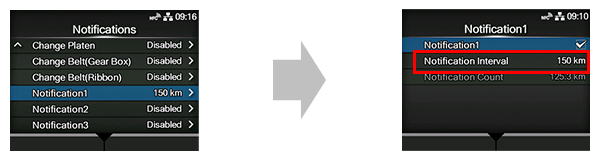
-
When the current mileage reaches the specified distance, message (Notification1) in below right screen will be shown.
Common command feature
Set a message to display feature enhancement notification.
This command can customize settings menu, message to display when the specified distance is reached.
Up to three patterns of the notification message can be retained.
Format
[DC2]PR, a...a,b,(c...c)[CR][LF]
(d...d)[CR][LF]
:
(i...i)[CR][LF]
Data example1
Update Notification1 message
[PR],107,1, Clean Notice[CR][LF]
Noti-enable[CR][LF]
Printer Clean[CR][LF]
check the printer[CR][LF]
and the device[CR][LF]
Contact phone no:[CR][LF]
012-3456-7890[CR][LF]
Display example1
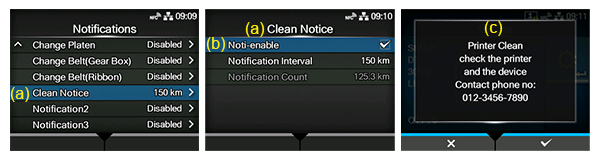
Data example2
Return Notification1 message to a default one
[PR],4,1,[CR][LF]
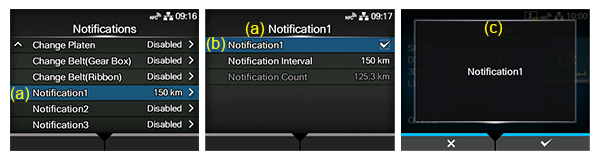
Display example2
Parameter
| Symbol | Parameter name | Valid range | How to get |
|---|---|---|---|
| a |
Total data bytes * Total data bytes after parameter b. Does not include comma between parameter a and b. Includes newline code [CR][LF](0Dh,0Ah). |
0 - 1024 | Up to "," |
| b | Message descriptor | 1 - 3 | Get one-fixed character |
| c |
Notification title message |
Within range of UTF-8 character code | Get up to "[CR][LF]" |
| d |
Valid/invalid title message |
Within range of UTF-8 character code | Get up to "[CR][LF]" |
| e - i |
Notification message |
Within range of UTF-8 character code | Get up to "[CR][LF]" |
Return data format (normal time)
[ACK]<06>16
Return data format (abnormal time)
[NAK]<15>16
Exceptional case
| Parameter name | Exception condition: Specify out of spec value |
Exception condition: The specified size and received size are different |
|---|---|---|
| Total data bytes | Command error |
Excessively small: - (*1), Excessively large: Remaining data standby (*2) |
| Message descriptor | Command error | - |
| Notification title message | Invalid item (skip) | - |
| Valid / invalid title message | Invalid item (skip) | - |
| Notification message | Invalid item (skip) | - |
- A message of the specified is set, and subsequent messages are discarded. At this time, a command error will not occur.
- After remaining data standby, if the total number of bytes of data received, a command error will not occur.
| Term | Description |
|---|---|
| Command error | All items will not be set. Received data after command error is judged will not be considered as parameter of this command. |
| Invalid item | Ignores data of one item (data up to [CR][LF]). |
Supplementary Explanation
- Up to five lines of Notification message can be specified.
- Blank line will be filled in the display; but it is handled as one line data.
- Be sure to insert a newline code [CR][LF] at the end of one line data. Messages for lines without a newline code are not set.
- The newly specified message will be displayed by rebooting the printer. Previously set message will be shown until the reboot.
- The message can be set if the reboot request message is displayed.
- If the message is set in language other than the one displayed, the message may not be correctly shown.
- The message is valid only in the currently displayed language. If the message want to be set in other language, please change the language displayed.
- If a message exceeding the number of displayable characters (Notification line(a), (b) in the above screen) is specified in the title message, the end of the message will be omitted by showing "...".
- By setting Notification interval at 0km, the message can be instantly shown and can check if the specified distance is correctly reflected in the message. However, the message will show all the time; so bigger value than 0km should be specified in Notification Interval for actual use.
-
See below table for reset, clone, profile data.
Applicable: Yes Non-applicable: No
Data name Setting reset Data reset Clone Profile Enable/Disable Yes No Yes No Mileage to notify Yes No Yes No Current mileage No No No No Notification title message No Yes Yes No Enable/Disable title message No Yes Yes No Notification message No Yes Yes No