Bluetooth
Basic Specifications
Standard
CL4NX/CL6NX and PW208NX/PW208mNX
Bluetooth Ver. 3.0+EDR Power Class 2
FX3-LX and CT4-LX/HC4-LX
Bluetooth Ver. 4.1
PW4NX
Bluetooth Ver. 5.0
CL4-SXR/CL6-SXR
Bluetooth Ver. 5.2+BR/EDR/BLE
Communication distance
10 m (Prescribed measurement environment)
Profile for use
CL4NX/CL6NX and PW208NX/PW208mNX
-
Serial Port Profile (SPP)
SPP defines connection of two Bluetooth supported devices by establishing virtual serial port.
FX3-LX and CT4-LX/HC4-LX
-
Serial Port Profile (SPP)
SPP defines connection of two Bluetooth supported devices by establishing virtual serial port.
- Human Interface Device Profile (HID)
- Headset Profile (HSP)
- Hands-Free Profile (HFP)
PW4NX
-
Serial Port Profile (SPP)
SPP defines connection of two Bluetooth supported devices by establishing virtual serial port.
- iSPP (iAP / iAP2)
- Human Interface Device Profile (HID)
- Generic Attribute Profile (GATT) / Generic Access Profile (GAP)
CL4-SXR/CL6-SXR
-
Serial Port Profile(SPP)
SPP defines connection of seven Bluetooth supported devices by establishing virtual serial port.
- Human Interface Device Profile(HID)
- Generic Attribute Profile(GATT)
- HID Over GATT Profile(HOGP)
Operation mode
Master / Slave mode
[PW208NX/PW208mNX]: Slave mode only
[PW4NX]: The corresponding profile depends on the value of [Bluetooth] > [BT Operation Mode] in the [Interface] menu. (Default value: Device)
| BT Operating Mode | Supported Profiles |
|---|---|
| Host (Master mode) | HID |
| Device (Slave mode) | SPP / iSPP |
Security level
Level 1: No authentication
Level 2-1: PIN code authentication, Service level, No encryption
Level 2-2: PIN code authentication, Service level, No encryption
Level 3: PIN code authentication, Link level, No encryption
Level 4: Support for secure simple pairing, Service level, Encryption
Initial value: No authentication
PIN
ASCII code in 4 to 16 digits (20H, 21H, 23H to 7EH)
Initial value: 0000
[FX3-LX (Japan)]: it complies with Android specifications.
Device name
ASCII code in 1 to 53 digits* (20H, 21H, 23H to 7EH)
Initial value: SATO PRINTER_xxxxxxxxxxxx (xxxxxxxxxxxx is BD address)
[FX3-LX (Japan)]: it complies with Android specifications.
[CL4-SXR/CL6-SXR]: 0 to 53 digits
Power saving mode
sniff (except PW4NX), park, hold (Operate according to host setting)
Sleep feature (PW4NX only)
Supports the OOB (Out of Band) sleep mode
Setting of CRC (Enabled / Disabled)
Enabled, Disabled
Initial value: Disabled
[FX3-LX(Japan)]: Not supported
Disconnection timeout period (SPP layer)
0 seconds (Initial value)
Disconnection timeout period (LMP layer)
[CL4-SXR/CL6-SXR]:100 seconds (Initial value)
[The others]:60 seconds (Initial value)
Parameter
| Setting item | Setting range |
|---|---|
| Protocol |
Status3 Status4 (initial value) None |
Receive buffer size
[CL4-SXR/CL6-SXR]:3.00MB
[The others]:2.95MB
0MB
MAX
Remaining 0.95MB
0MB
MAX
Remaining 1.95MB
Pairing
[PW4NX]: Keep link keys for 8 devices
[CL4-SXR/CL6-SXR]: Keep link keys for 22 devices (Classic:20, HOGP:2)
The others: Keep link keys for 10 devices
CoD (Class of Device)
Major service class: Unspecified
Major device class: Imaging major class
Minor device class: Printer
supervision timeout
Initial value
[CL4-SXR/CL6-SXR]:6 seconds
[The others]: 20 seconds
Note
- The printer operates in slave mode. Before establishing connection, specify Bluetooth Device address (BD address) from the master.
-
Connection may not be established when master's authentication mode, packet type, and PIN code are different from above setting. In that case, confirm authentication level and PIN code by [Tools] menu > [Test Print] > [Configure List] in [Settings] menu, executing a test print, match with master setting and try reconnection.
* Not supported by FX3-LX (Japan).
- When Bluetooth LINK is lost (e.g. out of service area), disconnects from the printer after supervision timeout period has passed.
- When Bluetooth communication is disconnected while sending print data ([STX]<A> to <Z>[ETX]), the received data is discarded after disconnection time-out period has passed. It is required to resend print data ([STX]<A> to <Z>[ETX]) when time out occurs. Time out is not monitored if disconnection time out period is set to 0.
- Buffer over occurs if the printer has full of receive buffer. Please send [ENQ] then send print data as checking the status of receive buffer.
-
[ACK]/[NAK] is returned when CRC check result is normal and CRC check is valid.
* FX3-LX (Japan) does not support CRC.
- Bluetooth interface and the printer are connected by internal serial interface.
- Only one-to-one connection and communication is possible with the printer. The printer cannot connect and communicate with multiple devices at the same time.
- If there is no response in the SDP search, it is considered as SPP Host.
- Device name can be set on Android setting screen.
- When connecting and communicating with printers, up to 9 units can be connected (7 Classic units and 2 HOGP units).
- Pairing can only be done via the pairing menu in the settings menu.
[CL4NX/CL6NX and PW208NX/PW208mNX]
[PW4NX]
[FX3-LX (Japan)]
[CL4-SXR/CL6-SXR]
Bluetooth Settings
Following items are available for Bluetooth interface setting.
* FX3-LX (Japan): Refer to Android 7.1 specifications for details.
Authentication level
Level1, Level2-1, Level 2-2, Level 3, Level 4
PIN code (Alphanumeric character and codes (20H, 21H, 23H to 7EH) 4 to 16 digits)
PIN code (Personal Identification Number, Pass-key) consists of 4 to 16 codes and is an authentication password to be used for identifying the printer. This PIN code is required for authentication level 2 to 4. When paring starts in the printer after authentication with PIN code, link key will be automatically generated. Once link key is generated, it is no longer necessary to perform authentication with PIN code so that it is possible to establish connection during paring without confirmation of PIN code.
Bluetooth module supports FastConnect.
[CL4NX/CL6NX and PW208NX/PW208mNX]
Information on pairing for 10 devices is saved under the printer. When pairing is performed for 10 devices or more, the printer will delete the oldest information on paring then will save the information on paring of new connected device. (Information on paring will not be cleared by Factory Clear.)
[FX3-LX (International) and CT4-LX/HC4-LX]
Information on pairing for 10 devices is saved under the printer. The first from the top is HFP, the second is HFP, and the third is HID. For the 4th to 10th, save for 7 SPP (iSPP). When pairing with more than seven in SPP (iSPP), the printer will delete the oldest information on paring then will save the information on paring of new connected device. (Information on paring will not be cleared by Factory Clear.)
[PW4NX]
The printer has the storage area that information on paring is saved for 10 devices. Two of them are not used because these are for unsupported profiles of the printer. The eight remaining of storage areas are allocated to HID for one device and SPP (iSPP) for seven devices. When pairing with more than seven in SPP (iSPP), the printer will delete the oldest information on paring then will save the information on paring of new connected device. (Information on paring will not be cleared by Factory Clear.)
[CL4-SXR/CL6-SXR]
The printer stores pairing information for 22 devices. If more than 22 devices are paired, the printer will delete the oldest pairing information and store the pairing information for the newly connected device.
Communication parameter (ISI, ISW, PSI, PSW)
Bluetooth module has setting values of ISI, ISW, PSI, PSW, and the details are described in the list below.
| Setting | Contents |
|---|---|
| ISI (Inquiry Scan Interval) |
ISW time interval 18 to 4096 (every 0.625 ms) |
| ISW (Inquiry Scan Window) |
Response time for search request from the host 18 to 4096 (every 0.625 ms) [CL4NX/CL6NX and PW208NX/PW208mNX] 17 to 4096 (every 0.625 ms) |
| PSI (Page Scan Interval) |
PSW time interval 18 to 4096 (every 0.625 ms) |
| PSW (Page Scan Window) |
Response time for connection request from the host 18 to 4096 (every 0.625 ms) [CL4NX/CL6NX and PW208NX/PW208mNX] 17 to 4096 (every 0.625 ms) |
- When ISI=0 and ISW=0, device search from master device can be rejected.
- Initial values of factory clear are as follows:
- ISI: 2048 (1.28 sec)
- ISW: 18 (11.25 ms)
- PSI: 2048 (1.28 sec) *[PW208NX/PW208mNX]: 144 (90 ms)
- PSW: 18 (11.25 ms)
- It is prohibited to set as ISI < ISW nor PSI < PSW.
- Normally communication parameter does not need to be changed. However it needs to be adjusted when the radio wave signals are low.
Device name (Alphanumeric character and codes (20H, 21H, 23H to 7EH) 1 to 53 digits)
Any device name can be set and displayed on connected device to identify the printer.
BT Operation Mode (Host, Device) (PW4NX only)
By setting the Host / Device of the printer, switch between Master mode and Slave mode.
The supported profiles for Host / Device configuration are as follows.
| BT Operating Mode | Supported Profiles |
|---|---|
| Host (Master mode) | HID |
| Device (Slave mode) | SPP / iSPP |
Host BD Address (PW4NX only)
For the host BD address, the BD address of the SPP / iSPP device is displayed when connected to the SPP / iSPP device.
Regarding the operation when disconnecting, there are following differences for each profile.
- SPP: Blank after disconnection.
- iSPP: Appears after disconnection and is blank when pairing information is deleted.
Encryption of data communication (applicable models only)
Set whether to enable encryption of communication data (default: Enabled)
Encryption password (applicable models only)
The password used to encrypt the print data. Set 1 to 16 alphanumeric characters.(Default: NULL)
Important
- Initialized communication parameter is set to Bluetooth interface as turning on the power of the printer for the first time after it was set. Do not turn off the power of the printer until the printer is booted normally for reboot.
CRC Transmission Data
When CRC check mode is selected, transmit data format needs to be configured as follows.

| Item | Size | Contents |
|---|---|---|
| [STX(0x02)] | 1 byte | Transmission control character to start text |
| Commands | variable | Commands+Parameter |
| [ETX(0x03)] | 1 byte | Transmission control character to end text |
| CRC | 2 bytes | Calculate by computation method called CRC-ANSI. Sends High first then Low with error control value calculated by CRC-16 (generating polynomial X16+X15+X2+1*2) |
- Start Code <A> and Stop Code <Z> shall be set to the command. [STX] and [ETX] must to be set in transmission data. When the printer cannot receive [STX] or [ETX], print operation is not executed.
- Since it is a right shift, the actual value used for calculation will be 0xA001. Initial value is 0x0000.
CRC Calculation Data
Following shows a part of CRC calculation process when sending print speed <CS> as an example.
Transmission data is STX <A> <CS>2 <Z> ETX. This will be "02 1B 41 1B 43 53 32 1B 5A 03" in HEX, and underlined area is CRC calculation range. Generating polynomial is expressed "1010 0000 0000 0001" as binary numbers. 1B is the first object of calculation and it is expressed "0001 1011" as binary numbers. Initial value of CRC is "0".
| (1) | CRC = CRC XOR Object data(1B) | 0000 0000 0000 0000 | (CRC) | ||
| XOR) | 0000 0000 0001 1011 | (1B) | |||
| CRC= | 0000 0000 0001 1011 | ||||
| (1-1) | A = CRC AND "0001" CRC = shift 1bit right of CRC |
A = 1 | |||
| CRC= | 0000 0000 0000 1101 | ||||
| (1-2) | If A = 1, CRC XOR Generating polynomial, and assign the result to CRC. If A = 0, do nothing |
0000 0000 0000 1101 | (CRC) | ||
| XOR) | 1010 0000 0000 0001 | (Polynomial) | |||
| CRC= | 1010 0000 0000 1100 | ||||
| (2-1) | Calculate the same as (1-1), and repeat (1-1) and (1-2) calculation seven times. (8 bits in total) | A = 0 | |||
| CRC= | 0101 0000 0000 0110 | ||||
| (2-2) | Calculate the same as (1-2). CRC is as it is since A = 0. | CRC= | 0101 0000 0000 0110 | ||
| (3-1) | Calculation the same as (1-1). | A = 0 | |||
| CRC= | 0010 1000 0000 0011 | ||||
| (3-2) | Calculate the same as (1-2). | CRC= | 0010 1000 0000 0011 | ||
| (4-1) | Calculation the same as (1-1). | A = 1 | |||
| CRC= | 0001 0100 0000 0001 | ||||
| (4-2) | Calculate the same as (1-2). | 0001 0100 0000 0001 | (CRC) | ||
| XOR) | 1010 0000 0000 0001 | (Polynomial) | |||
| CRC= | 1011 0100 0000 0000 | ||||
| (5-1) | Calculate the same as (1-1). | A = 0 | |||
| CRC= | 0101 1010 0000 0000 | ||||
| (5-2) | Calculate the same as (1-2). | CRC= | 0101 1010 0000 0000 | ||
| (6-1) | Calculate the same as (1-1). | A = 0 | |||
| CRC= | 0010 1101 0000 0000 | ||||
| (6-2) | Calculate the same as (1-2). | CRC= | 0010 1101 0000 0000 | ||
| (7-1) | Calculate the same as (1-1). | A = 0 | |||
| CRC= | 0001 0110 1000 0000 | ||||
| (7-2) | Calculate the same as (1-2). | CRC= | 0001 0110 1000 0000 | ||
| (8-1) | Calculate the same as (1-1). | A = 0 | |||
| CRC= | 0000 1011 0100 0000 | ||||
| (8-2) | Calculate the same as (1-2). | CRC= | 0000 1011 0100 0000 | ||
| CRC calculation for "1B" is completed. Repeat the same calculation of (1) for next object data "41" until "03." In this case EC 5E. |
Calculation result until 03 | ||||
| CRC= | 1110 1100 0101 1110 | ||||
Example of Transmission Data
Following shows an example of transmission data.
Print data
STX
<A>
<X22>,SATO
<Q>0001
<Z>
ETX
71H 9CH
Following shows HEX data to be sent. CRC is shown with underline.
02 1B 41 1B 58 32 32 2C 53 41 54 4F 1B 51 30 30 30 31 1B 5A 03 71 9C
Print speed Command <CS>
STX
<A>
<CS>2
<Z>
ETX
ECH 5EH
Following shows HEX data to be sent. CRC is shown with underline.
02 1B 41 1B 43 53 32 1B 5A 03 EC 5E
CRC Error Display
The printer checks the validity of receiving data by calculating CRC per data item being received and compares it with sent CRC. When those CRC are different, the printer judges that receiving data is incorrect and causes [CRC error] before printing the item then stops printing operation.
There are two ways to clear CRC error as follows.
-
Hold down [PRINT] key (PW208NX/PW208mNX: [Media feed/Enter] key)
Resumes printing from the print data with CRC error.
-
Hold down [CANCEL] key (PW208NX/PW208mNX: [Print/Select] key)
Clears print data with CRC error and resume printing from next item.
Note
Return status of Status3, 4 at the time of CRC error will be [Other errors].
Transmission Sequence
Normal End
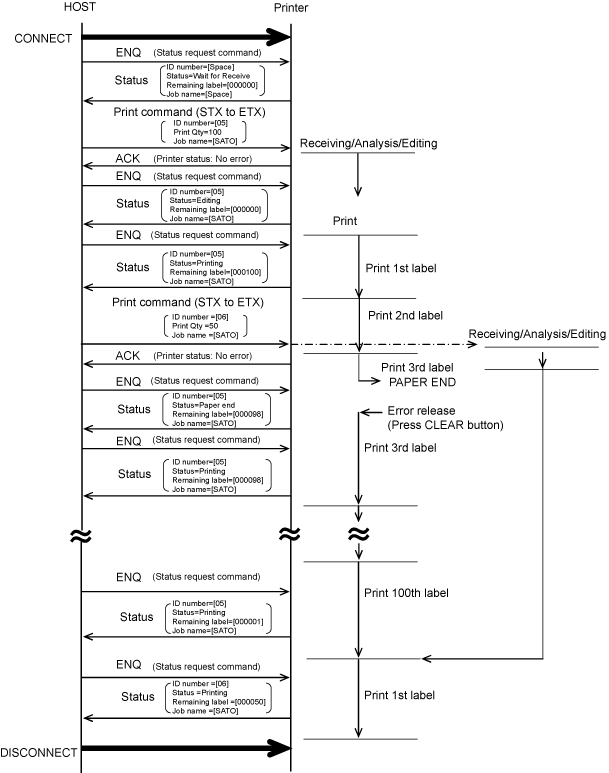
Status4 (CRC check is enabled)
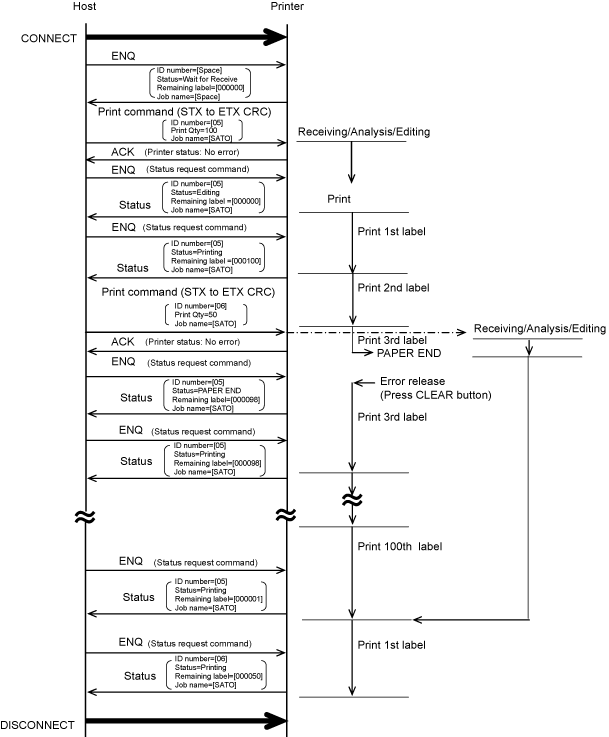
Status4 (CRC check is disabled)
In case where communication is lost while transferring print data
Important
-
The print data cannot be guaranteed if communication through Bluetooth is disconnected while sending print data.
Make sure to turn off the power of the printer, then turn on it again to retransmit the print data.
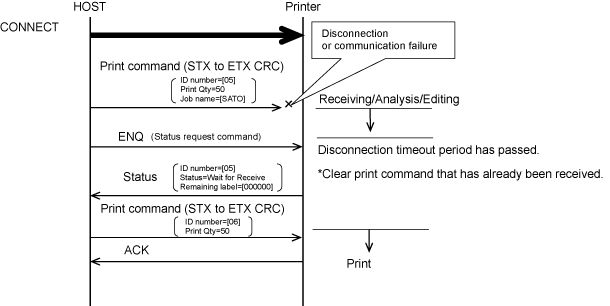
CRC check is enabled (Common in status3 and status4)
Important
- In case where communication through Bluetooth is disconnected while transmitting print data, print data that has already been received, will be cleared after disconnection timeout period.
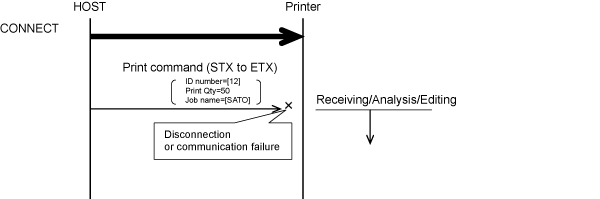
CRC check is disabled (Common in status3 and status4)
Important
- The print data cannot be guaranteed if communication through Bluetooth is disconnected while sending print data as in the figure above. Make sure to turn off the power of the printer, then turn on it again to retransmit the print data.
In case where communication is lost while transferring status after receiving print data
CRC check is enabled (Common in status3 and status4)
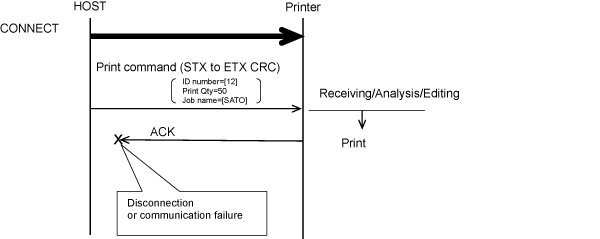
Important
- When [ACK] is not returned after sending print data, it shall be regarded as communication failure and sending print data has to be stopped.
- ACK may not return when communication through Bluetooth is disconnected before the printer returns [ACK].
CRC check is disabled (Common in status3 and status4)
Works the same as "CRC check is enabled (Common in status3 and status4)".
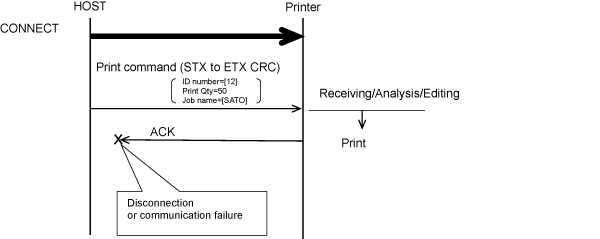
Important
- When [ACK] is not returned after sending print data, it shall be regarded as communication failure and sending print data has to be stopped.
- ACK may not return when communication through Bluetooth is disconnected before the printer returns [ACK].
Abnormal end when CRC check is enabled
In the event of CRC error (Common in status3 and status4)
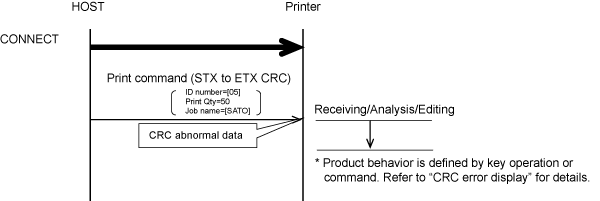
Important
- Received data is cleared and [ACK]/[NAK] is not returned when the received printer data has CRC error.
In the event of disconnection time-out (Common in status3 and status4)
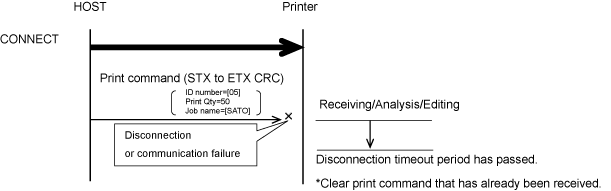
Important
- In case where receive data is not available in communication time-out period (10 sec) while receiving print command, time-out occurs to clear print data that has already been received ([ACK]/[NAK] is not returned).