Setting a Password
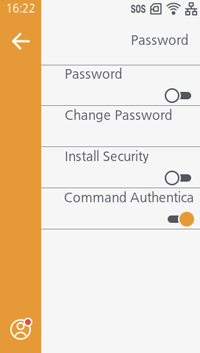
[Password] appears if you log in as the administrator.
For the login procedure, see
(5) Login.
[Password]
[Change Password]
[Install Security]
Use the password set in [Change Password] to install a pkg file from a USB memory.

- Contact your SATO reseller or technical support for more information on pkg files.
Initial value: Disabled
[Common Command Authentication]
Forgot Your Password
If you forget the password you set, you can temporarily restore it to the default password.
Press and hold the  button and the
 button, then press the
 button to turn on the printer.
When the LED indicator lights up, release only the button.
Continue holding the button and the button until the Online/Offline screen appears.
- This key operation is a temporary solution that allows the user to access the [Settings] menu using the default password. After accessing the [Settings] menu with the default password, you must set the passwords again.
- If you restart the device without reconfiguring the passwords, authentication using the user-configured passwords will be required.