
PW208NX/PW208mNX Operator Manual
SATO

MENU

MENU

  • TOP (Table of Contents)
  • Getting Started
  • Searching from Category
  • Searching by Function Names
  • Searching According to What You Want to Do
  • Troubleshooting
  • Support and Warranty
Close
TOP > Various Settings of the Product > Product’s [Settings] Menu > [System] Menu > [Firmware Update] (PW208NX only) > [Install Prompt]
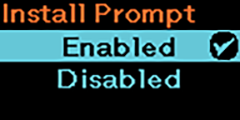
[Install Prompt]
The confirmation screen appears before the latest firmware is installed to the product.
The options are as follows:
Enabled
Once the latest firmware has been downloaded from the SATO App Storage server, the installation confirmation screen will appear.
Disabled
The installation confirmation screen will not appear.
After downloading the latest firmware from the SATO App Storage server, the firmware will be automatically installed to the product when it is powered on/off.
 
•
The confirmation screen does not appear if the latest firmware has already been installed.
•
In the following cases, the confirmation screen will not be displayed even if this setting is enabled.
◦
When any error is occurring
◦
During printing
◦
When the product has a print job
◦
When the Settings menu is displayed
◦
When executing a package update via USB memory
•
Please note that if the battery level is low, the firmware will not be installed even if you select [Execute] on the installation confirmation screen.

Back to top

© 2019 SATO Corporation