[ESC+YS] Format Registration
Hexadecimal code
| ESC | <1B>16 |
|---|---|
| YS | <59>16<53>16 |
Parameter
,aaa
Initial value
Nil
Valid range and term of command
| When the power switch is OFF | The set parameter is not maintained. |
| Valid range within items | The set parameter is valid until the next valid setting. |
| Valid range between items | The set parameter is valid until the next valid setting. |
Function
Registering print format.
Format
<YS>,aaa
-
Parameter
a [Format registration number] = Valid Range: 1 to 999
Coding Example
<A>
<CC>1
<YS>,1
</N>,3,3
<%>0<V>100<H>200<P>2<L>0101<XM>ABC
<Z>
Supplementary Explanation
- When registering multiple formats, Delimit Start of Data Transmission <A> and End of Data Transmission <Z> with one format.
- Specify Card Slot for Use <CC> prior to this command when using.
- Use this command and Registration of Field </N> as a pair.
- Attempts to re-register with registered No., error will occur, and the targeted content will be printed.
- The error occurs when specifying unused or specifying the slot which the printer is allocated.
Note
- Don't power off while accessing the memory.
- The maximum registration with </N> is 99 fields. (Refer to [ESC+/N] Registration of Field for the commands that can be registered.)
- The maximum registration with other than </N> is 50 fields. (Refer to the customizable print command for the commands can be registered.)
Point
Details of Format Registration
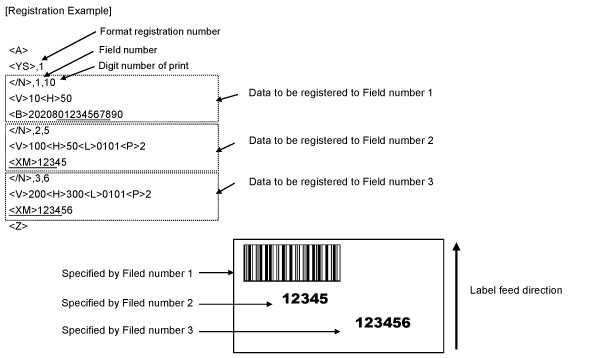
A group of commands can be registered to a memory card (option). Once registered, it saves time to specify the identical command group. The registration also allows a change of print data when invoking the format. Such function is called "Format Registration".
One item consists of different command groups necessary for printing, and such groups are called "Field". Note that multiple fields make format.
Commands for format registration:
One format consists of a pair of commands from Start of Data Transmission <A> to End of Data Transmission <Z>, and specify Registration of Format <YS> right after <A>. For <YS>, specify [Format registration No.] between 1 and 999. And then, insert Registration of Field </N> after <YS> to specify [Field No.] and [Digit No. of print quantity].
After [Field No.] and [Digit No. of print quantity] are entered, specify print position, character type, barcode, and so on.
Invoking the registered print contents
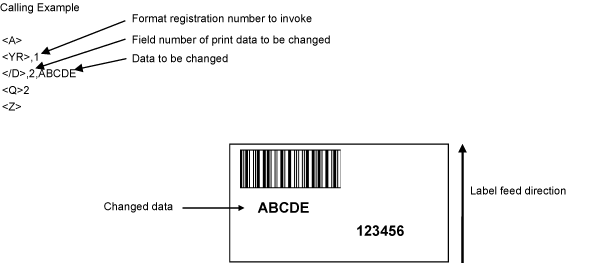
Specify saved [Format registration No.] between 1 and 999 with Format Call <YR>.
To change print data, use Print of Field <D> to specify [Field No.] to be changed, and continuously specify the changed print data.
Note that the underlined parts in the [Registration Example] are changeable.
Available registration command is as follows.
Available registration command
Print position
<V>
<H>
Font
<XU>
<XS>
<XM>
<XB>
<XL>
<OA>
<OB>
<RD>
<$=>
<K1>
<K2>
<K3>
<K4>
<K5>
<K8>
<K9>
<KA>
<KB>
<KD>
<k1>
<k2>
<k3>
<k4>
<k5>
<k8>
<k9>
<kA>
<kB>
<kD>
<U>
<S>
<M>
<WB>
<WL>
<X20>
<X21>
<X22>
<X24>
<PP>
<X1>
<X2>
<X3>
<X80>
<X81>
<X82>
<X83>
<X84>
<X85>
<X86>
<X87>
<X88>
<XK>
<PP1>
<PP2>
<PP3>
<RG> *1
<RH> *1
<<Xa1>-<Xa6>
<Xb1>-<Xb8>
<Xc1>-<Xc9>
<Xd1>-<Xd9>
<Xe1>-<Xe9>
<Xf1>-<Xf5>
<Xm1>-<Xm4>
Barcode
<B>
<BC>
<BG>
<BI>
<D>
<D><d>
<BD>
<BW>
Modification
<P>
<L>
<PS>
<PR>
<%>
<FW>
<(>
<WD>
<KC>
System
<A1>
<A3>
Memory card
<&R>
</N>
<GR>
<GC>
- Character code: UNICODE (UTF-16 BE) is not supported.
(Caution)The operation when registering a command other than available command is not guaranteed.