[DC2+PB] Printer Setting Information Acquisition
HEX code
| DC2 | <12>16 |
|---|---|
| PB |
<50>16<42>16 |
Parameter
(,aa(,b...b)) + EOT (04h)
Default Value
None
Valid range and term of command
| When turning off the power switch | - |
| Valid range | - |
| Printer operation in progress | The command can be received even during the printer operation. |
| Error | The command can be received even if an error is occurring. |
| Unauthentication |
Commands can be received even if authentication is not in progress using the [DC2+PS] command. |
Command Valid Range and Period [CL4-SXR/CL6-SXR]
| When turning off the power switch | - |
| Valid range | - |
| Printer operation in progress | The command can be received during printing operation. |
| Error | Commands can be received even if an error is occurring. However, the command cannot be received during a system error. ([NAK] return) |
| When the settings screen is displayed | The command can be received when the settings screen is displayed. |
| Unauthentication |
Commands can be received even if authentication is not in progress using the [DC2+PS] command. |
Function
This command is used to acquire the printer information.
Format
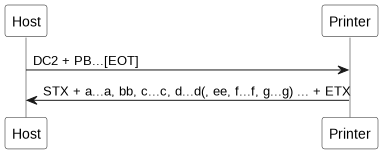
[DC2]PB(,aa(,b・・・b))[EOT]
Parameters
| Symbol | Parameter name | Valid range | Note |
|---|---|---|---|
| a | Identifier | Refer to [Identifier] below |
* When omitted, all items will be returned. |
| b | Setting Item name | Refer to [DC2+PA] Printer Setting | Acquire up to [EOT] |
Return data format (normal)
[STX]a...a,bb,c...c,d...d(,ee,f...f,g...g)...[ETX]
Return data
| Symbol | Parameter name | Valid range |
|---|---|---|
| a |
Total number of data byte * This is the total number of bytes after parameter b. The delimiting comma between parameters a and b, and the ETX are not included. |
Data size from the first identifier until before [ETX] |
| b(e) | Identifier | Refer to [Identifier] below |
| c(f) |
Setting information data size * Number of bytes of the section unit after parameter d. The delimiting comma between sections is not included. |
Size of the corresponding setting information data |
| d(g) |
Setting information data * Text format |
Refer to "Setup information data" below. |
Identifier
| Model | Valid range |
|---|---|
|
CL4NX/CL4NX-J CL6NX/CL6NX-J |
AS: Auto Switch Group CA: Common settings CB: Notification functionality II: IEEE1284 settings IR: RS-232C settings IL: LAN settings IU: USB settings IW: WLAN settings IB: Bluetooth settings IE: EXT settings IF: RFID settings IN: NFC settings SB: SBPL settings SZ: SZPL settings SI: SIPL settings SD: SDPL settings ST: STCL settings SE: SEPL settings SA: AEP Settings |
|
CL4-SXR CL6-SXR |
CA: Common Settings CB: Notification Function IR: RS-232C Settings IL: LAN Settings IU: USB Settings IW: WLAN Settings IB: Bluetooth Settings IE: EXT Settings IF: RFID Settings IN: NFC Settings SB: SBPL Settings SZ: SZPL Settings SI: SIPL Settings SD: SDPL Settings SG: SPGL Settings SM: SMGL Settings SA: AEP Settings PS: Media Profile |
|
PW208/PW208m PW208NX/PW208mNX |
CA: Common settings CB: Notification functionality IL: LAN settings IU: USB settings IW: WLAN settings IB: Bluetooth settings IN: NFC settings*1 SB: SBPL settings SZ: SZPL settings*2 SI: SIPL settings*2 SD: SDPL settings*2 ST: STCL settings*2 SP: SPOS settings (reserve) SC: SCPL settings (reserve)*2 SA: AEP Settings*2
|
| PW4NX |
CA: Common settings CB: Notification functionality IL: LAN settings IU: USB settings IW: WLAN settings IB: Bluetooth settings IN: NFC settings SB: SBPL settings SZ: SZPL settings SI: SIPL settings SD: SDPL settings ST: STCL settings SC: SCPL settings (reserve) |
| FX3-LX |
CA: Common settings CB: Notification functionality*1 IL: LAN settings IU: USB settings IW: WLAN settings IB: Bluetooth settings IN: NFC settings SB: SBPL settings SZ: SZPL settings SI: SIPL settings*1 SD: SDPL settings*1 ST: STCL settings*1 SE: SEPL settings*1 SA: AEP Settings*1
|
| CT4-LX/HC4-LX |
AS: Auto Switch Group CA: Common settings CB: Notification functionality IR: RS-232C settings IL: LAN settings IU: USB settings IW: WLAN settings IB: Bluetooth settings IF: RFID settings IN: NFC settings SB: SBPL settings SZ: SZPL settings SI: SIPL settings SD: SDPL settings ST: STCL settings SE: SEPL settings PS: Media profile settings SA: AEP Settings * Fixed value 43mm is returned when "WASTE_PREVENTION_MEDIA_LENGTH" is acquired when "WASTE_PREVENTION_MEDIA_TYPE" setting is "koDakara". |
| LR4NX-FA |
AS: Auto Switch Group CA: Common settings CB: Notification functionality II: IEEE1284 settings IR: RS-232C settings IL: LAN settings SB: SBPL settings SZ: SZPL settings SI: SIPL settings SD: SDPL settings SA: AEP Settings SO: LR settings |
| S84NX/S86NX |
AS: Auto Switch Group CA: Common settings CB: Notification functionality IR: RS-232C settings IL: LAN settings IU: USB settings IW: WLAN settings IE: EXT settings IF: RFID settings IN: NFC settings SB: SBPL settings SZ: SZPL settings SI: SIPL settings SD: SDPL settings SA: AEP Settings |
Setting information data format
"Setting item name" + ":" + "Setting data" + "Line feed (0DH, 0AH)"
h...h:i...i[CR][LF](j...j:k...k[CR][LF])...
Setting information data
| Symbol | Parameter name | Valid range |
|---|---|---|
| h(j...) | Setting Item name | Refer to the printer status information list |
| i(k...) | Setting data | Refer to the printer status information list |
Data Example)
CA,12345,SPEED:4
LEVEL:5
CONCENTRATION:A
      :
Return data format (when a command error occurs)
[NAK]<15>16
Exception processing
| Parameter name | Exception condition: A value outside the range is specified |
Exception condition: The specified size and received size are different |
|---|---|---|
| Identifier | Command error | Invalid receive data |
| Terminology | Description |
|---|---|
| Command error | The data received after a command error is determined is not considered as a parameter of this command. |
Supplementary Explanation
- When identifiers are omitted, all data will be returned.
- When setting item names are specified, setting information of the item which was set will be returned.
Sequence