LAN/Wireless LAN
Basic Specifications (LAN)
Interface
RJ45
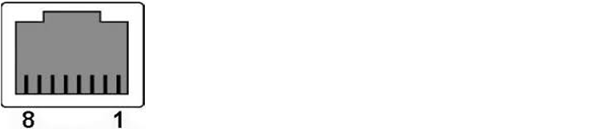
Connector
Connector Type
RJ-45
Cable Type
-
CL4NX/CL6NX, LR4NX-FA, and S84NX/S86NX
For 10BASE-T and 100BASE-TX (Category 5 or upper)
-
FX3-LX, CT4-LX/HC4-LX, and CL4-SXR/CL6-SXR
For 10BASE-T, 100BASE-TX, and 1000BASE-T (Category 5 or upper)
Cable length
Equal to or less than 100 m
Link/Status LED
For CL4NX/CL6NX, LR4NX-FA, and S84NX/S86NX
LED lights when link is established with Ethernet device or when packet is received.
| LED | Color | Not connected | 10BASE-T | 100BASE-TX |
|---|---|---|---|---|
| LED1 | Green | OFF | ON*1 | ON*1 |
| LED2 | Yellow | ON | OFF | ON |
- Lights at a moment after receiving packet (10 ms)
For FX3-LX and CT4-LX/HC4-LX
LED lights when link is established with Ethernet device.
| LED | Color | Not connected | 10BASE-T | 100BASE-TX | 1000BASE-T |
|---|---|---|---|---|---|
| LED1 | Green | OFF | ON | ON | OFF |
| LED2 | Yellow | OFF | ON | OFF | ON |
For CL4-SXR/CL6-SXR
| LED (Color) | Not connected | 10BASE-T (Full/Half duplex) | |
|---|---|---|---|
| Standby | Communication | ||
| LED1 (Yellow) | OFF | ON | Blink |
| LED2 (Green) | OFF | OFF | OFF |
| LED (Color) | ||||
|---|---|---|---|---|
| 100BASE-TX (Full duplex) | 100BASE-TX (Half duplex) | |||
| Standby | Communication | Standby | Communication | |
| LED1 (Yellow) | Blink*1 | Blink*2 | ON | Blink |
| LED2 (Green) | Blink*1 | Blink*2 | ON | Blink |
| LED (Color) | 1000BASE-T (Full duplex) | |
|---|---|---|
| Standby | Communication | |
| LED1 (Yellow) | OFF | OFF |
| LED2 (Green) | Blink*1 | Blink*2 |
- Link pulse blinks periodically.
- Blinks during communication.
Protocol
Following communication protocol is configurable.
| Setting item | Setting range |
|---|---|
| Protocol |
None Status3 return Status4 return (Cycle response mode) Status4 return (ENQ response mode) Status5 return*1 StatusL return*2 |
- FX3-LX (Japan) does not support Status5.
- LR4NX-FA only
Receive buffer size
CL4-SXR/CL6-SXR:3.00MB
The others:2.95MB
0MB
MAX
Remaining 0.95MB
0MB
MAX
Remaining 1.95MB
LAN Settings / Display Items
Refer to DC2+PA List of Setting Items [LAN] Section.
Basic Specifications (Wireless LAN)
Protocol
Following communication protocol is configurable.
| Setting item | Setting range |
|---|---|
| Protocol |
Status3 return Return Status 4 (Cycle response mode) Return Status 4 (ENQ response mode) Status5 return*1 |
- FX3-LX (Japan) does not support Status5.
Wireless status display
Display radio field intensity with icon on screen.
| Icon | Name | Description |
|---|---|---|
|
* For PW208NX
|
Disconnected | Wi-Fi is enabled but is disconnected. |
|
* For PW208NX
|
Wi-Fi radio field intensity | Wi-Fi is connected. Displays intensity (Level 4) |




* FX3-LX (Japan): Refer to Android 7.1 specifications for details.
Display Wi-Fi information
Displays information of Wi-Fi on Wi-Fi Status screen.
e.g.) For CL4NX/CL6NX
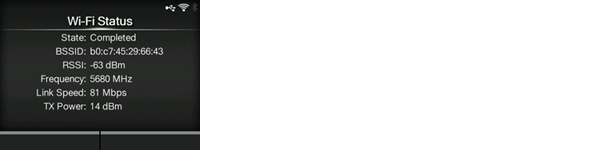
Specifications of Wi-Fi
Important
- Please consult with your system administrator and make sure that there will be no affect on medical devices and equipment when the printer is used near the medical devices and equipment.
Communications Standards
Comply with IEEE802.11a/b/g/n/ac/ax
CL4NX/CL6NX, PW208NX, FX3-LX, CT4-LX/HC4-LX, S84NX/S86NX
| Communications standards | Frequency band | Maximum speed*1 |
|---|---|---|
| IEEE802.11b | 2.4 GHz | 11 Mbps |
| IEEE802.11a | 5 GHz | 54 Mbps |
| IEEE802.11g | 2.4 GHz | 54 Mbps |
| IEEE802.11n | 2.4/5 GHz | 135 Mbps |
| IEEE802.11ac*2 | 5 GHz | 433.3 Mbps |
- These are the theoretical values based on the wireless LAN specifications and are not the actual data transfer speeds.
- CL4NX/CL6NX, PW208NX: Supported on W-LAN2. Refer to the Operator Manual for how to confirm the installed wireless LAN module.
PW4NX
| Communications standards | Frequency band | Maximum speed*1 |
|---|---|---|
| IEEE802.11b | 2.4 GHz | 11 Mbps |
| IEEE802.11a | 5 GHz | 54 Mbps |
| IEEE802.11g | 2.4 GHz | 54 Mbps |
| IEEE802.11n | 2.4/5 GHz | 150 Mbps |
| IEEE802.11ac | 5 GHz | 433.3 Mbps |
- These are the theoretical values based on the wireless LAN specifications and are not the actual data transfer speeds.
CL4-SXR/CL6-SXR
| Communications standards | Frequency band | Maximum speed*1 |
|---|---|---|
| IEEE802.11b | 2.4 GHz | 11 Mbps |
| IEEE802.11a | 5 GHz | 54 Mbps |
| IEEE802.11g | 2.4 GHz | 54 Mbps |
| IEEE802.11n | 2.4/5 GHz | 270 Mbps |
| IEEE802.11ac | 5 GHz | 1733 Mbps |
| IEEE802.11ax | 2.4/5/6 GHz*2 | 2.4 Gbps*3 |
- These are the theoretical values based on the wireless LAN specifications and are not the actual data transfer speeds.
- 6GHz is supported on a country/region basis.
- Supports 26, 52, 106, 242, 484, 966, and 2*966 tone RUs.
Connection conditions for IEEE802.11n
MCS value 0 to 6 supported
MCS value 7 is working, but performance is not guaranteed.
| Band width | Guard interval | Communication speed: MCS6 |
Communication speed: MCS7 (reference value) |
|---|---|---|---|
| 20 MHz | 800 ns | 58.5 Mbps | 65.0 Mbps |
| 400 ns | 65.0 Mbps | 72.2 Mbps | |
| 40 MHz | 800 ns | 121.5 Mbps | 135.0 Mbps |
| 400 ns | 135.0 Mbps | 150.0 Mbps |
Wireless LAN communication mode
Infrastructure mode
Ad Hoc mode
Note
- IEEE802.11n works only in Infrastructure mode.
- FX3-LX (Japan) and CL4-SXR/CL6-SXR does not support Ad Hoc mode.
Channel for use
| 【2.4GHz】Connecting with IEEE802.11b/g/n/ax |
1 to 13
|
| 【5GHz】Connecting with IEEE802.11a/n/ac/ax |
W52 : 36, 40, 44, 48(5.2 GHz band) W53 : 52, 56, 60, 64(5.3 GHz band) W56 : 100, 104, 108, 112, 116, 120, 124, 128, 132, 136, 140, 144(5.6 GHz band) W58 : 149, 153, 157, 161, 165(5.8 GHz band) W59 : 169, 173, 177(5.9 GHz band)
|
| 【6GHz】Connecting with IEEE802.11ax |
1, 3, 5, 7, 9, 13, 15, 17, 19, 21, 23, 25, 27, 29, 33, 35, 37, 39, 41, 43, 45, 47, 49, 51, 53, 55, 57, 59, 61, 65, 67, 69, 71, 73, 75, 77, 79, 81, 83, 85, 87, 89, 91, 93, 97, 99, 101, 103, 105, 107, 109, 111, 113, 115, 117, 119, 121, 123, 125, 129, 131, 133, 135, 137, 139, 141, 143, 145, 147, 149, 151, 153, 155, 157, 161, 163, 165, 167, 169, 171, 173, 175, 177, 179, 181, 183, 185, 187, 189, 193, 195, 197, 199, 201, 203, 205, 207, 209, 211, 213, 215, 217, 219, 221, 225, 227, 229, 233
|
SSID
Set 1 to 32 of alphanumeric characters or code (available range of character is 20H to 7EH)
Wireless security
[CL4NX/CL6NX and PW208NX]
| Wireless security | None | ||
| WEP | |||
| WPA+WPA2 | |||
| WPA2 | |||
| Dynamic WEP | |||
| WEP | Open System | ||
| Shared Key | |||
| WEP Key | 1 to 4 | ||
| WEP Key character string |
64bit: 5 ASCII / 10 hex 128bit: 13 ASCII / 26 hex |
||
| WPA+WPA2, WPA2 | PSK | PSK Key 8 to 63 ASCII 64 hex | |
| Enterprise (802.1x) | EAP Conf | ||
| CCKM | |||
| EAP | FAST | W-LAN*1 | MSCHAPv2 |
| GTC | |||
| TLS | |||
| W-LAN2*1 | AUTO | ||
| LEAP | |||
| PEAP | W-LAN*1 | MSCHAPv2 | |
| GTC | |||
| TLS | |||
| MD5 | |||
| OTP | |||
| W-LAN2*1 | MSCHAPv2 | ||
| TLS | |||
| TTLS | W-LAN*1 | MSCHAPv2 | |
| MSCHAP | |||
| CHAP | |||
| PAP | |||
| EAP-GTC | |||
| EAP-MD5 | |||
| EAP-MSCHAPv2 | |||
| EAP-OTP | |||
| EAP-TLS | |||
| W-LAN2*1 | MSCHAPv2 | ||
| MSCHAP | |||
| CHAP | |||
| PAP | |||
- Wireless LAN module. Refer to the Operator Manual for how to confirm the installed wireless LAN module.
[FX3-LX (Japan)]
| Wireless security | None | |
| WEP | ||
| WPA+WPA2 | ||
| WPA2 | ||
| WEP | Open System | |
| Shared Key | ||
| WEP Key | 1 to 4 | |
| WEP Key character string |
64bit: 5 ASCII / 10 hex 128bit: 13 ASCII / 26 hex |
|
| WPA+WPA2, WPA2 | PSK | PSK Key 8 to 63 ASCII 64 hex |
| Enterprise (802.1x) | EAP Conf | |
| EAP | FAST | AUTO |
| LEAP | ||
| PEAP | MSCHAPv2 | |
| TLS | ||
| TTLS | MSCHAPv2 | |
| MSCHAP | ||
| CHAP | ||
| PAP | ||
[FX3-LX (International), CT4-LX/HC4-LX, PW4NX, and S84NX/S86NX]
| Wireless security | None | |
| WEP | ||
| WPA+WPA2 | ||
| WPA2 | ||
| Dynamic WEP | ||
| WEP | Open System | |
| Shared Key | ||
| WEP Key | 1 to 4 | |
| WEP Key character string |
64bit: 5 ASCII / 10 hex 128bit: 13 ASCII / 26 hex |
|
| WPA+WPA2, WPA2 | PSK | PSK Key 8 to 63 ASCII 64 hex |
| Enterprise (802.1x) | EAP Conf | |
| CCKM | ||
| EAP | FAST | AUTO |
| LEAP | ||
| PEAP | MSCHAPv2 | |
| TLS | ||
| TTLS | MSCHAPv2 | |
| MSCHAP | ||
| CHAP | ||
| PAP | ||
[CL4-SXR/CL6-SXR]
| Authentication Method | Open System | ||
| IEEE 802.1X (EAP-TLS) | |||
| WPA2-Personal | |||
| WPA/WPA2-Personal mixed mode | |||
| WPA3-Personal(DH Group 19, 20, 21) | |||
| WPA2-Enterprise*1 *2 | |||
| WPA/WPA2-Enterprise mixed mode*1 *2 | |||
| WPA3-Enterprise*1 *2 | |||
| WPA3-Enterprise 192-bit security*1 *2 | |||
| Encryption method | None | ||
| TKIP |
Personal:64 hex / 8~63 ASCII Enterprise:Configured by Radius |
||
| AES(CCMP, GCMP) |
Personal:64 hex / 8~63 ASCII(※Cannot be set with WPA3) Enterprise:Configured by Radius |
||
| EAP | EAP-TLS | Key Size: 1024 / 2048 / 4096 / 8192 bits | |
| EAP-TTLS | PAP / CHAP / MSCHAP / MSCHAPv2 | ||
| PEAP | MSCHAPv2 | ||
| EAP-FAST | — | ||
| LEAP | — | ||
- Enterprise only supports station mode.
- Enterprise supports EAP-TLS, EAP-TTLS, EAP-PEAP, LEAP, and EAP-FAST.
Security (authentication method and encryption method combination)
Ad Hoc mode
| Security | Authentication |
|---|---|
| None | - |
| WEP | Open System |
| Shared Key |
* IEEE802.11n does not support Ad Hoc mode.
Infrastructure mode
Refer to the "Wireless security".
Others
- Supports WPS 2.0 (Wi-Fi Simple Configuration Technical Specification v2.0.0)
-
Able to communicate with 6 devices at the maximum in Ad Hoc mode.
* FX3-LX (Japan) does not support Ad Hoc mode.
-
Supports Wi-Fi Direct
Supplementary explanation: PW4NX
-
Normal P2P (When run by [Connect] of Wi-Fi Direct)
If you set 5 GHz at the [Band] of Wi-Fi setting, you cannot use Wi-Fi Direct.
Because, Wi-Fi Direct can be used on 1ch, 6ch and 11ch only.
-
Autonomous GO (When run by [Start Group] of Wi-Fi Direct)
Frequency of the generated group is depending on [Band] of Wi-Fi Direct.
If you set [All], that will be generated 2.4 GHz.
-
The correspondence between the frequency band of the Wi-Fi setting and the number of channels of the creation group is as follows.
Frequency band Number of channels All 1 2.4 GHz 1 5 GHz 36
-
- FX3-LX: Wake on Wireless LAN supports wakeup from deepsleep mode.
Receive buffer size
CL4-SXR/CL6-SXR:3.00MB
The others:2.95MB
0MB
MAX
Remaining 0.95MB
0MB
MAX
Remaining 1.95MB
Wireless LAN Setting / Display Items
Refer to DC2+PA List of Setting Items [WLAN] Section.
Software Specifications
Supported protocol
TCP/IP
Link layer
* CL4-SXR/CL6-SXR only
ARP
Network layer
IPv4, IPv6*1, ICMP, ICMPv6*2
- FX3-LX (Japan) does not support IPv6.
- Compatible with CL4-SXR/CL6-SXR only.
Session layer
TCP, UDP
Application layer
CL4NX/CL6NX, FX3-LX (International), CT4-LX/HC4-LX, LR4NX-FA and S84NX/S86NX
LPR, FTP/FTPS, DHCP, HTTP/HTTPS, SNMP, NTP
- LPR, FTP/FTPS and Dedicated Socket protocol of TCP/IP can be used for sending print data.
- Printer status can be obtained by dedicated Socket protocol.
CL4-SXR/CL6-SXR
LPR, FTP/FTPS, DHCP, HTTP/HTTPS, SNMP, NTP, mDNS, IPP
- Print data can be sent using TCP/IP LPR, FTP/FTPS, or dedicated Socket protocol.
- The printer status can be obtained via a dedicated socket protocol.
PW208NX
LPR, FTP/FTPS, DHCP, HTTP/HTTPS, SNMPv1, SNMPv2c, SNMPv3
- LPR, FTP/FTPS and Dedicated Socket protocol of TCP/IP can be used for sending print data.
- Printer status can be obtained by dedicated Socket protocol.
FX3-LX (Japan)
DHCP, NTP
- Dedicated Socket protocol of TCP/IP can be used for sending print data.
- Printer status can be obtained by dedicated Socket protocol.
PW4NX
LPR, FTP, DHCP, HTTP/HTTPS, SNMP, NTP, SFTP
- LPR, FTP, SFTP and Dedicated Socket protocol of TCP/IP can be used for sending print data.
- Printer status can be obtained by dedicated Socket protocol.
Specifications of TCP/IP
TCP/IP protocol environment has LPR/LPD, FTP, SFTP, and FTPS for print. DHCP can be used for setting address.
Specifications of LPR
LPR protocol complies with RFC1179 and handles a list of theoretical printer names as queue name.
The queue name is "lp".
Send sequence of data file and control file in the job does not affect on print operation when the job is sent by LPR.
- Job deletion is not supported by LPR.
- Specifications of LPR can be used only in Status 4: ENQ response.
- Missing label or duplicated image may occur when many labels are printed by LPR due to the specifications of Windows.
- Banner page print is not supported.
- Multiple sessions cannot be established at the same time.
CL4-SXR/CL6-SXR: It is recommended that the size of a single job be kept within 30 MB.
- PW4NX: IPv4 only supported.
Specifications of FTP
FTP protocol complies with RFC959. FTP protocol handles the list of theoretical printer names as a transfer directory, and file transfer to this directory executes print operation. Note that it is possible to specify ASCII (A) and BINARY (I) as transfer mode, and mode varies by the client.
The directory name is "lp".
-
[PW4NX and CL4-SXR/CL6-SXR]: Up to 5 sessions can be connected at the same time.
[Except PW4NX and CL4-SXR/CL6-SXR]: Multiple sessions cannot be established at the same time. - After three failed login attempts to the FTP server in two minutes, all logins are prohibited for the next minute.
- If a login is attempted while login is prohibited, an error status (421 Service not available, remote server has closed connection) is returned to the FTP client and the connection is immediately disconnected.
CL4-SXR/CL6-SXR: It is recommended that the size of a single job be kept within 30 MB.
Specifications of FTPS
[CL4NX/CL6NX, PW208NX, FX3-LX (International), CT4-LX/HC4-LX, LR4NX-FA and S84NX/S86NX]:
A communication protocol that encrypts data sent and received via FTP using SSL/TLS, standardized by the IETF in RFC 2228 and RFC 4217. To encrypt using SSL/TLS, a certificate must be installed on the printer when using the FTPS function. As with the FTP specification, a list of theoretical printer names is treated as a destination directory, and file transfers to that directory are executed as print operations.
- After three failed login attempts to the FTP server in two minutes, all logins are prohibited for the next minute.
- If a login is attempted while login is prohibited, an error status (421 Service not available, remote server has closed connection) is returned to the FTP client and the connection is immediately disconnected.
Specifications of SFTP
[PW4NX]
SFTP protocol handles the list of logical printer name as a transmission destination directory, and performs transmitting files to the directory as the print operation. You can select an Authentication method from Password Authentication or Key Authentication. And User name is fixed by the printer.
The printer accepts the below characters for Password. And the number of characters is 0 or 4 to 32.
Half-width alphanumeric characters (uppercase and lowercase) and symbols (!#$%\'()+\-\.;=@\[\]^_`{}~\"&|\\:*/_<>,?)
The printer accepts only RFC4716 format for the Public key.
The directory name is "lp".
* Up to 5 sessions can be connected at the same time.
NTP (Network Time Protocol)
NTP corrects the time of the printer. NTP obtains the time from NTP server to correct the time of the printer when the NTP functionality is enabled. It also corrects time of calendar IC when calendar IC is equipped. LAN or Wireless LAN interface operates this functionality. Error screen will appear if [NTP error notification functionality] is enabled when NTP fails to correct time.
[CL4-SXR/CL6-SXR]
If 0.0.0.0 is specified as the NTP server, the following global NTP servers will automatically be used as the synchronization destination NTP servers.
- 0.pool.ntp.org
- 1.pool.ntp.org
- 2.pool.ntp.org
- 3.pool.ntp.org
Specifications of mDNS(muticastDNS)
[CL4-SXR/CL6-SXR]
The mDNS protocol is compliant with RFC6762. It is a protocol for resolving hostnames to IP addresses in small networks where there is no local name server.
Specifications of IPP(Internet Printing Protocol)
[CL4-SXR/CL6-SXR]
This is a standard for communicating print data between a printer and a computer in a remote location using a TCP/IP network.
Specifications of HTTP/HTTPS
The printer is configurable by using Web browser. (Recommended browser: Chrome)
Wireless LAN Setting (802.1x Authentication and Certification)
Depending on format, certification may be required or may not be required for 802.1x authentication. When certification is required, it is necessary to import it from Web setting screen or USB memory.
Following shows the necessity of certifications, ID and password of each format for 802.1 authentication followed by the types of certifications and secret keys.
Items to be imported from Web setting screen and USB memory
| No. | Items to be imported | Contents |
|---|---|---|
| 1 | Root certificate | File: Select a file of root certificate |
| 2 | Client certificate |
Password: Enter secret password of client certificate File: File of client certificate |
| 3 | Private Key |
Password: Enter password of private key File: Select file of private key |
| 4 | PAC file |
Password: Enter password of PAC file File: Select PAC file |
Necessity of ID/Password, certifications of each format for 802.1x authentication
CL4NX/CL6NX, PW208NX, FX3-LX (International), CT4-LX/HC4-LX, PW4NX, S84NX/S86NX and CL4-SXR/CL6-SXR
Necessary information (Yes: Necessary, No: Unnecessary)
| EAP format | User name | Password | Certification Password | Root certificate | Client certificate | Private Key | PAC file |
|---|---|---|---|---|---|---|---|
| EAP-TLS | Yes | No | Yes | Yes | Yes | Yes | No |
| EAP-PEAP | Yes | Yes | No | Yes*1 | No | No | No |
| EAP-LEAP | Yes | Yes | No | No | No | No | No |
| EAP-TTLS | Yes | Yes | No | Yes*1 | No | No | No |
| EAP-FAST | Yes | Yes | No | No | No | No | Yes |
- PW208NX: Use client certificate instead of root certificate as long as it meets the conditions as described in note (3).
Note (PW208NX)
- The supporting hash algorithm is SHA1 and SHA2.
- Root certificate must fulfill the minimum requirements as follows.
- Certification of computer in server shall be connected to reliable root certification authority (CA), the certification shall be run by CryptoAPI, and it should pass all tests being specified by remote access polity and network policy.
- Computer certificates for NPS server and VPN server shall be configured as Extended Key Usage (EKU) is including server authentication in (Object ID for server authentication is 1.3.6.1.5.5.7.3.1.).
- Server certification shall consist of required algorithm value RSA.
- When SubjectAltName-extension is used, DNS name of server shall be included to this SubjectAltName-extension.
- Server accepts Certification attempts by client if the server meets the following
requirements when using EAP-PEAP and EAP-TTLS. (For Windows Server
2008/2008R2/2012/2012R2)
- Client certificate shall be issued by Enterprise CA or it shall be mapped to account of user or computer in ActiveDirectory® domain service (AD DS).
- There shall be certification chain for certification of user and computer of client and the certification chain shall be used for reliable root CA. EKU extension shall aim for client certificate (Object identifier of client certificate is 1.3.6.1.5.5.7.3.2). In addition, those certifications shall pass the check test run with CryptoAPI and specified by remote access policy and/or network policy, and also those certifications shall pass the check test on certificate object identifier specified by IAS remote access policy and/or NPS network policy.
- 802.1x client shall not use any of registry based certificates such as Smart Card Logon Certificate or password protected certificate.
- SubjectAltName-extension of certificate shall include Fully Qualified Domain Name (FQDN) (DNS name) for computer certificate.
FX3-LX (Japan)
Necessary information (Yes: Necessary, No: Unnecessary)
| EAP format | User name | Password | Certification Password | Root certificate | Client certificate | Private Key | PAC file |
|---|---|---|---|---|---|---|---|
| EAP-TLS | Yes | No | Yes | Yes | Yes | Yes | No |
| EAP-PEAP | Yes | Yes | No | Yes | No | No | No |
| EAP-TTLS | Yes | Yes | No | Yes | No | No | No |
Socket Communication
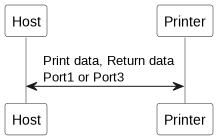
In the socket server of TCP/IP, it is possible to use 2-port connection where Port 1 is used for receiving print data and Port 2 is used for returning printer status, or 1-port connection where Port 1 or Port 3 is used for both receiving print data and returning printer status.
When Port3 is used, only status return data and printer operation setting request data are returned to host.
It is not possible to use 2 port connection and 1 port connection at the same time.
It is not possible to have few sessions connected at once to each Socket.
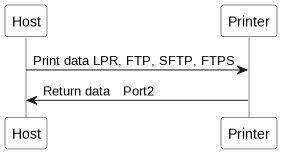
Besides Socket, it is possible to use LPR, FTP, SFTP, and FTPS for sending print data. It is not allowed to connect to print data port (Port 1 or Port 3) while LPR, FTP, SFTP, or FTPS is connected due to Socket communication.
Please do not use 2 ports connections consist of Port 2 port and Port 3 port.
-
Print by 2 port connection/Socket (Status4)
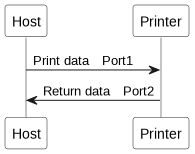
-
Print by 1 port connection/Socket (Status4)
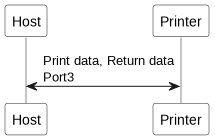
-
Print by 1 port connection/Socket (Return status3, 5, L)
-
Print with LPR, FTP, SFTP, or FTPS
Connection and Disconnection of Session
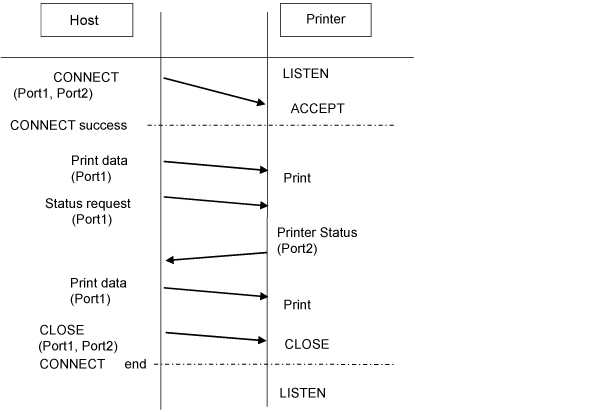
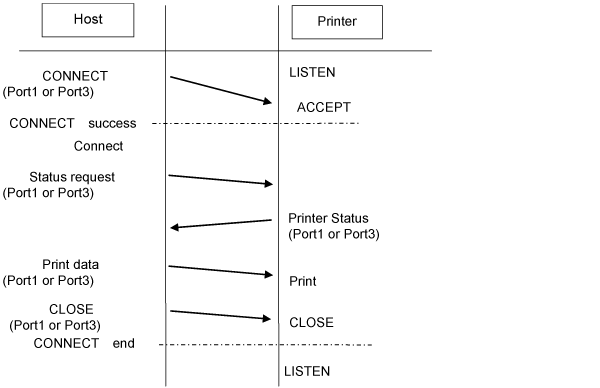
Following is the procedure for connection and disconnection of Port 1 (for print data) and Port 2 (for status return) and Port 3 or Port 1 (for send/return port) in socket server functions.
Print data port (Port1), Status return port (Port2)
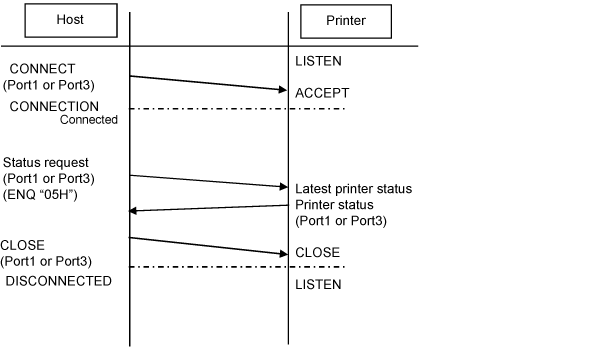
Sent/Received port (Port3 or Port1)
TCP Connection Queue
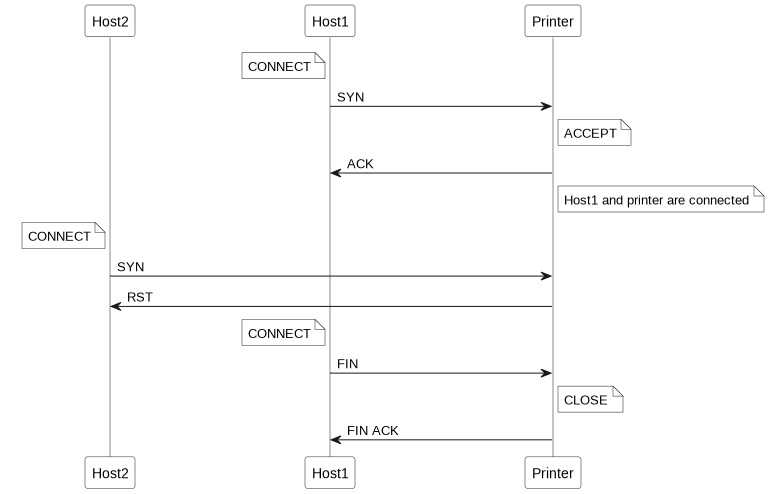
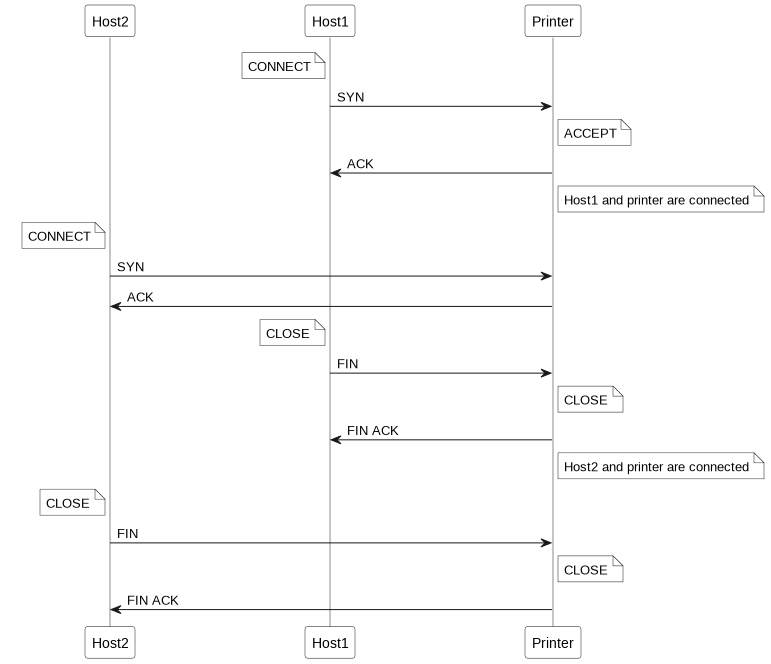
TCP connection queue functionality allows the printer to return an acknowledgment response [ACK] to a connection request [SYN] from another host while the printer is connected to one host.
For connection with one host, this function prevents the printer from returning a forced disconnection [RST] to the host if the printer receives the next connection request [SYN] ahead in case a process of connection termination [FIN] is delayed by network delay.
TCP connection queue: Disabled
While connected to one host, the printer returns a forced disconnection [RST] to a connection request [SYN] from another host.
TCP connection queue: Enabled
While connected to one host, the printer returns an acknowledgment response [ACK] to a connection request [SYN] from another host.
Only 1 port connection of Status 3, 4, 5 is supported when TCP connection queue is enabled.
Printer Status
Status Mode
For CL4NX/CL6NX, LR4NX-FA, FX3-LX, CT4-LX/HC4-LX, S84NX/S86NX and CL4-SXR/CL6-SXR
There are three types of mode for status return when using LAN or Wireless LAN interface.
- Status4/Cycle response mode (2 port connection or 1 port connection)
Port1 is used for print data port, Port2 is used for status return, Port3 is used for print data port and status return.
Printer status is output at certain period (500 to 1000 ms interval). Printer Status is returned when the printer receives status request command from host.
- Status4/ENQ response mode (2 port connection or 1 port connection)
Port1 is used for print data port, Port2 is used for status return, Port3 is used for print data port and status return.
Printer Status is returned when the printer receives status request command from host.
- Status3, Status5, StatusL*1/ENQ response mode (1 port connection)
Port1 is used for both print data port and status return port. Port3 is used for both print data port and status return port.
[ACK]*2 is returned when the printer receives print request command from host, and printer status is returned when the printer receives status request command from host.
When the Status3, L is used, label printing using a printer driver is unavailable.
- StatusL is only support with LR4NX-FA
- The printer sends back an [ACK] when status3 is used. When status5 is used, the printer does not send back an [ACK].
For PW208NX and PW4NX
There are two types of mode for status return when using Wireless LAN interface.
- Status4/ENQ response mode (2 port connection or 1 port connection)
Port1 is used for print data port, Port2 is used for status return, Port3 is used for print data port and status return.
Printer Status is returned when the printer receives status request command from host.
- Status3/ENQ response mode (1 port connection)
Port1 is used for both print data port and status return port. Port3 is used for both print data port and status return port.
[ACK] is returned when the printer receives print request command from host, and printer status is returned when the printer receives status request command from host.
When the Status3 is used, label printing using a printer driver is unavailable.
Data Format of Status Return
2 ports connection (Status4 return)
| Number of byte to send 4 bytes 0000001CH |
ENQ 1 byte 05H |
STX 1 byte 02H |
ID number 2 bytes |
Status 1 byte |
Remaining labels 6 bytes |
JOB name 16 bytes |
ETX 1 byte 03H |
(Total 32bytes)
Refer to Return Status of Status4 for the description of "Status".
1 port connection (Status5 return)
| STX 1 byte 02H |
Specified item No. 5 bytes |
Specified item status 2 bytes |
Currently processing item No. 5 bytes |
Currently processing item status 2 bytes |
Number of currently processing item to be printed 6 bytes |
ETX 03H 1 byte |
(Total 22bytes)
Refer to Return Status of Status5 for the description of "Status".
1 port connection (Status3 return, StatusL return)
| STX 1 byte 02H |
ID number 2 bytes |
Status 1 byte |
Remaining labels 6 bytes |
ETX 1 byte 03H |
(Total 11bytes)
Refer to Return Status of Status3 or Return Status of StatusL (LR4NX-FA Only) for the description of "Status".
Sequence
Status4/Cycle response mode (2 ports connection or 1 port connection)
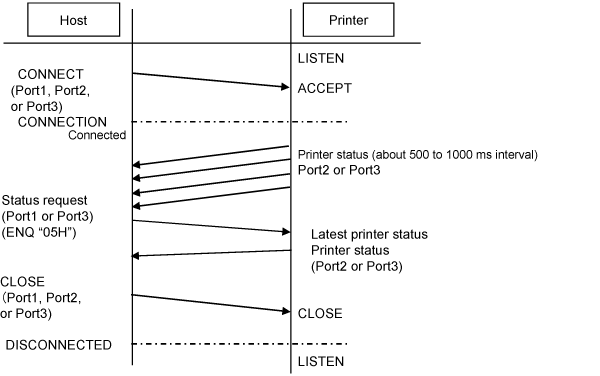
The printer returns status in the interval of 500 to 1000 ms. The latest printer status is returned when the printer receives status request command [ENQ(0x05)] from host.
Status4/ENQ response mode (2 ports connection or 1 port connection)
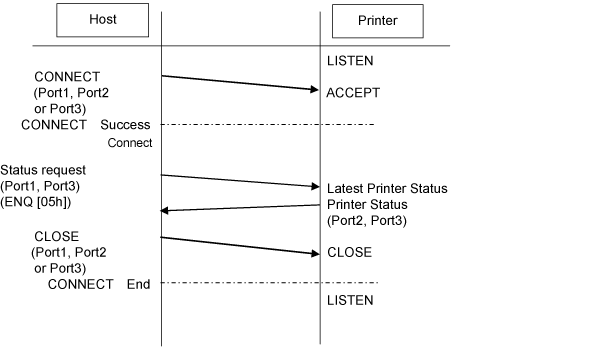
The latest printer status is returned after the printer receives status request command [ENQ(0x05)] from host.
Status3, Status5, StatusL/ENQ response mode (1 port connection)
The printer sends [ACK] after receiving print request command from host and sends printer status after receiving status request command [ENQ(0x05)] from host.
Switching LAN and WLAN (CL4NX/CL6NX and S84NX/S86NX Only)
This feature switches LAN and WLAN so that LAN can be used while the WLAN unit is connected.
Select the interface from Interface > Network > Interface on LCD.
There are three options to select from as below.
| Item name | Description |
|---|---|
| AUTO | LAN is enabled when LAN cable is connected at printer startup. WLAN will be enabled if the printer detects that LAN cable is not connected. |
| LAN | Enables LAN and disables WLAN. |
| Wi-Fi | Enables WLAN and disables LAN. |
If the settings are changed, they will be enabled after restarting the printer.
It is also possible to implement from DC2 command separately from LCD.
Restrictions
- The settings will automatically be switched to "AUTO" if you start up the printer after detaching the WLAN unit with the settings set to "Wi-Fi".
Firewall
Firewall function
Firewall can improve the security. It prevents an unauthorized access from external computers and malicious programs. When firewall is enabled, only the services and ports which are allowed will be able to access.
This firewall function uses the packet filtering setting function to control the communication in the printer. It will control communication network of the printer separately for each chain (INPUT, OUTPUT, FORWARD). As the basic policy of filtering, OUTPUT is all allowed (ACCEPT), INPUT and FORWARD are all disallowed (DROP). The customize setting can be done in INPUT chain to allow the communication for the necessary packet. In addition to registering services and ports, it is also possible to specify allowed port individually. Protocol (TCP or UDP, etc.), direction (source port or destination port) and port number are required for specify allowed port setting. For PING, ICMP type must be specified.
Allowed services and ports setting
This below table shows the packet filtering setting for each Allowed services and port setting.
| Allowed services and ports | TCP Source Port | TCP Destination Port | UDP Source Port | UDP Destination Port | ICMP |
|---|---|---|---|---|---|
| Data Ports*1 | - | 1024, 1025, 9100 | - | - | - |
| FTP | - | 20, 21 | - | - | - |
| FTPS*2 | - | 20, 21 | - | - | - |
| LPD | - | 515 | 53 | - | - |
| MAILC | 465, 587 | - | 53 | - | - |
| NTP | - | - | 53, 123 | - | - |
| Online Services*3 | 443, 8883 | - | 53 | - | - |
| PING | - | - | - | - | 0, 8 |
| Proxy*4 | - | - | - | - | - |
| SATO All-In-One Tool | - | 9100 | - | 161, 19541 | - |
| SCP | 22 | - | 53 | - | - |
| SFTP*5 | - | 22 | - | - | - |
| SNMP Agent | - | - | - | 161 | - |
| WEBC | 80, 443, 8080 | - | 53 | - | - |
| WebConfig | - | 80, 443 | - | - | - |
| IPP*6 | - | 631 | - | - | - |
| SATO App Storage*6 | 80, 443, 8883 | - | 53 | - | - |
| SOTI Connect*6 | 443, 1883 | - | 53 | - | - |
| mDNS*6 | - | - | 5353 | 5353 | - |
| AEP Tools*6 | - | 9101 | - | - | - |
| Online Services | TCP Source Port | TCP Destination Port | UDP Source Port | UDP Destination Port | ICMP |
|---|---|---|---|---|---|
| Disable | - | - | - | - | - |
| On-Demand | - | - | - | - | - |
| Real-Time with MQTT | 443, 8883 | - | 53 | - | - |
| Real-Time with MQTT over WebSocket | 443 | - | 53 | - | - |
| Light | 443 | - | 53 | - | - |
- The setting which was showed in the table is initial setting. It may be changed due to other setting.
- CL4NX/CL6NX, FX3-LX (International), CT4-LX/HC4-LX, LR4NX-FA and S84NX/S86NX only
- The setting which was showed in the table is initial setting. It may be changed due to other setting.
- CT4-LX/HC4-LX and PW4NX only
Port number specified in the proxy setting (80 if not specified). - PW4NX only
- CL4-SXR/CL6-SXR only
DHCP Option Specification
DHCP option has the octet strings of various lengths. The first octet is the option code. The 2nd octet is the number of subsequent octets. And the remaining octets are depending on option code. This chapter describes each option specification.
DHCP Option 12 (PW4NX and CL4-SXR/CL6-SXR only)
This option was defined by RFC2132 (DHCP Options and BOOTP Vendor Extensions). And that can specify the host name. You can qualify this host name using by the local domain name. Characters restriction is conformed to RFC1035.
This option code is 12 and the minimum length of the host name is 1 character.
| Code | Len | Hostname | ||||||
| 12 | n | h1 | h2 | h3 | h4 | h5 | h6 | … |
DHCP Option 77 (PW4NX and CL4-SXR/CL6-SXR only)
This option was defined by RFC3004 (The User Class Option for DHCP). That can specify the user class. DHCP client uses that specifies option or category of user and application to identify the type.
This option code is 77 and the configuration is as follows:
| Code | Len | Value |
| 77 | N | Use Class Data ('Len'Octets) |
| UC_Len_i | User_Class_Data_i |
| L_i | Opaque-Data ('UC_Len_i'Octets) |
DHCP Option 81 (CL4NX/CL6NX, LR4NX-FA, FX3-LX (International), CT4-LX/HC4-LX, PW4NX, and S84NX/S86NX and CL4-SXR/CL6-SXR only)
DHCP server has to recognize FQDN of client that DHCP server leases address, to update mapping of IP address and FQDN. The client FQDN is defined to send FQDN from client to server.
This option code is 81. The Len includes number of octets following the Len field and that minimum is 3 octets.
| Code | Len | Domain name | |||
| 81 | n | Flags | RCODE1 | RCODE2 | … |
DHCP Option 39 (CL4-SXR/CL6-SXR only)
* DHCPv6 option 39 is enabled if either the hostname option or the FQDN option is enabled.
See RFC4704 for details.
DHCP Option 15 (CL4-SXR/CL6-SXR only)
See RFC3315 for details.
Notes
Common with LAN /Wireless LAN interface
- 150 ms to 200 ms interval is required to close port then open port, if you want to open and close print data port (Port 1), status port (Port 2) and send/received port (Port 3). Short interval setting may cause double connection. Request for double connection occurs when [CONNECT] request is made to Port (Port1, Port2 or Port3) in addition to the request [CONNECT (Socket OPEN)] which has already been made to Port (Port1, Port2 or Port3). When printer receives request for double connection, it sends response of disconnection (Socket CLOSE) to the request.
- When using LAN and wireless LAN at the same time, NTP time acquisition and SNMP trap information transmission are performed from the last link up interface.
LAN Interface
Communication may not be established if you plug in/out LAN cable while PC is connected. Do not plug in/out LAN cable while starting up printer. When LAN cable is removed/inserted and it caused communication loss, please turn on the power of the printer again.
Wireless LAN interface
- Communication distance and transmission rate between host and the printer (Wireless LAN board) varies by operating environment due to operating conditions of Wireless LAN.
-
It is recommended to use it in Infrastructure mode on the condition that display of field intensity of Wireless LAN is level3 or above (following chart).

- It is likely that communication data is lost if environment of Wireless LAN is not appropriate because Wireless LAN is portable or due to ambient conditions.
-
Please set frequency of channel for each group to every [5 channel] or more than 5 channels if you want to place few Wireless LAN network groups next to each other.
Ex) When channel of group1 is [1], channel of group 2 shall be set to [6] channel or after.