Communication Protocol
Types of Communication Protocol and Reception Mode
The available receive mode differs depending on the combination of interface and communication protocol.
However, the NFC (Pass through) communication protocol is limited to Multiple buffer mode only.
- Multiple receive mode
Able to receive data up to reception buffer near full size during printing.
- Bi-directional communication (Status3, Status4, Status5, StatusL*1)
Monitors printer status to carry out data communication.
- No bidirectional communication (READY/BUSY)
Hardware controls data communication.
- Refer to each interface for the detailed description of READY/BUSY, XON/XOFF, Status3, Status4, Status5, and StatusL*1.
- LR4NX-FA only
Following chart shows the communication protocols available for each interface.
Refer to Overview for the interfaces supported by each model.
Yes: Available, No: Unavailable
| Communication protocol | RS-232C | IEEE1284 | USB | LAN | Wireless LAN | Bluetooth | NFC |
|---|---|---|---|---|---|---|---|
| Multiple buffer
Without bidirectional communication |
No | Yes | No | No | No | No | Yes |
| READY/BUSY
Multiple buffer Without bidirectional communication |
Yes | No | No | No | No | No | No |
| XON/XOFF
Multiple buffer With bidirectional communication |
Yes | No | No | No | No | No | No |
| Status3
Multiple buffer With bidirectional communication |
Yes | No | No | Yes | Yes | Yes | No |
| Status4
Multiple buffer With bidirectional communication |
Yes | Yes | Yes | Yes | Yes | Yes | No |
| Status5
Multiple buffer With bidirectional communication |
Yes | Yes | Yes | Yes | Yes | No | No |
| StatusL*1
Multiple buffer With bidirectional communication |
Yes | Yes | - | Yes | - | - | - |
- LR4NX-FA only
Return Status
The purpose of return status is to manage the printer status from the host, and the printer returns the status by request command from host.
There are four types of return status format; Status3, Status4, Status5 and StatusL*1. Each return status is listed below.
The printer returns the status after receiving request command.
| Communication protocol | Command | Command name |
|---|---|---|
| READY/BUSY | - | - |
| XON/XOFF | - | - |
| Status3 | ENQ | Status request command |
| CAN | Cancel request command | |
| Status4 | ENQ | Status request command |
| CAN | Cancel request command | |
| DLE | Print stop request command | |
| DC1 | Print start request command | |
| Status5 | SOH + ENQ | Status request command |
| SOH + CAN | Cancel request command | |
| SOH + DLE | Print stop request command | |
| SOH + DC1 | Print start request command | |
| StatusL*1 | ENQ | Status request command |
| CAN | Cancel request command |
- LR4NX-FA only
Note
- In Status3, 4 and L, command is processed for ESC+ENQ and ESC+CAN and returns status, but does not process command nor returns status for ESC+DLE and ESC+DC1.
- The ENQ response delay setting is applied to ENQ responses for Status 3: all communication interfaces, and Status 4: all communication interfaces (excluding periodic LAN responses).
Remarks
When you acquire return status from the printer, please input transmission interval time after sending each command to the printer.
PW208NX/PW208mNX: Returning start up time will be delayed about 1.0 second.
| Command | Command name | Transmission interval time (Actual value) |
|---|---|---|
| ENQ (05H) | Status request |
5 ms or more
* This varies depending on the type of communication interface. |
| CAN (18H) | Cancel request | 500 ms or more |
| DLE (10H) | Print stop request | |
| DC1 (11H) | Print start request |
ENQ (Status request)
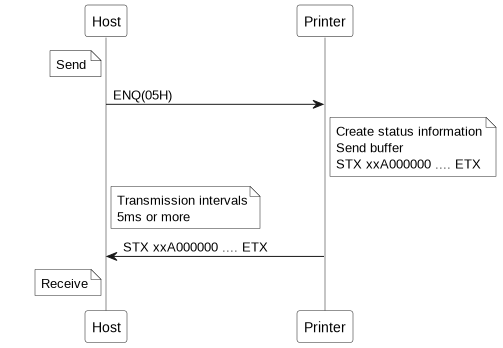
The value shown above is a guideline for the wait time required before reading status information from the printer. The actual wait time may vary depending on the interface type, settings, and network environment. A wait time of 100 ms or longer is recommended.
CAN (Cancel request)
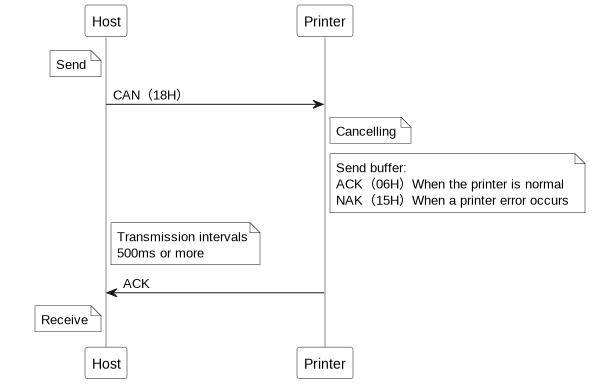
The values stated above are target values for queuing time until host reads ACK from the printer. It varies by the interface type or settings, and network environment, etc.
The rough standard for transmission interval shall be 900 ms or more when you request cancel (18H) when receive buffer is near full.
Return Status of Status3
The purpose of this communication protocol is to return the printer's condition and reply as a status to the host by receiving four types of request commands and print command.
Status Request Command
This command returns the Job ID number of the received data currently in processing and printing, the printer status and the number of remaining label to print to the host. All "0" (HEX 30H) is returned for print quality when the print is completed or when there is no received data. Space (HEX 20H) is returned for the Job ID numbers when command for the designation of the job ID number <ID> is not specified.
Please do not send ENQ (Status request) while sending print data (STX <A> to <Z> ETX). Status would not be returned properly or print would not be performed properly if ENQ is sent.
Command
ENQ (HEX 05H)
Return status, Format

When Legacy Status setting for Port 3 is valid

For details, refer to Status List of Status3.
Cancel Request Command
This command enables to cancel print jobs and to clear the entire contents of receive buffer.
* LR4NX-FA: The print commands and pass commands waiting for being received are cleared.
The printer status after finishing process is returned.
Command
CAN (HEX 18H)
Return status list
| Return Status | Contents |
|---|---|
| ACK (HEX 06H) | No error in the printer |
| NAK (HEX 15H) | Error in the printer
(LR4NX-FA: Cancellation is completed.) |
Note
- When the cancel request command has been sent, wait more than 500 ms before sending the next data.
- This command shall not be used while sending other data like print data.
- LR4NX-FA: Even when the printer is in the error state, a cancel request command is enabled.
Important (LR4NX-FA only)
- Do not send commands or other instructions before the cancel operation is completed. Print data or settings received during the cancel operation are not guaranteed for normal operation.
- When a cancel request is received, if a label is being printed or is waiting for being
applied, cancel operation is put on hold until the application of the label is
completed.
The held cancel will be activated after the application is completed (or when an error occurs), and the remaining print quantity and received data will be cleared.
Print Command
Print starts after receiving print command (STX <A> to <Z> ETX).
The printer status after receiving command is returned.
Return status list (the printer status)
RS-232C, Bluetooth, or LAN/WLAN interface
| Return Status | Contents |
|---|---|
| ACK (HEX 06H) | No error in the printer |
| NAK (HEX 15H) | Error in the printer |
Interface other than RS-232C, Bluetooth, and LAN/WLAN
| Return Status | Contents |
|---|---|
| None | No response is returned. |
Command example of Job ID number <ID>
<A>
<ID>01
<V>100<H>100<P>2<L>0202<X20>,ABC
<Q>1
<Z>
Refer to [ESC+ID] Job ID Number for details.
Note
- CL4NX/CL6NX: In Ver1.8.0 and after, ACK is returned during Sleep and Wake Up.
- PW208NX/PW208mNX: In Ver1.7.3 and after, ACK is returned during Sleep and Wake Up.
- CL4NX/CL6NX, PW208NX/PW208mNX, CL4-SXR/CL6-SXR: If ESC+Z is received and error occurs at the same time when the printer wakes up from Sleep mode, there is a timing to return ACK. But, this rarely occurs in operation because status is checked by ENQ.
Important (LR4NX-FA only)
-
The operation after clearing the error differs between during label printing and during application depending on the setting of the item completion condition.
- For "Item Completion Condition: PRINT END", if an error occurs during the label printing
operation, then labels are reissued with the content from that operation until the label
printing operation is completed after the error is cleared.
If an error occurs during the label application operations, then a normal label is considered to have been printed and the next label is printed after the error is cleared.
- For "Item Completion Condition: APPLY END", if an error occurs during the label printing and
application operations, then labels are reissued with the content from that operation until
the label printing and application operations are completed after the error is cleared.
(If the power is turned off during an operation, the printer initializes so reissue is not done.)
- For "Item Completion Condition: PRINT END", if an error occurs during the label printing
operation, then labels are reissued with the content from that operation until the label
printing operation is completed after the error is cleared.
Pass-through (LR4NX-FA only)
When receiving the pass-through <PA>, the printer allows an application target object pass without a label being applied.
The printer status after receiving command is returned.
Command
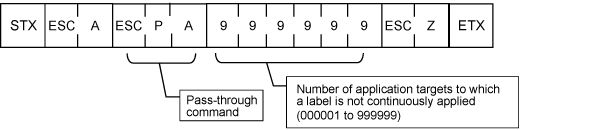
Do not send a command other than the pass-through <PA> to the command statement (STX - ETX).
(Job ID number specification <ID> and job name specification <WK> are available.)
This command is processed only when the printer is online.
(If an error occurs during the object passing processing and then when the online mode is activated after the error is cleared, the operation resumes with the pass processing that have not been completed. Activation inputs during the error are ignored. During the offline mode, when an application start signal is input as the Activate Apply signal, an error occurs, or when input as the Activate Apply (Level) signal, the signal is ignored.
Return status list
| Return Status | Contents |
|---|---|
| ACK (HEX 06H) | No error in the printer |
| NAK (HEX 15H) | Error in the printer
(The command will be normally received.) |
Return Status of Status4
The purpose of this communication protocol is to return the printer's condition and reply as a status to the host by receiving six types of request commands and print command.
Status Request Command
This command returns the Job ID number of the received data currently in processing and printing, the status of the printer, and the number of remaining labels to print to the host. All "0" (HEX 30H) is returned for print quantity when the print is completed or when there is no received data. Space (HEX 20H) is returned for the Job ID numbers when command for the designation of the job ID number <ID> is not specified.
Please do not send ENQ (Status request) while sending print data (STX <A> to <Z> ETX). Status would not be returned properly or print would not be performed properly if ENQ is sent.
Command
ENQ (HEX 05H)
Return status, Format
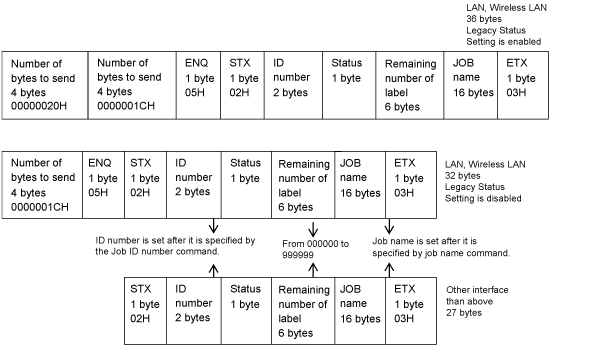
For details, refer to Status List of Status4.
Contributing factor to receive buffer near full
"Receive buffer near full" occurs when the buffer's free space goes down to 0.95 MB out of the 2.95 MB of receive buffer.
* The capacity of the receive buffer: 3MB (CL4-SXR/CL6-SXR), 2.95MB(other models).
Contributing factor to cancellation of receive buffer near full
"Receive buffer near full" is cleared when the buffer's free space increased to 1.95 MB.
Cancel Request Command
This command enables to cancel print jobs and to clear the entire contents of receive buffer.
* LR4NX-FA: The print commands and pass commands waiting for being received are cleared.
The printer status after finishing process is returned.
Command
CAN (HEX 18H)
Return status list
| Return Status | Contents |
|---|---|
| ACK (HEX 06H) | No error in the printer |
| NAK (HEX 15H) | Error in the printer
(LR4NX-FA: Cancellation is completed.) |
* In the case of LAN or wireless LAN interfaces, the following response data will be returned.
| Legacy Status setting: invalid | Legacy Status setting: valid |
|---|---|
|
Size information (4 bytes) + [ACK] or [NAK] ・In the case of [ACK]: 0x0000000106 ・In the case of [NAK]: 0x0000000115 |
[ACK] or [NAK] |
Note
- When the cancel request command has been sent, wait more than 500 ms before sending the next data.
- Please do not send CAN (Cancel request command) while STX <A> to <Z> ETX. CAN (Cancel request command) would not be sent properly.
- LR4NX-FA: Even when the printer is in the error state, a cancel request command is enabled.
Important (LR4NX-FA only)
- Do not send commands or other instructions before the cancel operation is completed. Print data or settings received during the cancel operation are not guaranteed for normal operation.
- When a cancel request is received, if a label is being printed or is waiting for being
applied, cancel operation is put on hold until the application of the label is
completed.
The held cancel will be activated after the application is completed (or when an error occurs), and the remaining print quantity and received data will be cleared.
Print Command
This command (<A> to <Z>) starts the printing process.
The printer status after receiving command is returned.
Return status list
RS-232C or Bluetooth interface
| Return Status | Contents |
|---|---|
| ACK (HEX 06H) | No error in the printer |
| NAK (HEX 15H) | Error in the printer |
* If the printer is in the Sleep status or WakeUp status, it returns not a NAK but an ACK.
Other than RS-232C and Bluetooth interface
| Return Status | Contents |
|---|---|
| None | No response is returned. |
Important (LR4NX-FA only)
-
The operation after clearing the error differs between during label printing and during application depending on the setting of the item completion condition.
- For "Item Completion Condition: PRINT END", if an error occurs during the label printing
operation, then labels are reissued with the content from that operation until the label
printing operation is completed after the error is cleared.
If an error occurs during the label application operations, then a normal label is considered to have been printed and the next label is printed after the error is cleared.
- For "Item Completion Condition: APPLY END", if an error occurs during the label printing and
application operations, then labels are reissued with the content from that operation until
the label printing and application operations are completed after the error is cleared.
(If the power is turned off during an operation, the printer initializes so reissue is not done.)
- For "Item Completion Condition: PRINT END", if an error occurs during the label printing
operation, then labels are reissued with the content from that operation until the label
printing operation is completed after the error is cleared.
Print Stop Request Command
This command halts the printing process.
The printer status after receiving command is returned.
Command
DLE (HEX 10H)
Return status list
| Return Status | Contents |
|---|---|
| ACK (HEX 06H) | No error in the printer |
| NAK (HEX 15H) | Error in the printer |
* In the case of LAN or wireless LAN interfaces, the following response data will be returned.
| Legacy Status setting: invalid | Legacy Status setting: valid |
|---|---|
|
Size information (4 bytes) + [ACK] or [NAK] ・In the case of [ACK]: 0x0000000106 ・In the case of [NAK]: 0x0000000115 |
[ACK] or [NAK] |
Please do not send DLE (Print stop request command) while STX <A> to <Z> ETX. DLE (Print stop request command) would not be sent properly. Font data, graphic data, barcode data will not be processed as DLE transmission (Print stop request).
Print Start Request Command
This command releases the pause mode of the printer and restarts the printing process.
The printer status after receiving command is returned.
Command
DC1 (HEX 11H)
Return status list
| Return Status | Contents |
|---|---|
| ACK (HEX 06H) | No error in the printer |
| NAK (HEX 15H) | Error in the printer |
* In the case of LAN or wireless LAN interfaces, the following response data will be returned.
| Legacy Status setting: invalid | Legacy Status setting: valid |
|---|---|
|
Size information (4 bytes) + [ACK] or [NAK] ・In the case of [ACK]: 0x0000000106 ・In the case of [NAK]: 0x0000000115 |
[ACK] or [NAK] |
Pass-through Command (LR4NX-FA only)
When receiving the pass-through command, the printer allows an application target object pass without a label being applied.
The printer status after receiving command is returned.
Command
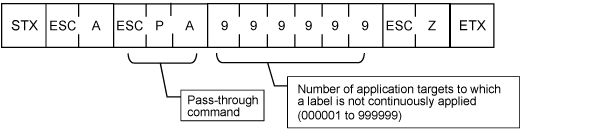
Do not send a command other than the pass command to the command statement (STX - ETX).
(Job ID number specification <ID> and job name specification <WK> are available.)
This command is processed only when the printer is online.
(If an error occurs during the object passing processing and then when the online mode is activated after the error is cleared, the operation resumes with the pass processing that have not been completed. Activation inputs during the error are ignored. During the offline mode, when an application start signal is input as the Activate Apply signal, an error occurs, or when input as the Activate Apply (Level) signal, the signal is ignored.)
Return status list
RS-232C interface
| Return Status | Contents |
|---|---|
| ACK (HEX 06H) | No error in the printer |
| NAK (HEX 15H) | Error in the printer
(The command will be normally received.) |
Interface other than RS-232C
| Return Status | Contents |
|---|---|
| None | No response is returned. |
Return Status of Status5
The following is functionality provided by this communication protocol.
Data Transmission Format
- All control commands like print data, status request, cancel request are specified by adding STX
(HEX 02H) and ETX (HEX 03H).
* It is not necessary to add STX (HEX 02H) and ETX (HEX 03H) for setting data.
- Item No. must be added to print data.
- BCC must be added at the end of item end (<Z>) when BCC check functionality is set to
enabled.
BCC is not necessary for obtaining information like status request etc.
Use example)
- Print data
STX <A> Print data <Z> BCC ETX - Status request
STX SOH ENQ 0000 ETX
- Print data
Item Status Obtaining Command
This command searches for the specified item number from the end of history buffer and returns the status of target item to host.
Command
SOH (HEX 01H) + ENQ (HEX 05H)
Format
STX + SOH + ENQ + aaaaa + ETX
- Parameter
a [Item No.] Valid range: 00000 to 99999 /
*****Parameter must be 5 digits.
Parameter [
*] is [HEX 2AH].Use item No. to be compatible with previous printers. Ignore Item No.
Always returns the status of final item.
Return status format
| [1] STX |
[5] Specified item No. *1 |
[2] Final item status *1 |
[5] Processing item No. |
[2] Processing item status *2 |
[6] Number of label for processing item |
[1] ETX |
STX(HEX 02H)
ETX(HEX 03H)
When Legacy Status setting is valid
| [4] Size |
[1] STX |
[5] Specified item No. *1 |
[2] Final item status *1 |
[5] Processing item No. |
[2] Processing item status *2 |
[6] Number of labe for processing item |
[1] ETX |
STX(HEX 02H)
ETX(HEX 03H)
Numerical number in [ ] indicates the number of bytes in use. Total 22 bytes of return status format (Fix). Header of four bytes is added before return status when Legacy Status for Port9100 is valid and Port3 is used.
Item No. is filled by "0".
The currently processing item No. will become space (20H) after printing is completed.
(LR4NX-FA: When [Item Completion Condition] is [Print End])
- Specified item No. is
*****(0x2A2A2A2A2A) and final item status is**(0x2A2A) fix. - The first digit shows the status of processing item and the second digit shows the error.
For details about processing item status, refer to Status List of Status5.
Example
STX SOH ENQ 00001 ETX
STX SOH ENQ ***** ETX
Note
- This command shall not be used while sending other data like print data. Status would not be returned properly or print would not be performed properly if this command is sent while sending print data.
- The printer returns the current status after receiving this command.
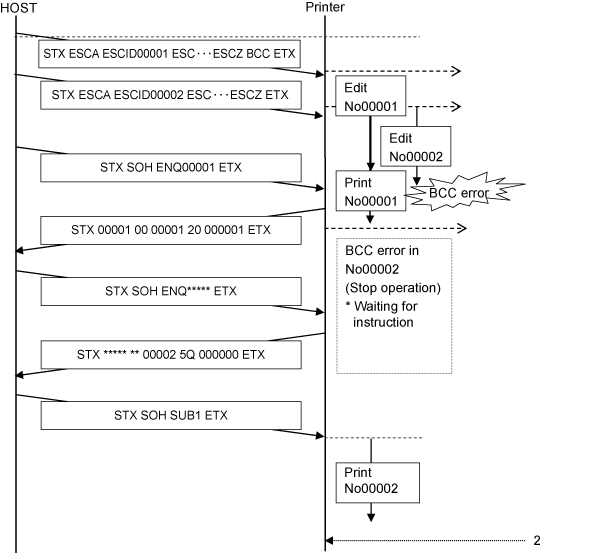
BCC Check Function
BCC (Block Check Code) is 1 byte of data calculated XOR of 1 send data (<A>-<Z>). BCC shall be added to the end of data (<Z>) per item for host to send data to the printer.
The printer checks the validity of receiving data by calculating BCC per data item being received and compares it with sent BCC. When those BCC are different, the printer judges that receiving data is incorrect and causes [BCC error] before printing the item then stops printing operation.
The following are cancellation method of BCC error.
| Press right soft key | Resume printing from print data with BCC error. |
| Send SUB command | Resume printing where it left off after canceling BCC error.
This commands able to specify whether to print data with error or cancel the data. |
| Press left soft key | Cancel all print data then resume printing from the next item. |
Calculation range of BCC)
- Print data
STX <A> <ID>00001 Print data <Z> BCC ETX Calculation range of BCC
Note
- Print data is only target for BCC check. Error will not be detected for error which does not require printing operation like registration data or printer setting command etc.
- Add only data, which starts from data transmission start <A> and ends at data transmission <Z> for BCC.
- BCC calculates exclusive OR for data in the calculation range.
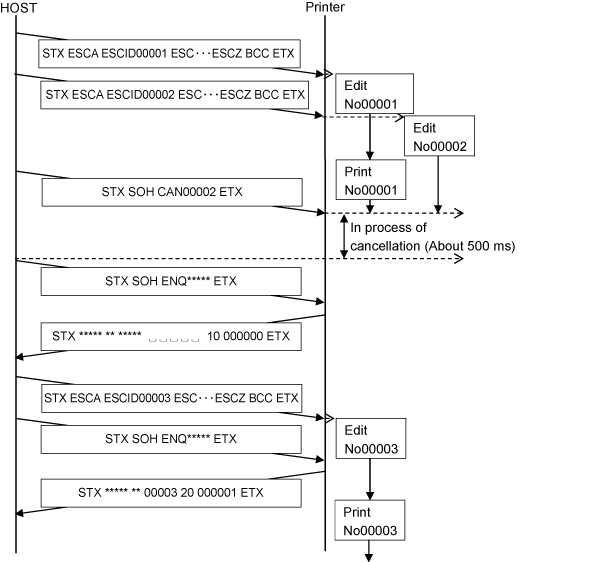
Cancel Request Command
This commands cancel all items.
Command
SOH (HEX 01H) + CAN (HEX 18H)
Format
STX + SOH + CAN + aaaaa + ETX- Parameter
a [Item No.] Valid range: 00000 to 99999 /
*****Parameter must be 5 digits.
Parameter [
*] is [HEX 2AH].Cancel all items regardless of Item No.
Example
STX SOH CAN 00001 ETX
STX SOH CAN ***** ETX
Note
- This command shall not be used while sending other data like print data.
- Please note that there is no return data for this command. Host will send item acquiring command (SOH+ENQ) so please check the result by checking the return status.
Print Stop Request Command
This command stops printing operation.
Command
SOH (HEX 01H) + DLE (HEX 10H)
Format
STX + SOH + DLE + ETX
Example
STX SOH DLE ETX
Note
- This command shall not be used while sending other data like print data.
- Please note that there is no return data for this command. Host will send item acquiring command (SOH+ENQ) so please check the result by checking the return status.
Print Start Request Command
This command cancels print operation in hold, which was stopped by print stop command (SOH+DLE), then resume printing operation.
Command
SOH (HEX 01H) + DC1 (HEX 11H)
Format
STX + SOH + DC1 + ETX
Example
STX SOH DC1 ETX
Note
- This command shall not be used while sending other data like print data.
- Please note that there is no return data for this command. Host will send item acquiring command (SOH+ENQ) so please check the result by checking the return status.
Status5 Return Error Cancellation Request Command
This command cancels Item No. error or BCC error and resume printing operation from the item with error.
Command
SOH (HEX 01H) + SUB (HEX 1AH)
Format
STX + SOH + SUB + a + ETX
a [Cancel]
0: Cancel error data
1: Print error data *[CL4-SXR/CL6-SXR] Not support.
Example
STX SOH SUB 0 ETX
Note
- Do not include this command to print data (<A>-<Z>).
- Please note that there is no return data for this command. Host will send item acquiring command (SOH+ENQ) so please check the result by checking the return status.
- Offline after error reset.
Pass-through Command (LR4NX-FA only)
When receiving the pass-through command, the printer allows an application target object pass without a label being applied.
The printer status after receiving command is returned.
Command
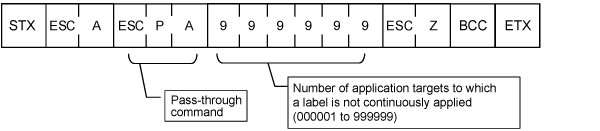
Do not send a command other than the pass command to the command statement (STX - ETX).
(Job ID number specification <ID> and job name specification <WK> are available.)
This command is processed only when the printer is online.
(If an error occurs during the object passing processing and then when the online mode is activated after the error is cleared, the operation resumes with the pass processing that have not been completed. Activation inputs during the error are ignored. During the offline mode, when an application start signal is input as the Activate Apply signal, an error occurs, or when input as the Activate Apply (Level) signal, the signal is ignored.)
Return Status of StatusL (LR4NX-FA Only)
The purpose of this communication protocol is to return the printer condition and reply as a status to the host by receiving five types of request commands and print command.
Status request command
This command returns the Job ID number of received data in processing, status of the printer and the number of labels completed application to the host.
Note that after a power OFF and ON the printer, when ENQ is received for the first time, the return status (Initial) is returned, and at subsequent times, the return status (Normal) is returned. After a power OFF and ON the printer, if receiving print data or other data (STX <A> - <Z> ETX) without receiving ENQ at first, the printer returns the return status (Normal) even when receiving ENQ for the first time after that.
Space (HEX 20H) is returned for the Job ID numbers when command for the designation of the job ID number <ID> is not specified.
Please do not send ENQ (Status request) while sending print data (STX <A> to <Z> ETX). Status would not be returned properly or print would not be performed properly if ENQ is sent.
Command
ENQ (HEX 05H)
Return status format
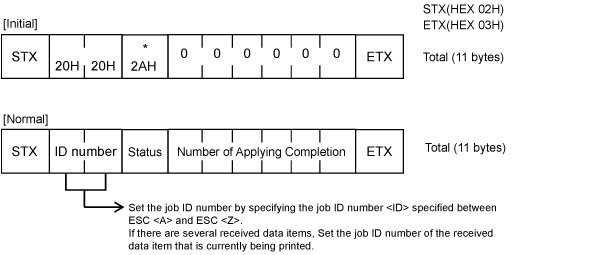
- When the power is turned on, the completion quantity of application is set to "000000".
After "999998", the number changes as follows: "999999" -> "000000" -> "000001" -> "000002".
Related command
Use this command to identify the print data obtained by multiple receive.
Store this command in the transmission data where the print data is stored.
[ESC+ES] Completion Quantity of Application
Store a desired number in the "Completion quantity of application" of the status.
Use this command as a system command separately from the print data.
For details, refer to Status List of StatusL.
Cancel Request Command
This command enables to cancel print jobs and to clear the entire contents of receive buffer. (The print commands and pass commands waiting for being received are cleared.)
The printer status after finishing process is returned.
Command
CAN (HEX 18H)
Return status list
| Return Status | Contents |
|---|---|
| ACK (HEX 06H) | No error in the printer |
| NAK (HEX 15H) | Error in the printer (Cancellation is completed.) |
Note
- When the cancel request command has been sent, wait more than 500 ms before sending the next data.
- This command shall not be used while sending other data like print data.
- Even when the printer is in the error state, a cancel request command is enabled.
Important
- Do not send commands or other instructions before the cancel operation is completed. Print data or settings received during the cancel operation are not guaranteed for normal operation.
- When a cancel request is received, if a label is being printed or is waiting for being applied, cancel operation is put on hold until the application of the label is completed.
- The cancel operation guarantees the "Completion quantity of application" in the return status.
To set the completion quantity of application to 0, separately use the command for setting the completion quantity of application.
Print Command
Print starts after receiving print command (STX <A> to <Z> ETX).
The printer status after receiving command is returned.
Return status list (the printer status)
| Return Status | Contents |
|---|---|
| ACK (HEX 06H) | No error in the printer |
| NAK (HEX 15H) | Error in the printer |
Command example of Job ID number <ID>
<A>
<ID>01
<V>100<H>100<P>2<L>0202<X20>,ABC
<Q>1
<Z>
Refer to [ESC+ID] Job ID Number for details.
Important
- When the statusL is used, if an error occurs during the label printing and application
operations, then after the error is cleared, labels are reissued with the content from that
operation until the label printing and application operations are completed.
(If the power is turned off during an operation, the printer initializes so reissue is not done.)
Pass-through command
When receiving the pass-through command, the printer allows an application target object pass without a label being applied.
The printer status after receiving command is returned.
Command
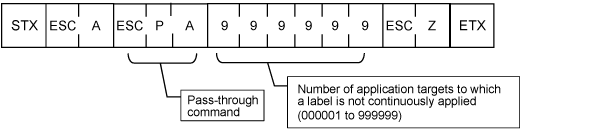
When the target objects have passed, the completion quantity of application in the status information (status for the ENQ request) is incremented.
Do not send a command other than the pass command to the command statement (STX - ETX).
(Job ID number specification <ID> and job name specification <WK> are available.)
This command is processed only when the printer is online.
(If an error occurs during the object passing processing and then when the online mode is activated after the error is cleared, the operation resumes with the pass processing that have not been completed. Activation inputs during the error are ignored. During the offline mode, when an application start signal is input as the Activate Apply signal, an error occurs, or when input as the Activate Apply (Level) signal, the signal is ignored.)
Return status list
| Return Status | Contents |
|---|---|
| ACK (HEX 06H) | No error in the printer |
| NAK (HEX 15H) | Error in the printer |
Completion Quantity of Application Specification Command
This command is setting the completion quantity of application in the ENQ response status to the set value.
The printer status after receiving command is returned.
Command
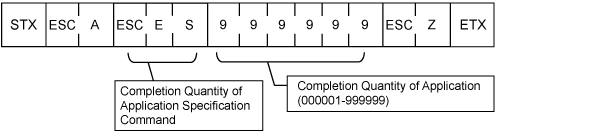
This command is provided only for the statusL and cannot be used with other protocols.
The completion quantity of application in the return status (return status for ENQ) is counted from the set quantity.
When the printer is turned off, the completion quantity of application in the return status is reset to zero.
Do not send this command during printing or application. (If there are unprocessed received data, do not send this command.)
Do not send to the command statement (between STX and ETX) a command other than the completion quantity of application specification command.
Return status list
| Return Status | Contents |
|---|---|
| ACK (HEX 06H) | No error in the printer |
| NAK (HEX 15H) | Error in the printer |
READY/BUSY
This communication protocol controls the reception of print data by the control of hard signal only.
Refer to RS-232C for the details.
XON/XOFF
This communication protocol communicates with the host to see if the printer is ready to receive data by sending "XON" (HEX 11H) or "XOFF" (HEX 13H) codes to signal line.
Refer to RS-232C for the details.
Status3
The purpose of this communication protocol is to control the printer status on host and to return status from the printer with request command from host.
Refer to Return Status of Status3 for the details of request command and return status.
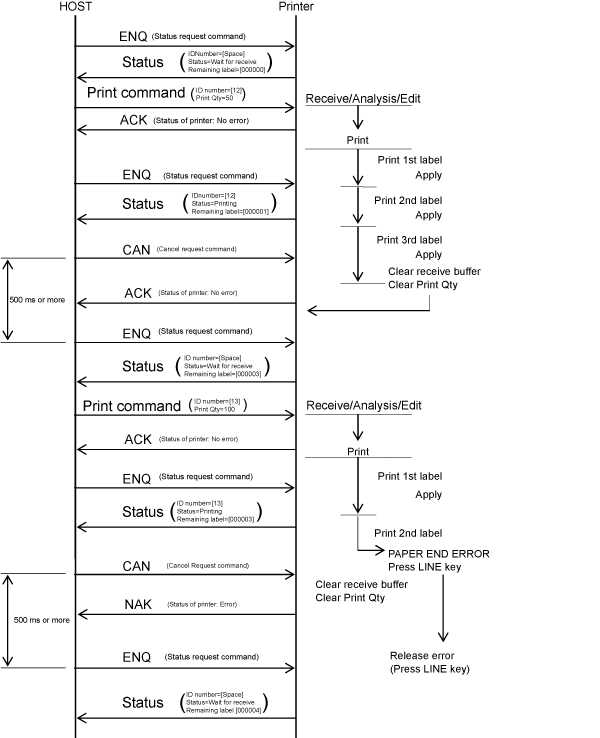
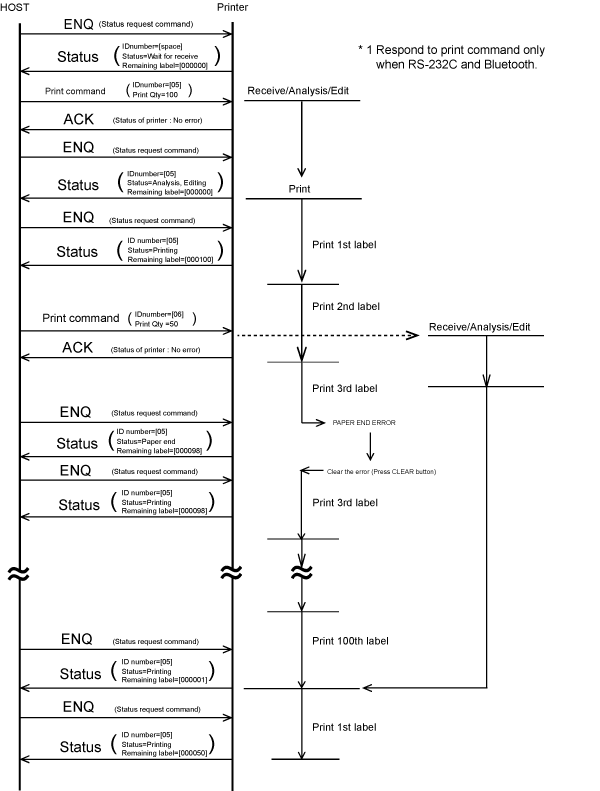
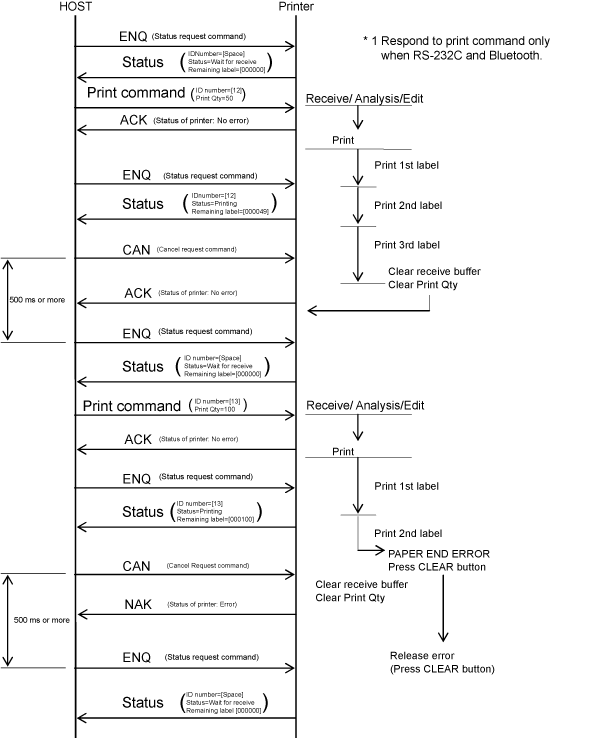
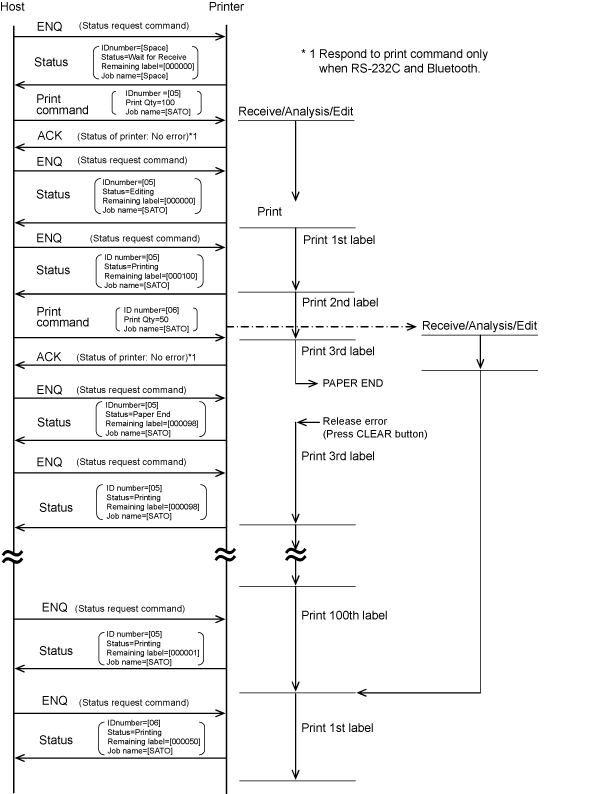
Return Sequence
When LAN/Wireless LAN interface is used, refer to Printer Status.
Normal
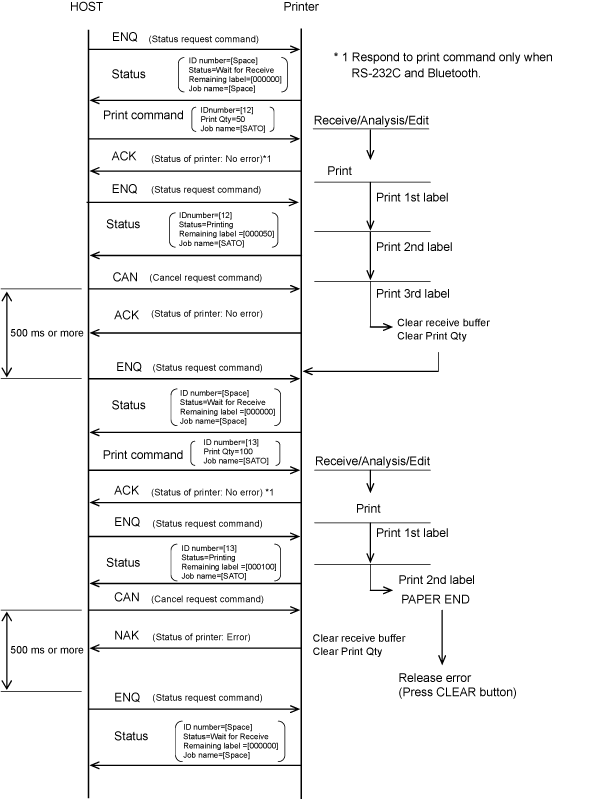
Cancel Request Command
Reference flow chart
Refer to the following flow chart for creating program at host with this protocol.
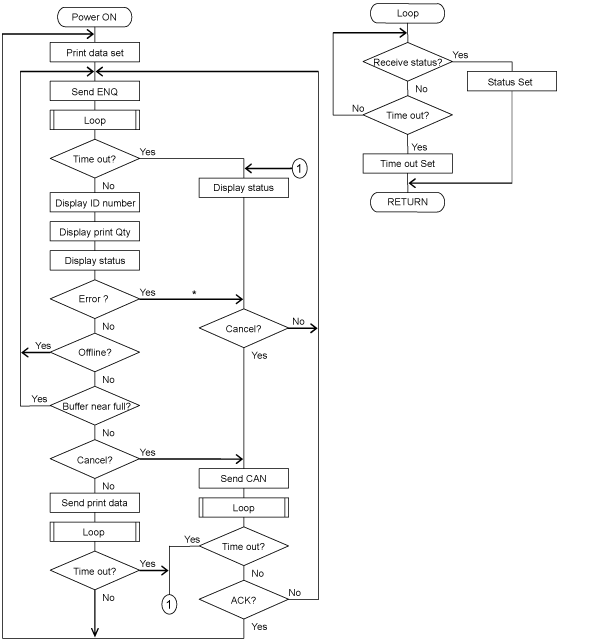
* Please make sure that error in the printer has been cleared by ENQ then send print data when the printer detects an error by checking status.
Status4
The purpose of this communication protocol is to control the printer status on host and to return status from the printer with request command from host.
Refer to Return Status of Status4 for the details of request command and return status.
Return Sequence
When LAN/Wireless LAN interface is used, refer to Printer Status.
Normal Process
Cancel Request Command
Status5
The purpose of this communication protocol is to monitor and to control the status of the print data on host, and this communication protocol has variety of functionalities.
Receive mode for this communication protocol is multi buffer mode.
Receiving Buffer Control
This protocol has 2 contributing factors to detect receive buffer near full to control information like receiving, print, cancel per item.
Contributing factor to receive buffer near full
"Receive buffer near full" occurs when the buffer's free space goes down to 0.95 MB out of the 2.95 MB of receive buffer.
* The capacity of the receive buffer: 3MB (CL4-SXR/CL6-SXR), 2.95MB(other models).
Contributing factor to cancellation of receive buffer near full
"Receive buffer near full" is cleared when the buffer's free space increased to 1.95 MB.
Return sequence
Refer to Printer Status when LAN/Wireless LAN interface is used.
Normal process
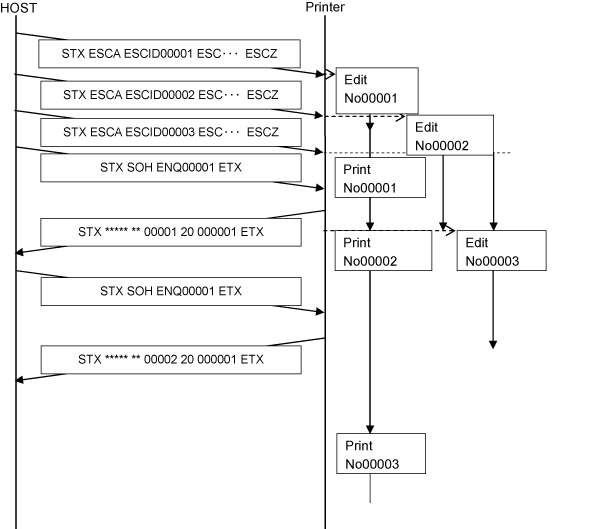
Cancellation
Error handling
StatusL (LR4NX-FA Only)
The purpose of this communication protocol is to control the printer status on host and to return status from the printer with request command from host.
Refer to Return Status of StatusL (LR4NX-FA Only) for the details of request command and return status.
Return sequence
Refer to Printer Status when LAN interface is used.
Normal process
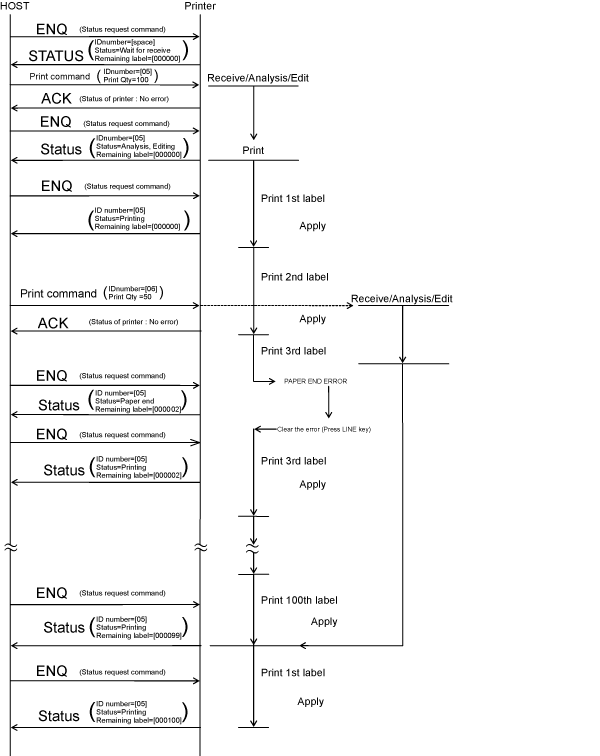
Cancel Request Command