RS-232C
Basic Specifications
This interface complies with RS-232C standard.
Various communication settings are available by the interface mode of the printer.
Interface
D-sub 9pin Female

Communication Settings
Setting range in communication settings mode
| Item | Configuration | Initial value |
|---|---|---|
| Data bit length | 7, 8 (bit) | 8 bit |
| Parity bit | NONE, ODD, EVEN | NONE |
| Stop bit | 1, 2 (bit) | 1 bit |
| Baud rate | 2400, 4800, 9600, 19200, 38400, 57600, 115200 (bps) | 115200bps |
| Protocol | READY/BUSY, XON/XOFF, Status3, Status4, Status5, StatusL*1
Refer to Communication Protocol for details. |
Status4 [LR4NX-FA]: StatusL |
| BCC check for status5 | Enable / Disable | Disable |
- LR4NX-FA only
Synchronization method
Asynchronous method
Receive buffer size
CL4-SXR/CL6-SXR:3.00MB
the others:2.95MB
0MB
MAX
Remaining 0.95MB
0MB
MAX
Remaining 1.95MB
Code
ASCII (7 bits) Graphic (8 bits)
Connector
Printer side: D-sub 9pin (female)
Cable side: D-sub 9pin (male)
Cable length: Equal to or less than 5 m
Transmission format
| Start | b1 | b2 | b3 | b4 | b5 | b6 | b7 | b8 | Stop |
When 7bit format is used, b8 is omitted.
Signal Level
High level: +5 to +12 V
Low level: −5 to −12 V
READY/BUSY
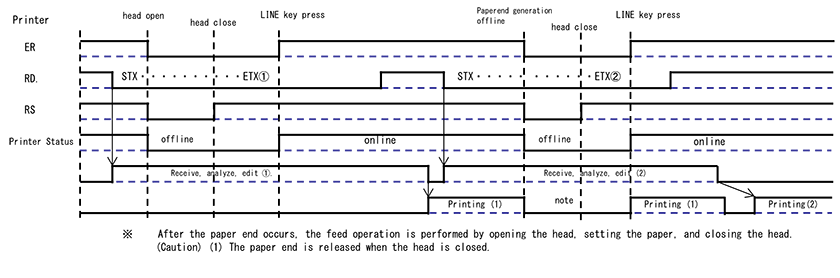
This communication protocol controls the reception of print data by the control of hard signal only.
When the print data ([STX] <A> to <Z> [ETX]) has been sent from the host in the conditions below, received data may not be accurate:
- When the printer is in offline state.
- When an error has occurred in the printer.
Connection diagram
1)D-sub 9pin
| Printer | Host | |||
| CD | 1 | 1 | CD | |
| RD | 2 | ----------------- | 3 | SD |
| SD | 3 | ----------------- | 2 | RD |
| ER | 4 | ----------------- | 6 | DR |
| SG | 5 | ----------------- | 5 | SG |
| DR | 6 | ----------------- | 4 | ER |
| RS | 7 | ----------------- | 8 | CS |
| CS | 8 | ----------------- | 7 | RS |
I/O signal
| Pin no. | Signal name | I/O | Contents |
|---|---|---|---|
| 2 | RD | Input | Data transferred from the host to the printer |
| 3 | SD | Output | Data transferred from the printer to the host |
| 4 | ER | Output | Data device ready |
| 5 | SG | - | Signal ground |
| 6 | DR | Input | Data set ready |
| 7 | RS | Output | Transmission request |
| 8 | CS | Input | Transmission available |
Timing Chart of Multiple Receive
LR4NX-FA
Normal process <Label delivery method: For Print and Wait>
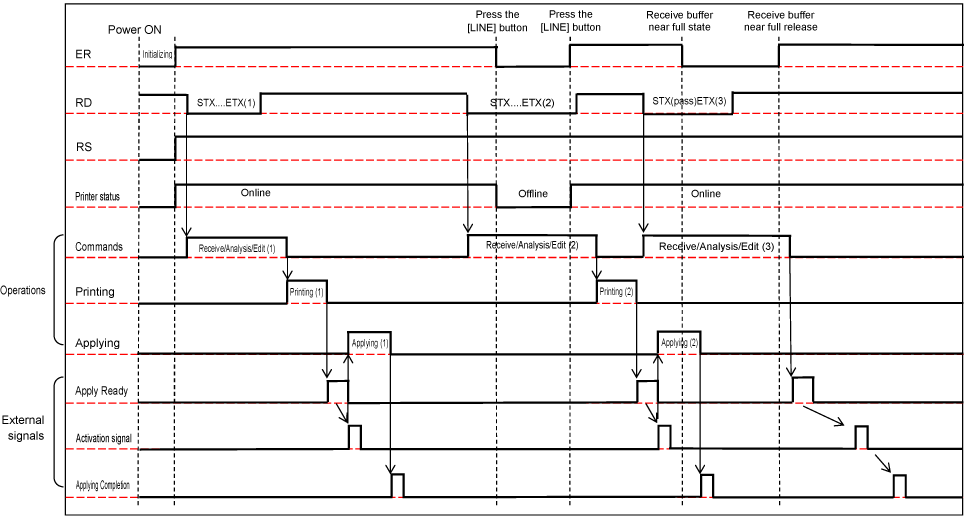
Error process
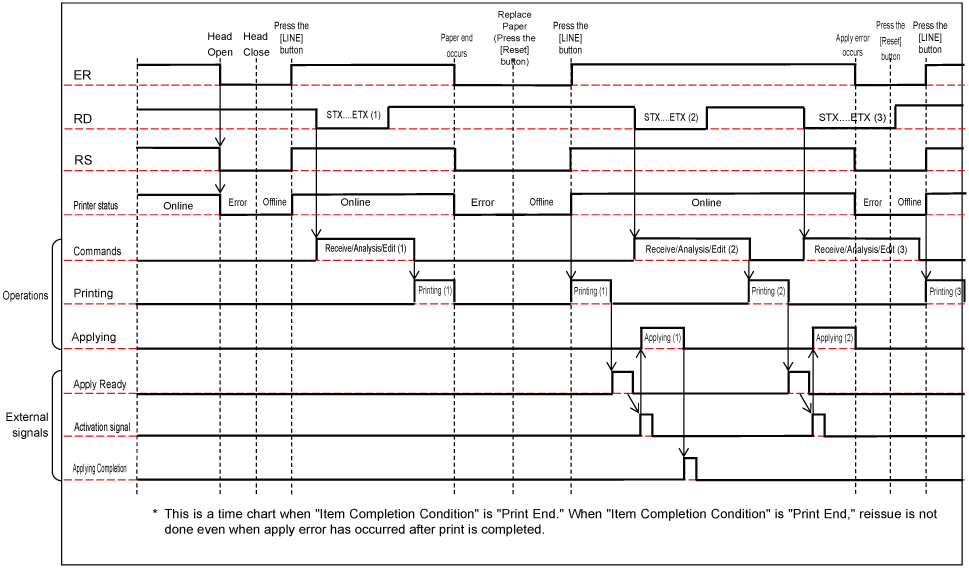
Important
-
The operation after clearing the error differs between during label printing and during application depending on the setting of the item completion reference.
-
For "Item Completion Condition: PRINT END", if an error occurs during the label printing operation, then labels are reissued with the content from that operation until the label printing operation is completed after the error is cleared.
If an error occurs during the label application operations, then a normal label is considered to have been printed and the next label is printed after the error is cleared.
- For "Item Completion Condition: APPLY END", if an error occurs during the label printing and application operations, then labels are reissued with the content from that operation until the label printing and application operations are completed after the error is cleared.
(If the power is turned off during an operation, the printer initializes so reissue is not done.)
-
CL4NX/CL6NX, CT4-LX/HC4-LX, S84NX/S86NX, and CL4-SXR/CL6-SXR
Normal process
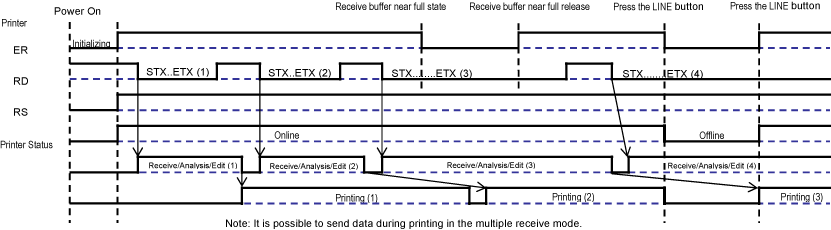
Error process(CL4NX/CL6NX、CT4-LX/HC4-LX、S84NX/S86NX)
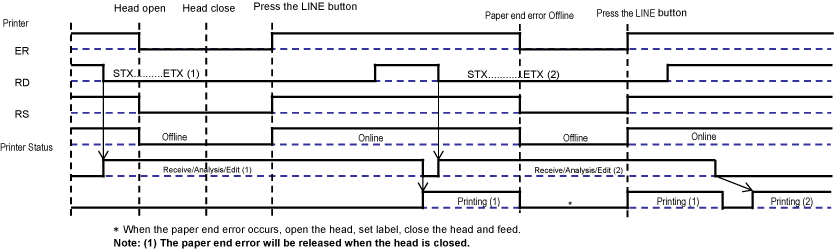
Error process(CL4-SXR/CL6-SXR)
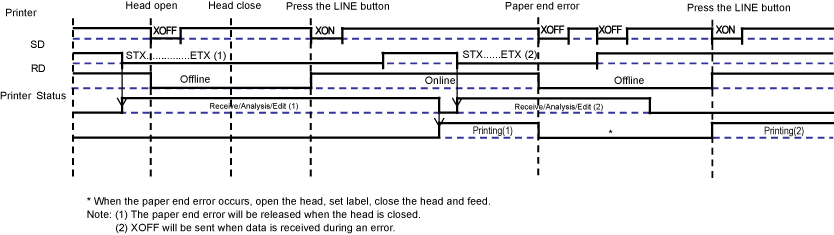
XON/XOFF
This communication protocol communicates with the host to see if the printer is ready to receive data by sending "XON" (0x11) or "XOFF" (0x13) codes to SD line.
When the print data ([STX] <A> to <Z> [ETX]) has been sent from the host in the conditions below, received data may not be accurate:
- When the printer is in offline state.
- When an error has occurred in the printer.
Connection diagram
1)D-sub 9pin
| Printer | Host | |||
| RD | 2 | ----------------- | 3 | SD |
| SD | 3 | ----------------- | 2 | RD |
| SG | 5 | ----------------- | 5 | SG |
* Depending on the host used, it may need to loop CS and RS (constantly maintain at "High" level) on the host side. For more details, refer to your host computer documentation.
I/O signal
| Pin no. | Signal name | I/O | Contents |
|---|---|---|---|
| 2 | RD | Input | Data transferred from the host to the printer |
| 3 | SD | Output | Data transferred from the printer to the host |
| 5 | SG | - | Signal ground |
Timing Chart of Multiple Receive
LR4NX-FA
Normal process <Label delivery method: For Print and Wait>
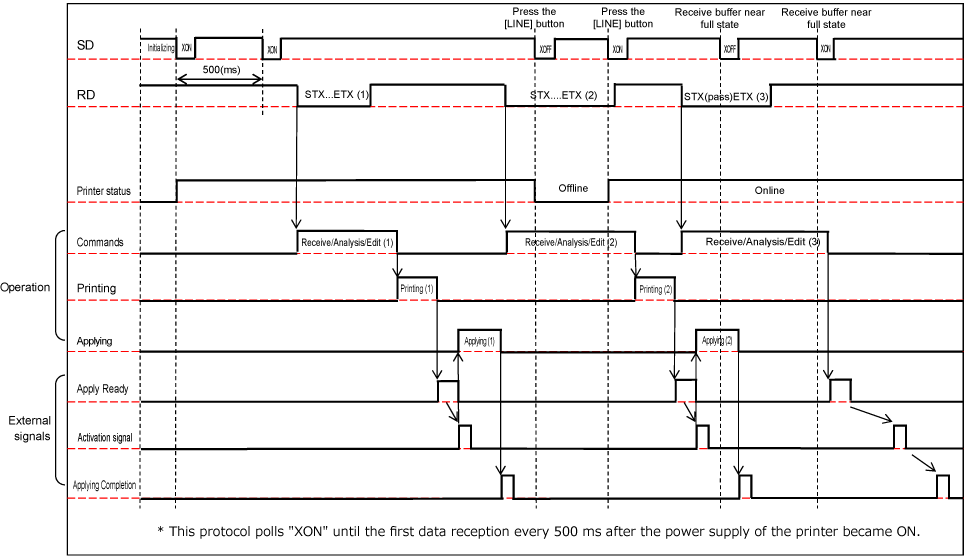
Error process
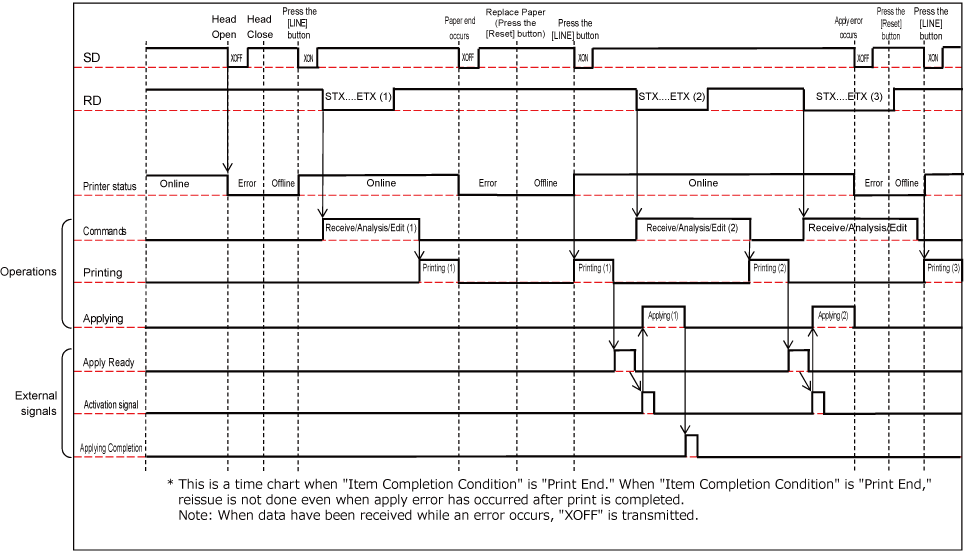
Important
-
The operation after clearing the error differs between during label printing and during application depending on the setting of the item completion reference.
-
For "Item Completion Condition: PRINT END", if an error occurs during the label printing operation, then labels are reissued with the content from that operation until the label printing operation is completed after the error is cleared.
If an error occurs during the label application operations, then a normal label is considered to have been printed and the next label is printed after the error is cleared.
- For "Item Completion Condition: APPLY END", if an error occurs during the label printing and application operations, then labels are reissued with the content from that operation until the label printing and application operations are completed after the error is cleared.
(If the power is turned off during an operation, the printer initializes so reissue is not done.)
-
CL4NX/CL6NX, CT4-LX/HC4-LX, S84NX/S86NX, and CL4-SXR/CL6-SXR
Normal process
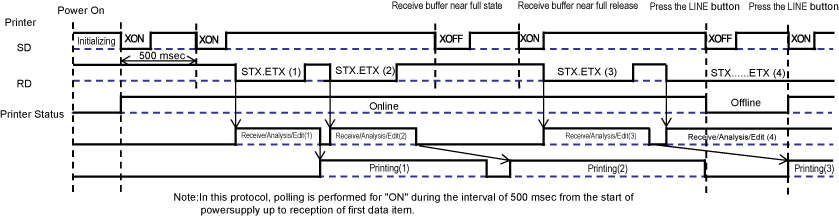
Error process
Status5 Return
The purpose of this communication protocol is to monitor and to control the status of printer data on host, and this communication protocol has variety of functionalities.
Receive mode for this communication protocol is multi buffer mode.
Connection diagram
1)D-sub 9pin
| Printer | Host | |||
| RD | 2 | ----------------- | 3 | SD |
| SD | 3 | ----------------- | 2 | RD |
| SG | 5 | ----------------- | 5 | SG |
* Depending on the host used, it may need to loop CS and RS (constantly maintain at "High" level) on the host side. For more details, refer to your host computer documentation.
I/O signal
| Pin no. | Signal name | I/O | Contents |
|---|---|---|---|
| 2 | RD | Input | Data transferred from the host to the printer |
| 3 | SD | Output | Data transferred from the printer to the host |
| 5 | SG | - | Signal ground |
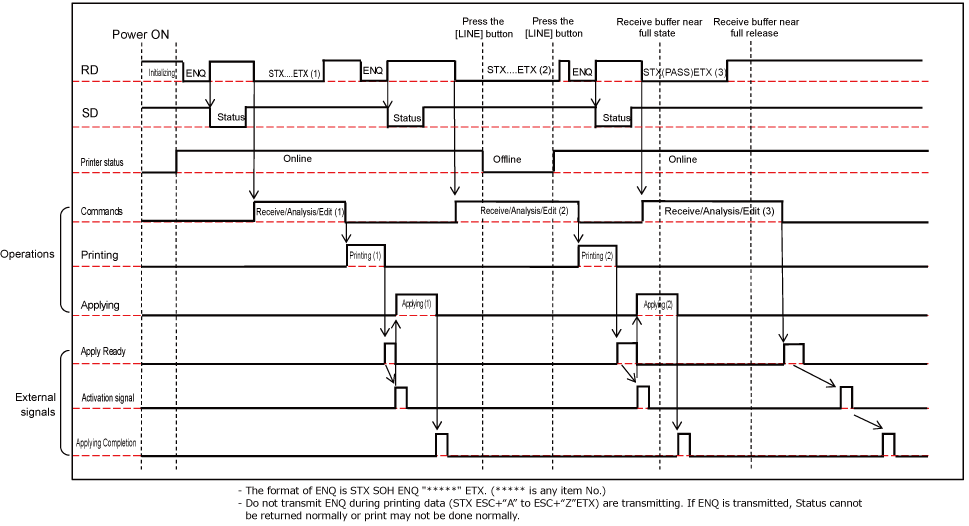
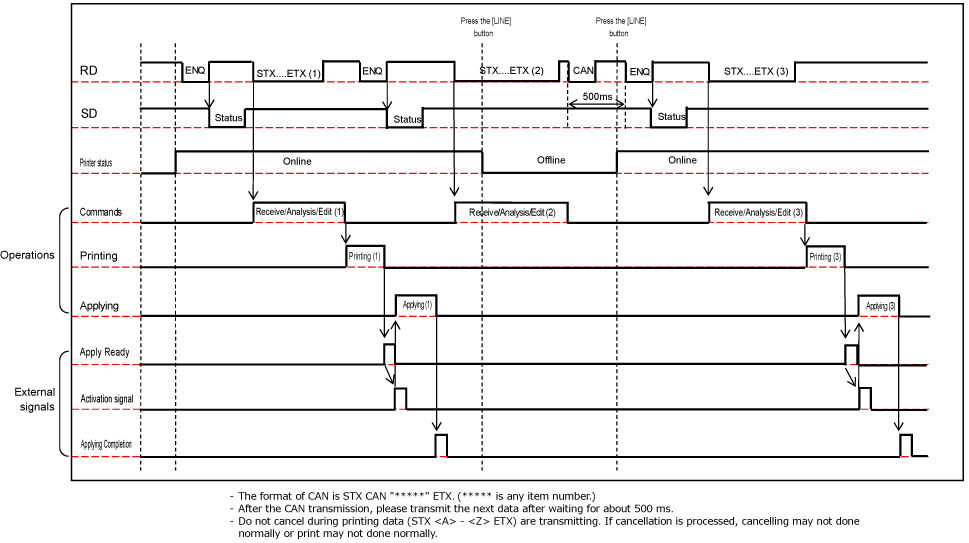
Timing Chart
LR4NX-FA
Normal process <Label delivery method: For Print and Wait>
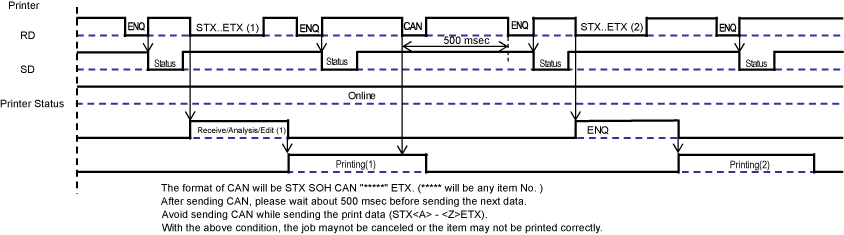
Cancel process
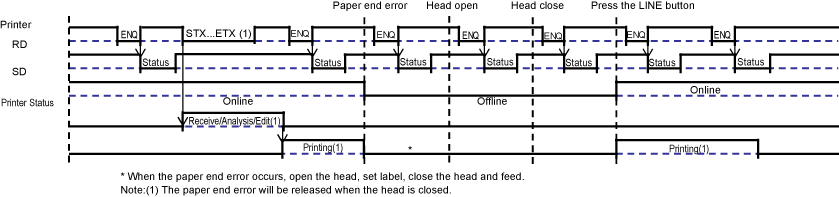
Error process
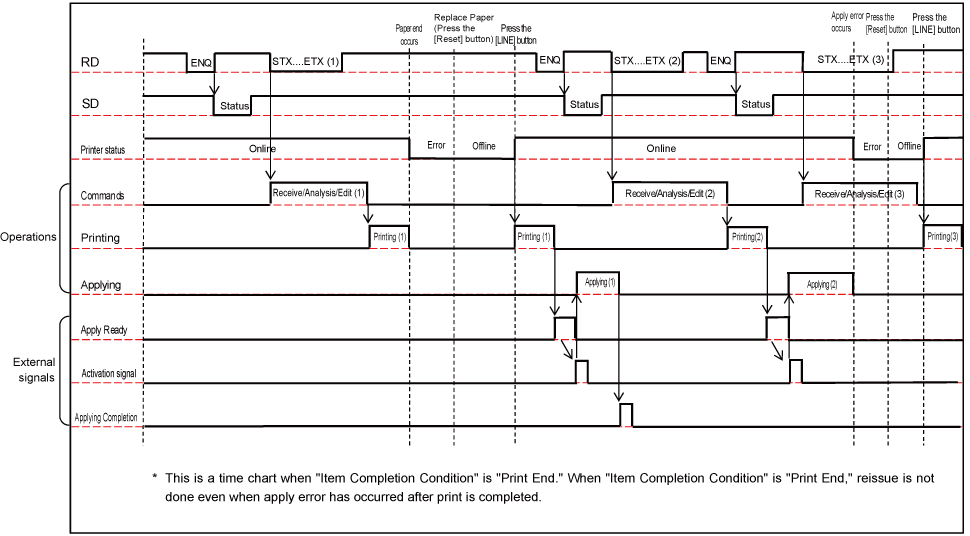
Important
-
The operation after clearing the error differs between during label printing and during application depending on the setting of the item completion reference.
-
For "Item Completion Condition: PRINT END", if an error occurs during the label printing operation, then labels are reissued with the content from that operation until the label printing operation is completed after the error is cleared.
If an error occurs during the label application operations, then a normal label is considered to have been printed and the next label is printed after the error is cleared.
- For "Item Completion Condition: APPLY END", if an error occurs during the label printing and application operations, then labels are reissued with the content from that operation until the label printing and application operations are completed after the error is cleared.
(If the power is turned off during an operation, the printer initializes so reissue is not done.)
-
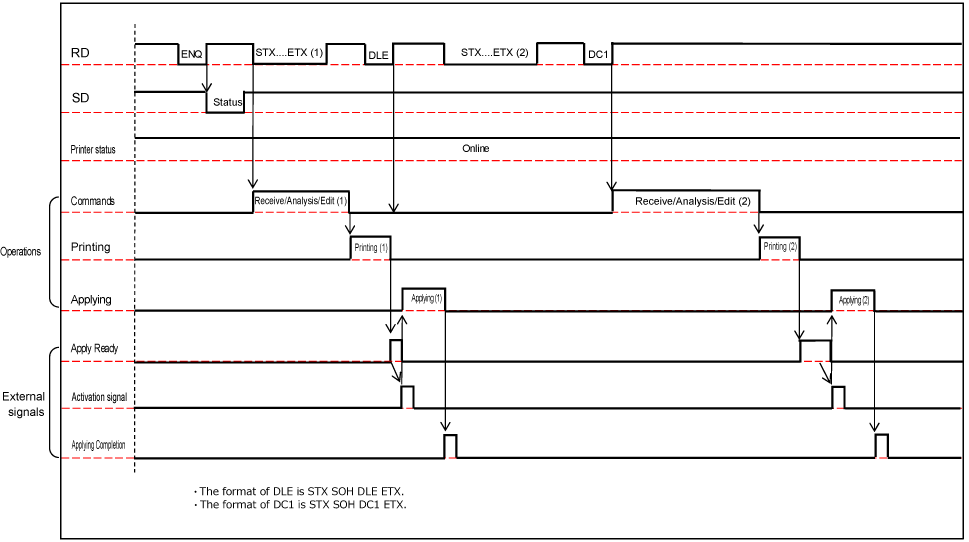
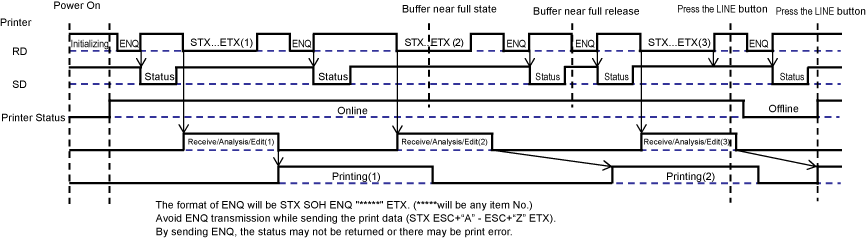
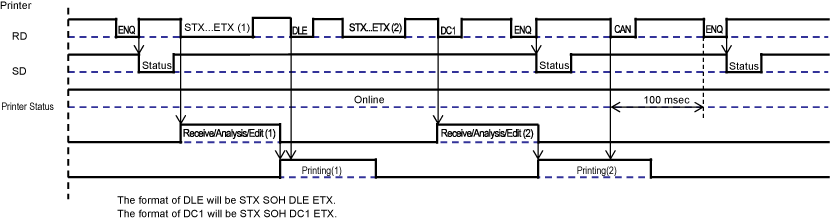
Print pause, print resume process
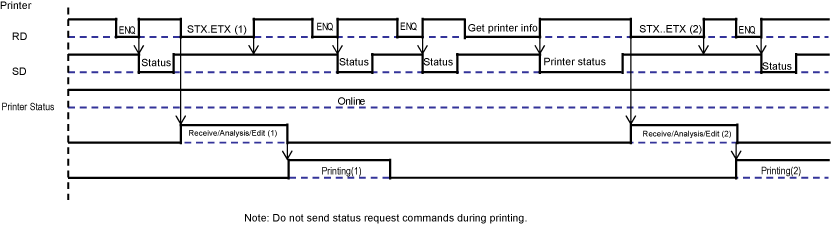
Information request command process
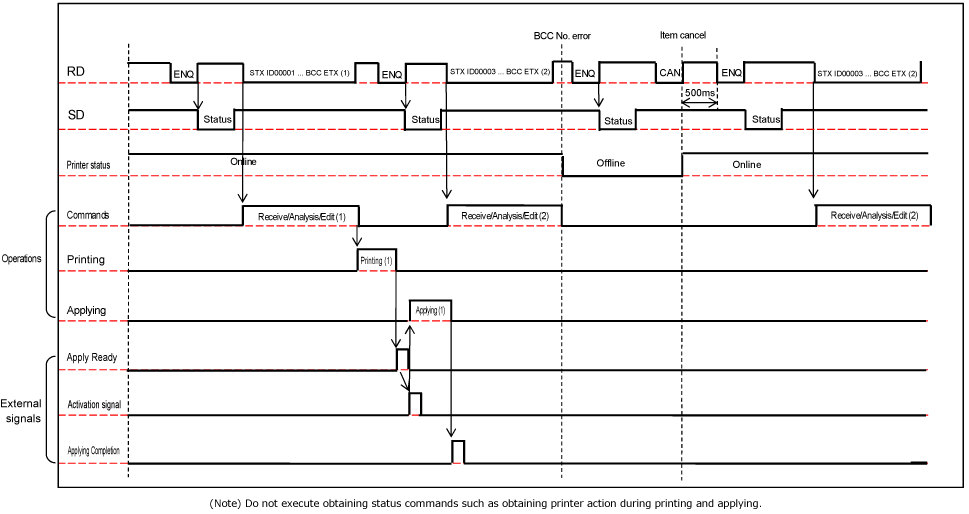
Item No. error (BCC error) process
CL4NX/CL6NX, CT4-LX/HC4-LX, S84NX/S86NX, and CL4-SXR/CL6-SXR
Normal process
Cancel process
Error process
Print pause, print resume process
Information request command process
Item No. error (BCC error) process
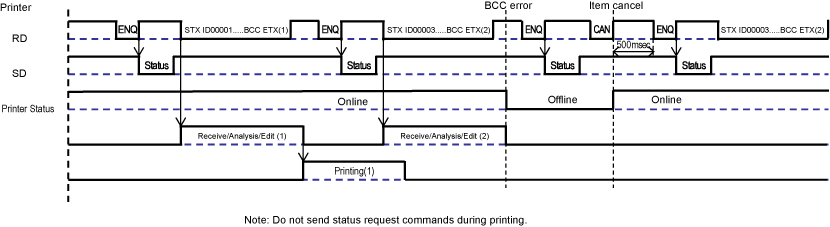
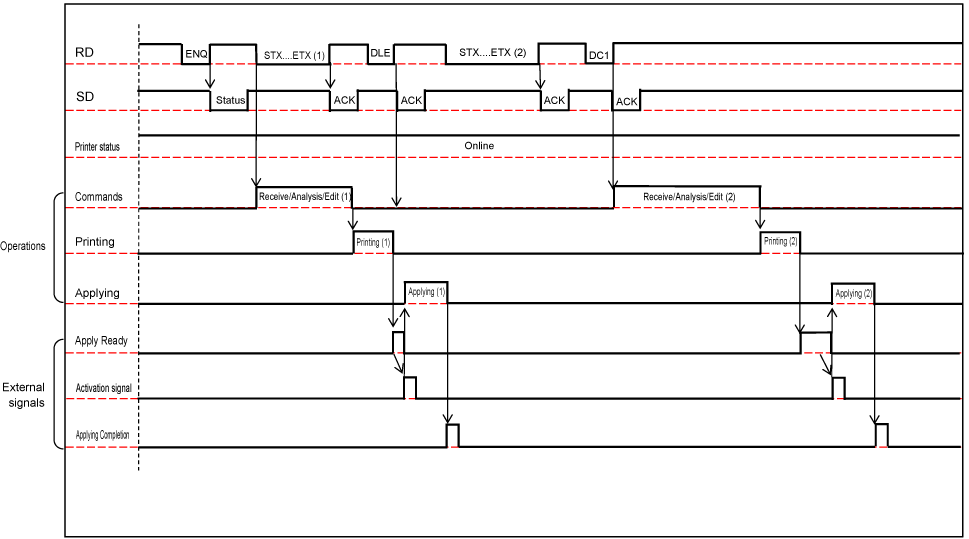
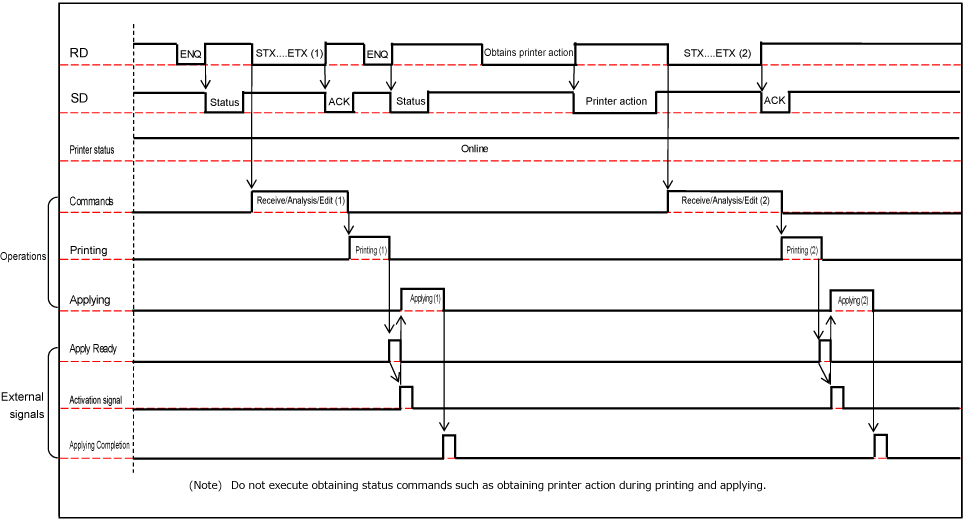
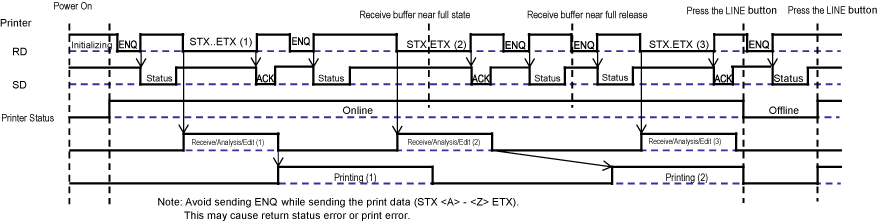
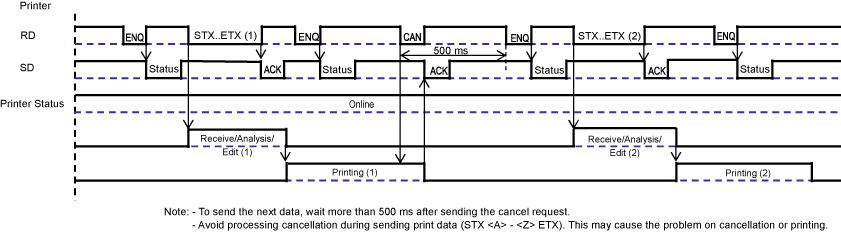
Status4 Return
The purpose of this communication protocol is to control the printer status on host and to return status from the printer with request command from host.
Status is returned immediately after receiving request command.
Receive mode for this communication protocol is multi buffer mode.
Connection diagram
1)D-sub 9pin
| Printer | Host | |||
| RD | 2 | ----------------- | 3 | SD |
| SD | 3 | ----------------- | 2 | RD |
| SG | 5 | ----------------- | 5 | SG |
* Depending on the host used, it may need to loop CS and RS (constantly maintain at "High" level) on the host side. For more details, refer to your host computer documentation.
I/O signal
| Pin no. | Signal name | I/O | Contents |
|---|---|---|---|
| 2 | RD | Input | Data transferred from the host to the printer |
| 3 | SD | Output | Data transferred from the printer to the host |
| 5 | SG | - | Signal ground |
Timing Chart
LR4NX-FA
Normal process <Label delivery method: For Print and Wait>
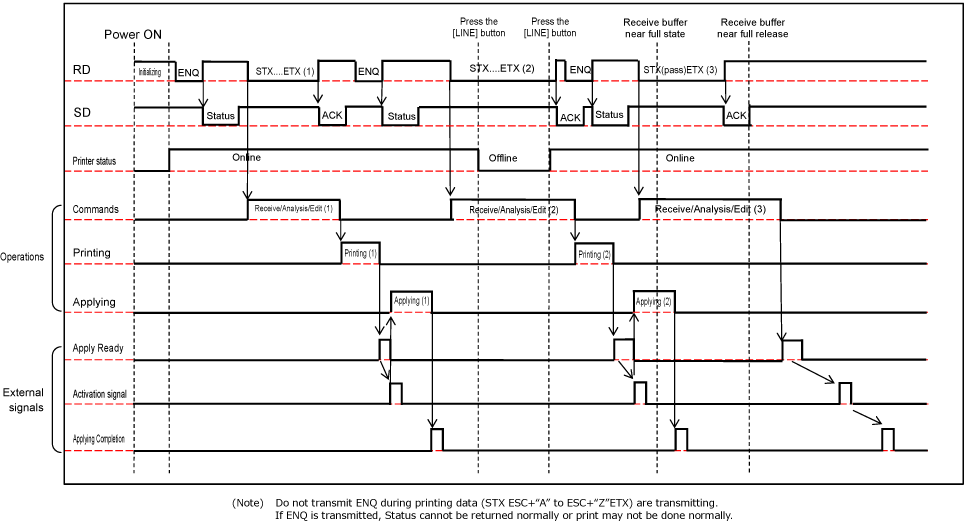
Cancel process
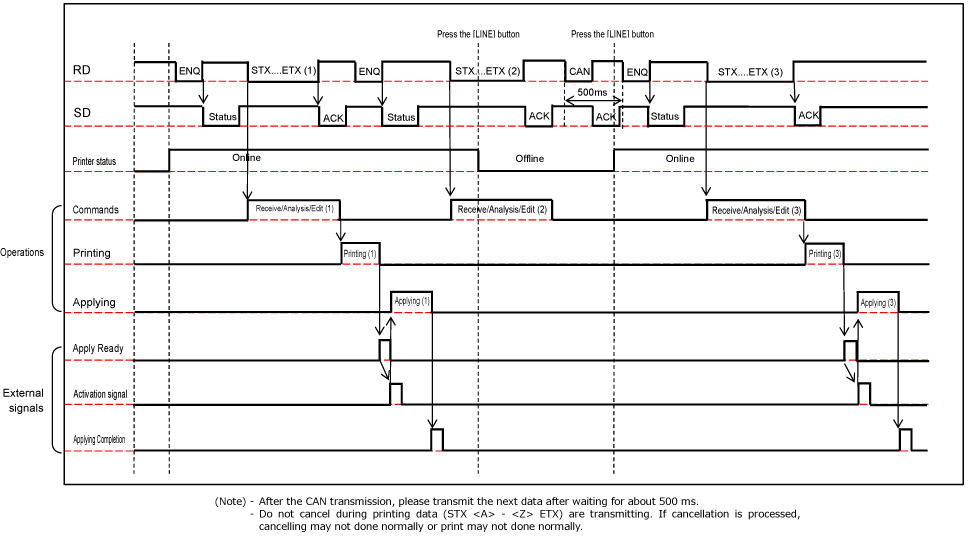
Error process
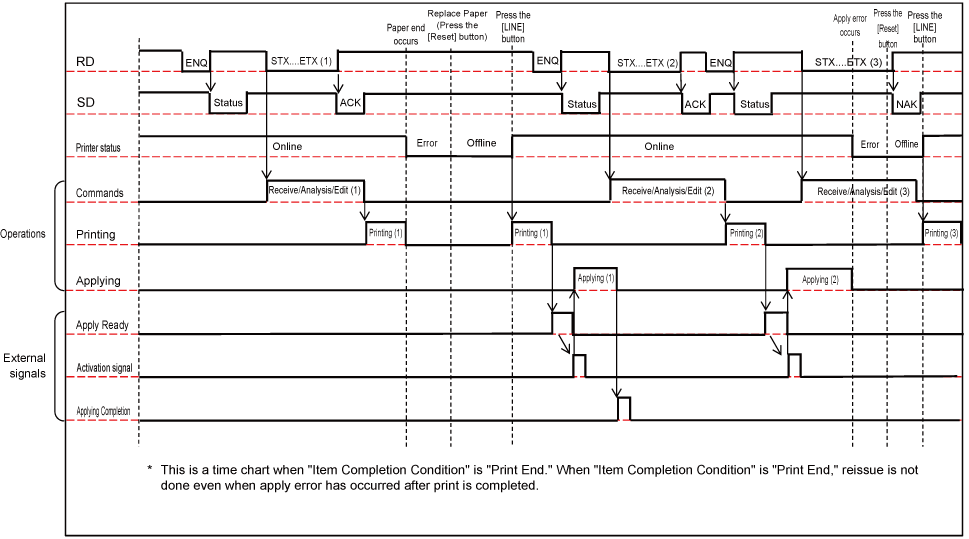
Important
-
The operation after clearing the error differs between during label printing and during application depending on the setting of the item completion reference.
-
For "Item Completion Condition: PRINT END", if an error occurs during the label printing operation, then labels are reissued with the content from that operation until the label printing operation is completed after the error is cleared.
If an error occurs during the label application operations, then a normal label is considered to have been printed and the next label is printed after the error is cleared.
- For "Item Completion Condition: APPLY END", if an error occurs during the label printing and application operations, then labels are reissued with the content from that operation until the label printing and application operations are completed after the error is cleared.
(If the power is turned off during an operation, the printer initializes so reissue is not done.)
-
Print pause, print resume process
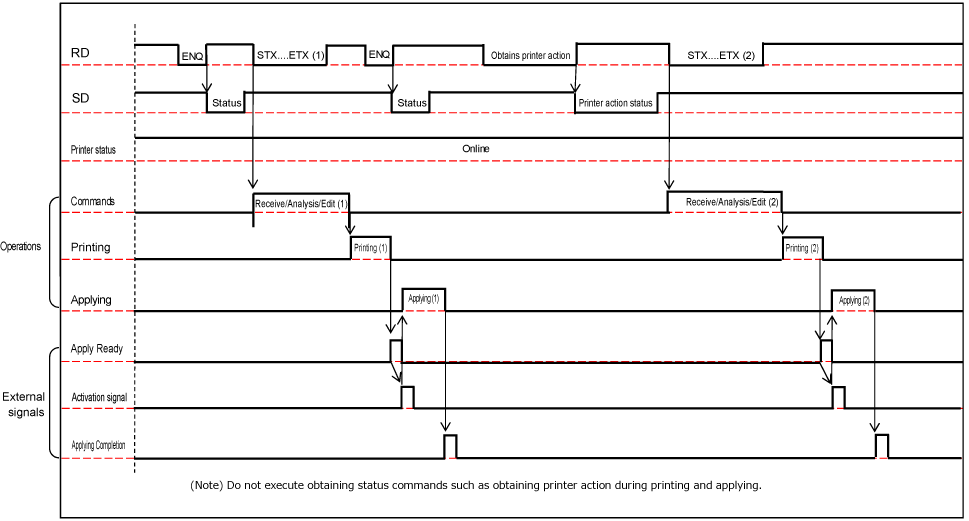
Information request command process
CL4NX/CL6NX, CT4-LX/HC4-LX, S84NX/S86NX, and CL4-SXR/CL6-SXR
Normal process
Cancel process
Error process
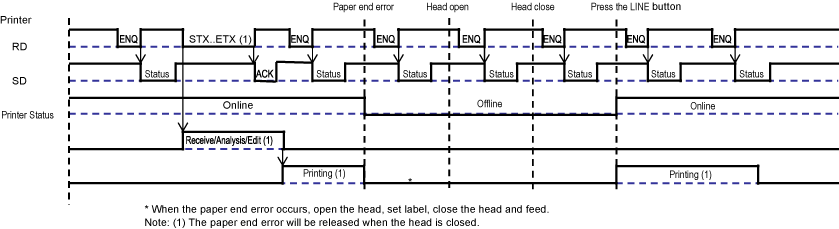
Print pause, print resume process
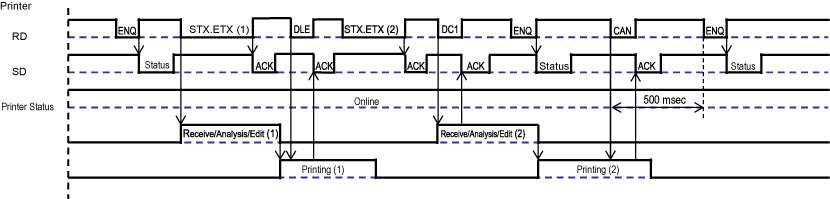
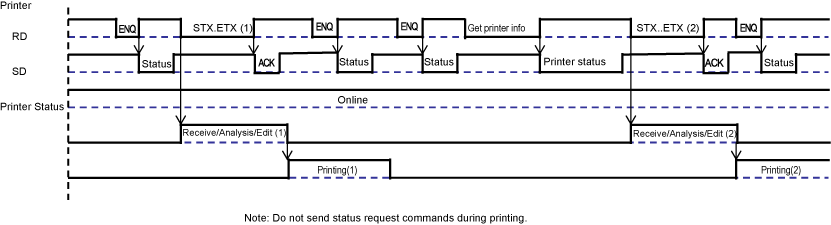
Information request command process
Status3 Return
The purpose of this communication protocol is to control the printer status on host and to return status from the printer with request command from host.
Status is returned immediately after receiving request command.
Receive mode for this communication protocol is multi buffer mode.
Connection diagram
1)D-sub 9pin
| Printer | Host | |||
| RD | 2 | ----------------- | 3 | SD |
| SD | 3 | ----------------- | 2 | RD |
| SG | 5 | ----------------- | 5 | SG |
I/O signal
| Pin no. | Signal name | I/O | Contents |
|---|---|---|---|
| 2 | RD | Input | Data transferred from the host to the printer |
| 3 | SD | Output | Data transferred from the printer to the host |
| 5 | SG | - | Signal ground |
Timing Chart
LR4NX-FA
Normal process <Label delivery method: For Print and Wait>
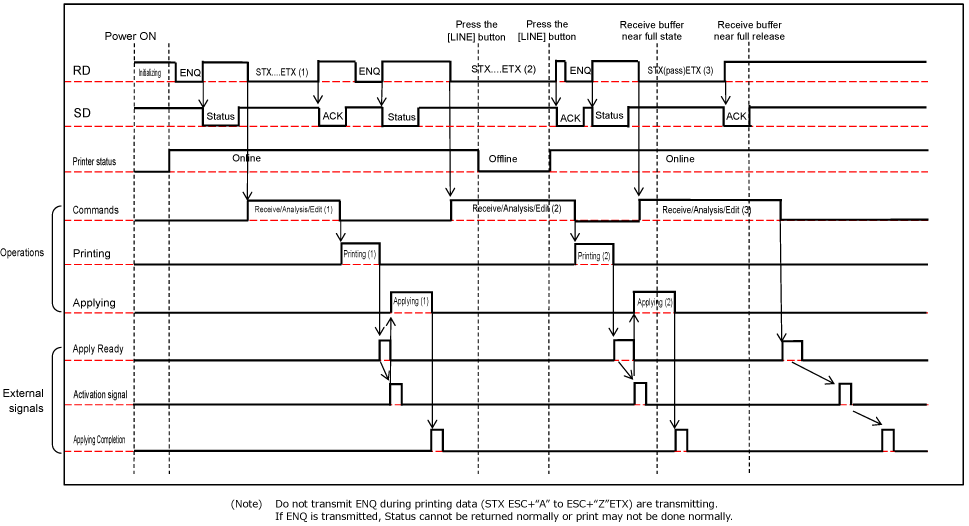
Cancel process
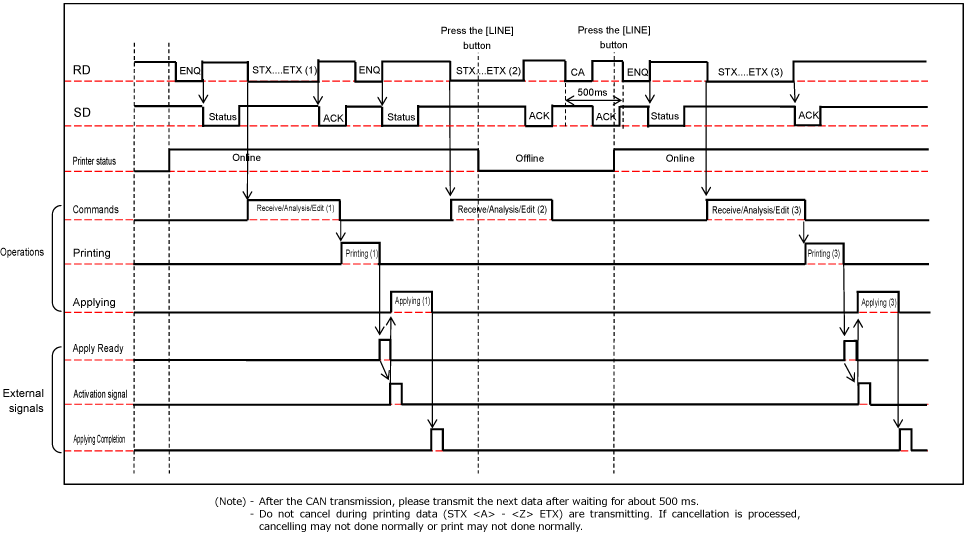
Error process
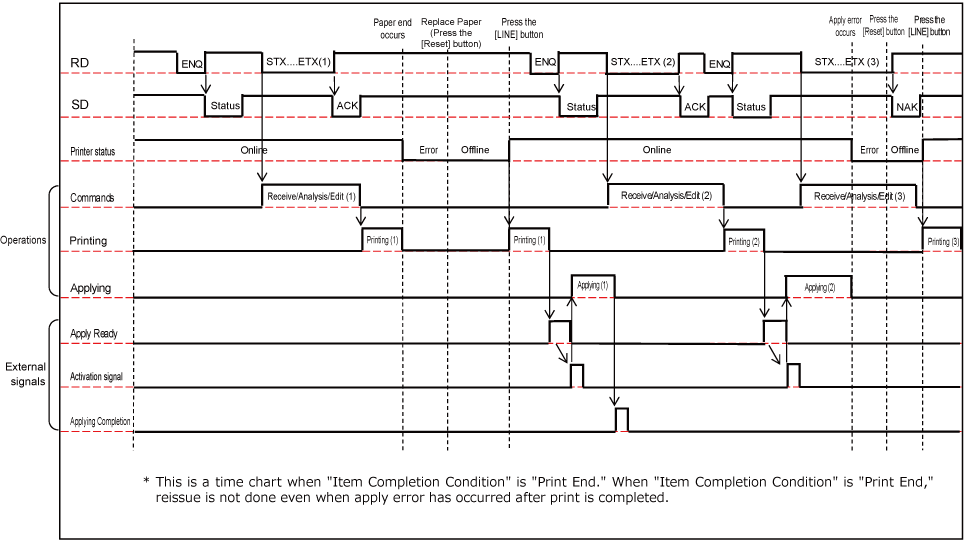
Important
-
The operation after clearing the error differs between during label printing and during application depending on the setting of the item completion reference.
-
For "Item Completion Condition: PRINT END", if an error occurs during the label printing operation, then labels are reissued with the content from that operation until the label printing operation is completed after the error is cleared.
If an error occurs during the label application operations, then a normal label is considered to have been printed and the next label is printed after the error is cleared.
- For "Item Completion Condition: APPLY END", if an error occurs during the label printing and application operations, then labels are reissued with the content from that operation until the label printing and application operations are completed after the error is cleared.
(If the power is turned off during an operation, the printer initializes so reissue is not done.)
-
Information request command process
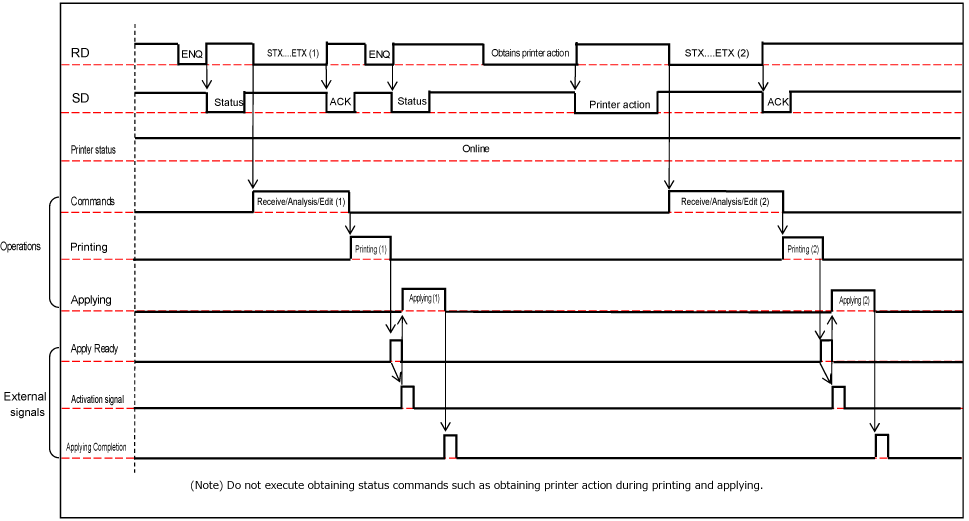
CL4NX/CL6NX, CT4-LX/HC4-LX, S84NX/S86NX, and CL4-SXR/CL6-SXR
Normal process
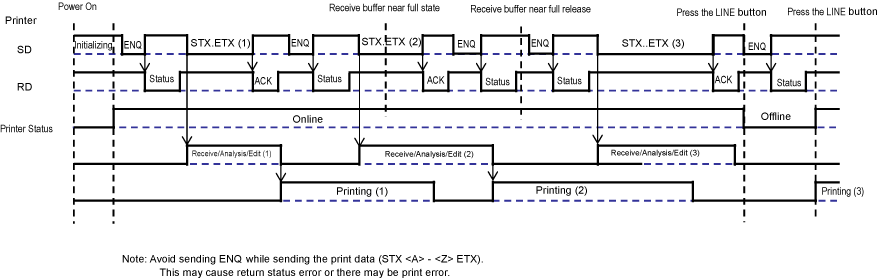
Cancel process
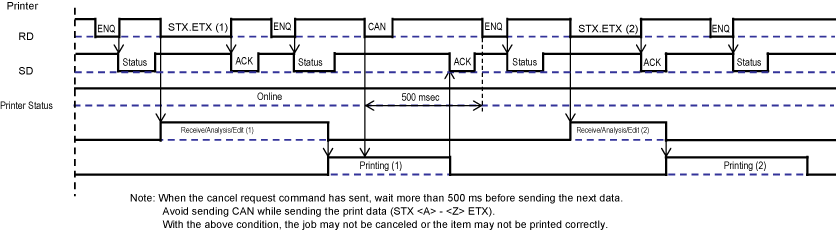
Error process
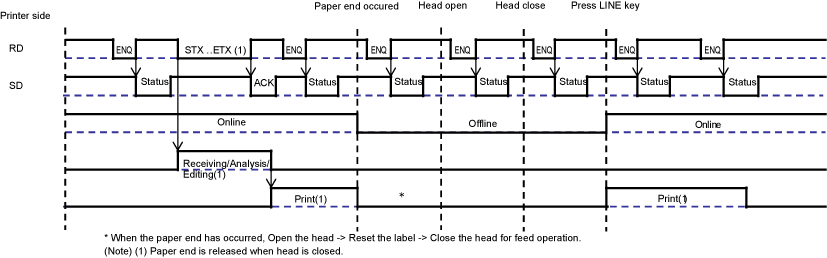
Information request command process
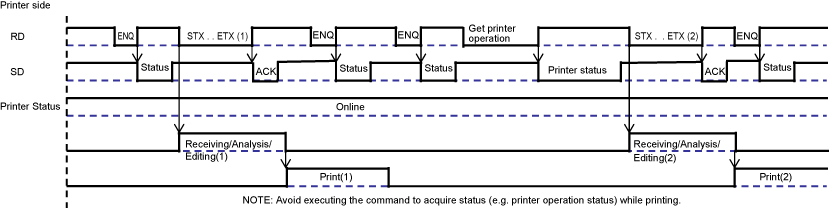
StatusL Return (LR4NX-FA Only)
The purpose of this communication protocol is to control the printer status on host and to return status from the printer with request command from host.
Status is returned immediately after receiving request command.
Receive mode for this communication protocol is multi buffer mode.
Connection diagram
1)D-sub 9pin
| Printer | Host | |||
| RD | 2 | ----------------- | 3 | SD |
| SD | 3 | ----------------- | 2 | RD |
| SG | 5 | ----------------- | 5 | SG |
I/O signal
| Pin no. | Signal name | I/O | Contents |
|---|---|---|---|
| 2 | RD | Input | Data transferred from the host to the printer |
| 3 | SD | Output | Data transferred from the printer to the host |
| 5 | SG | - | Signal ground |
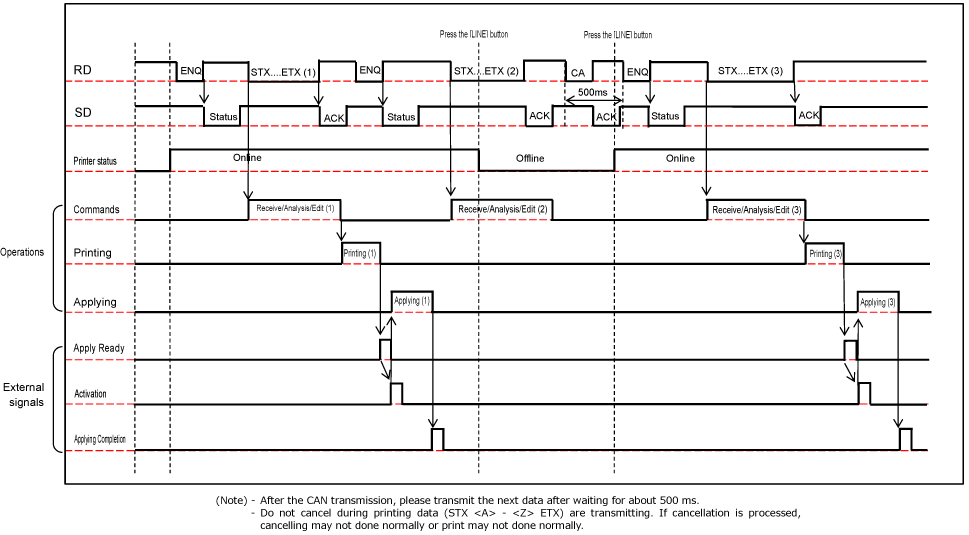
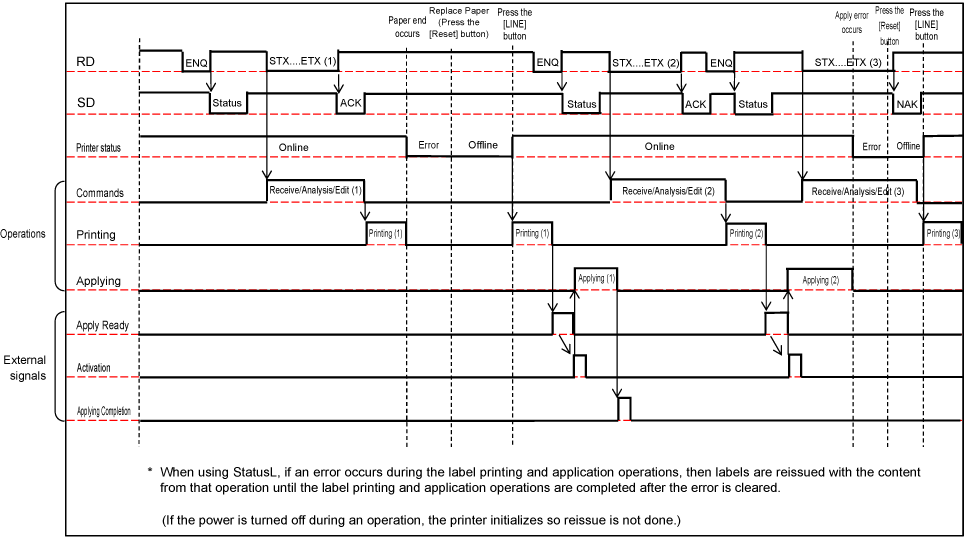
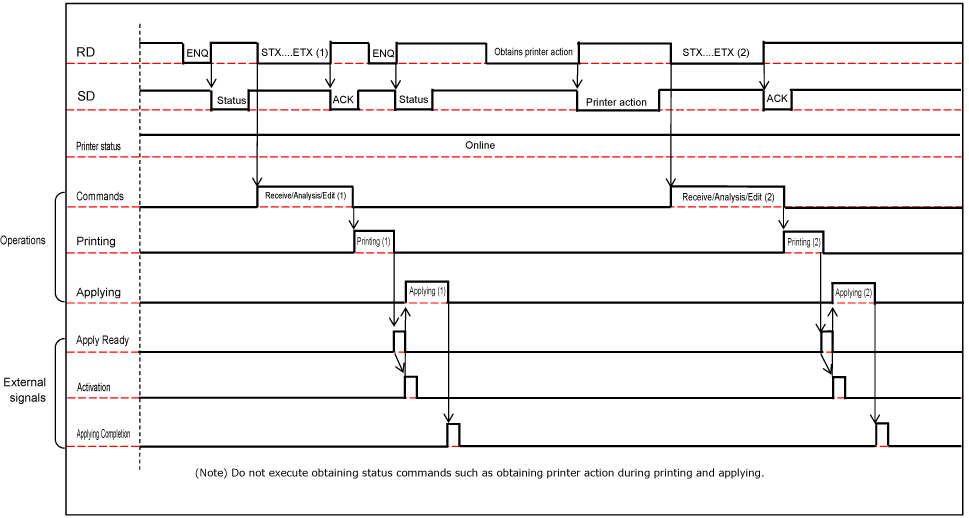
Timing chart
Normal process <Label delivery method: For Print and Wait>
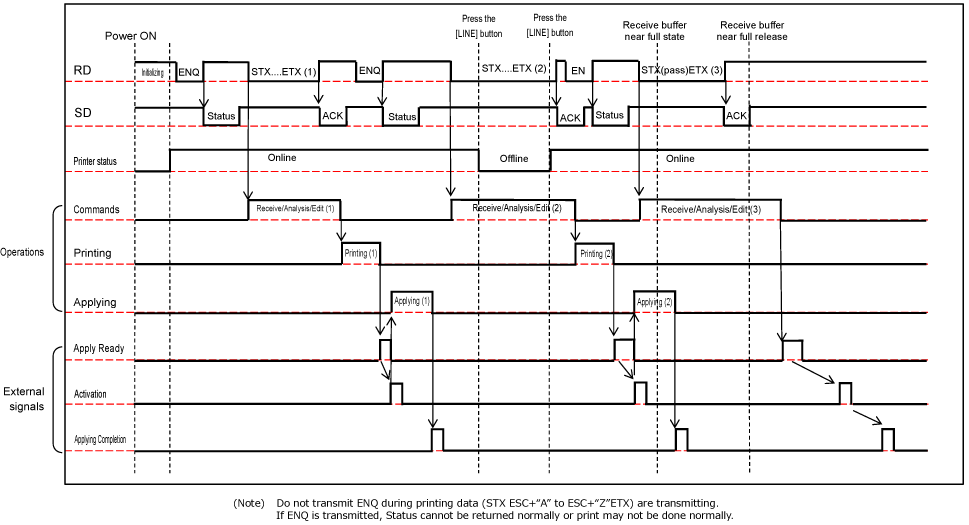
Cancel Process
Error Process
Obtain information command Process
Notes
-
Please mind the following items when using READY/BUSY control.
Make sure the printer is powered when sending print data from host.
- "Receive buffer full" error will occur if you send data larger than receive buffer size (2.95 MB*1) using XON/XOFF, Status3, Status4, Status5 or StatusL, so make sure to send data equal to or less than 2.9 MB and send data while monitoring printer status.
- Parity error is detected when parity error occurred after receiving [ESC+A].
- Noise may occur on RS232C when starting the printer, this may cause garbage data in the communication buffer. A data cancel function is provided only at startup.
- In case of CL4-SXR/CL6-SXR, 3.00MB.