Connecting Interfaces
Connect the interface according to your environment, and configure the interface settings of the product according to the communication conditions of the connected network and computer.
The product supports the following interfaces.
- USB
- Wired LAN
- NFC
- Wireless LAN (option)
- Bluetooth (option)
- SIM (
 option)
Allows connections to SOS (SATO Online Services). - RS-232C (
option,
 standard equipment)
 - External signal (
option,
standard equipment)
For the position of connectors, see
Parts Identification.
Regarding the various interfaces, see
Setting Up Connections.

- Do not connect or disconnect the interface cables (or use a switch box) while power is supplied to either the product or computer. This may cause damage to the interface circuitry in the product or computer and is not covered by warranty.

- This product must be connected through a router or similar networking device and cannot be directly connected to the internet provided by telecommunication carriers, including public wireless LANs. When connecting the product to the Internet, always connect via a router or similar device.
- Bluetooth connection may be unstable depending on a module spec or version of Bluetooth. When using Bluetooth connection, please test the operation beforehand in your usage environment (computer, print data, print quantity, print frequency, etc.).

- Use USB cables of Type A or B that are 3 m (9.84 ft) or shorter.
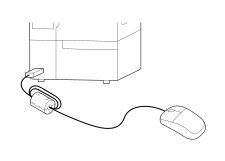
- When connecting a mouse to a Type A connector, attach a ferrite core to prevent radio wave interference to the surrounding area.
Recommended core characteristics: Impedance value 125 Ω@100 MHz
- A product connected with multiple interface cables can continue to operate when receiving data. However, you cannot receive data from more than one interface at a time. Normally, do not use multiple interfaces at a time.
- Wired LAN and wireless LAN can be used simultaneously. However, be sure to assign different network segments to the wired LAN and wireless LAN connections.