Other Troubles
No Power/Nothing on the Display
- Power on the product again.
(Press and hold the button until the LED indicator lights blue)
 - Confirm that the power cord is securely connected to the product and outlet.
- Connect to another outlet.
If Fix Demo, Price Demo, or QSR Demo Is Displayed
When you turn on the power to the product and switch it to Online mode, if the following screen appears, follow the steps below to resolve the issue.
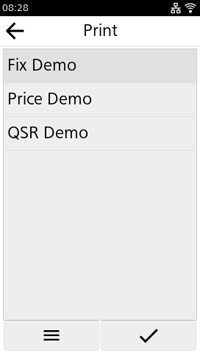
This screen appears when the AEP (Application Enabled Printing) function is enabled.
Disable AEP and return to normal mode.
- Press the
 button to show the Home screen.
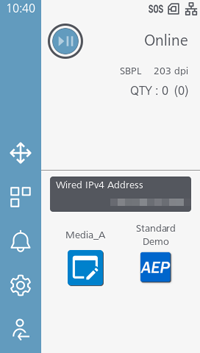
- Tap
 to show the settings menu.
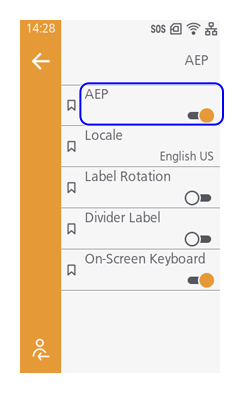
 - From the settings screen, tap [Applications] > [AEP] > [AEP] to disable the AEP function.
Exclamation Mark Icon Appears at the Top of the Screen
An icon with an exclamation mark will appear when printing or communication errors occur, or when notifying you to replace consumables.
Check the following page regarding the icons that appear on the screen.
Checking the Product's Status (Status Icon)
Sensor Auto Calibration Failure
- When performing auto calibration of the sensor, confirm that the following points are observed.
- Remove the label
- Load the liner so that the I-mark does not cover the media sensor
- Clean the media sensor and try auto calibration of the sensor again.
Cleaning When Using Standard/Cutter
Adjusting the Media Sensor Automatically