SATO

MENU

How to Search

MENU

  • TOP (Table of Contents)
  • Introduction
  • Getting Started
  • Navigating the Application
  • Various Menus of the Application
  • Searching by Function Names
  • View in PDF
Close
SATO All-In-One Tool V2 User Manual
TOP > Various Menus of the Application > The [Others] Menu > Opening Web Configuration
Opening Web Configuration
This functionality is available for the printer with LAN or wireless LAN connection only. It allows users to easily access the printer’s web configuration page via the default web browser without them entering the IP address manually.
 
•
For WT4-AXB series (International Model) printers, the [Open Web Configuration] option is available only when connected via the LAN interface. If the printer uses a wireless LAN connection, this option will be grayed out.
 
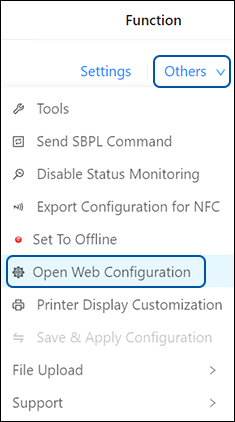
On the printer page, click [Others] > [Open Web Configuration] of the selected printer.
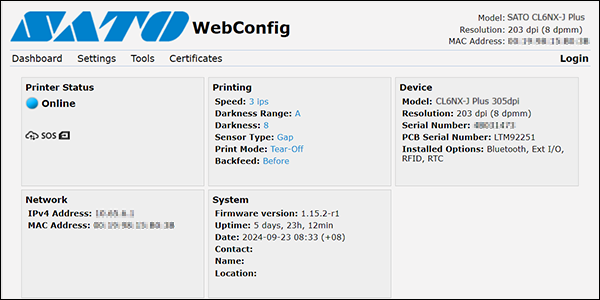
The web configuration page is opened by your default web browser.
When a security certificate is prompted, you must acknowledge and click Continue.
 
•
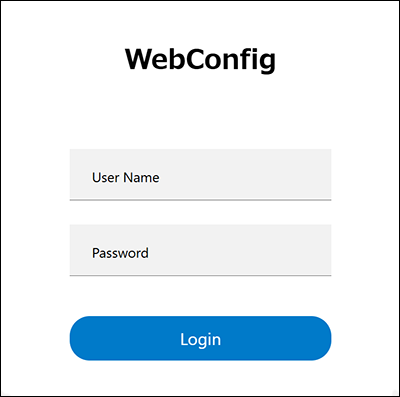
For CL4NX/CL6NX/CL4NX-J/CL6NX-J/CL4NX Plus/CL6NX Plus/CL4NX-J Plus/CL6NX-J Plus series with firmware version 1.16.0 or later, the login screen will appear. If the login screen does not appear, click [Login] in the upper right corner of the page.
For WT4-AXB series (International Model) printer
For CL4-SXR/CL6-SXR series printer
 

Related Topics
The [Others] Menu
The [Tools] Menu
The [Settings] Menu

Top

Back

© 2026 SATO Corporation. All rights reserved.